


Zimperium zScan is an automated Mobile Application Security Testing (MAST) platform that combines static, dynamic, and interactive analysis for Android and iOS applications. It scans app binaries and returns prioritized findings in 15-30 minutes.
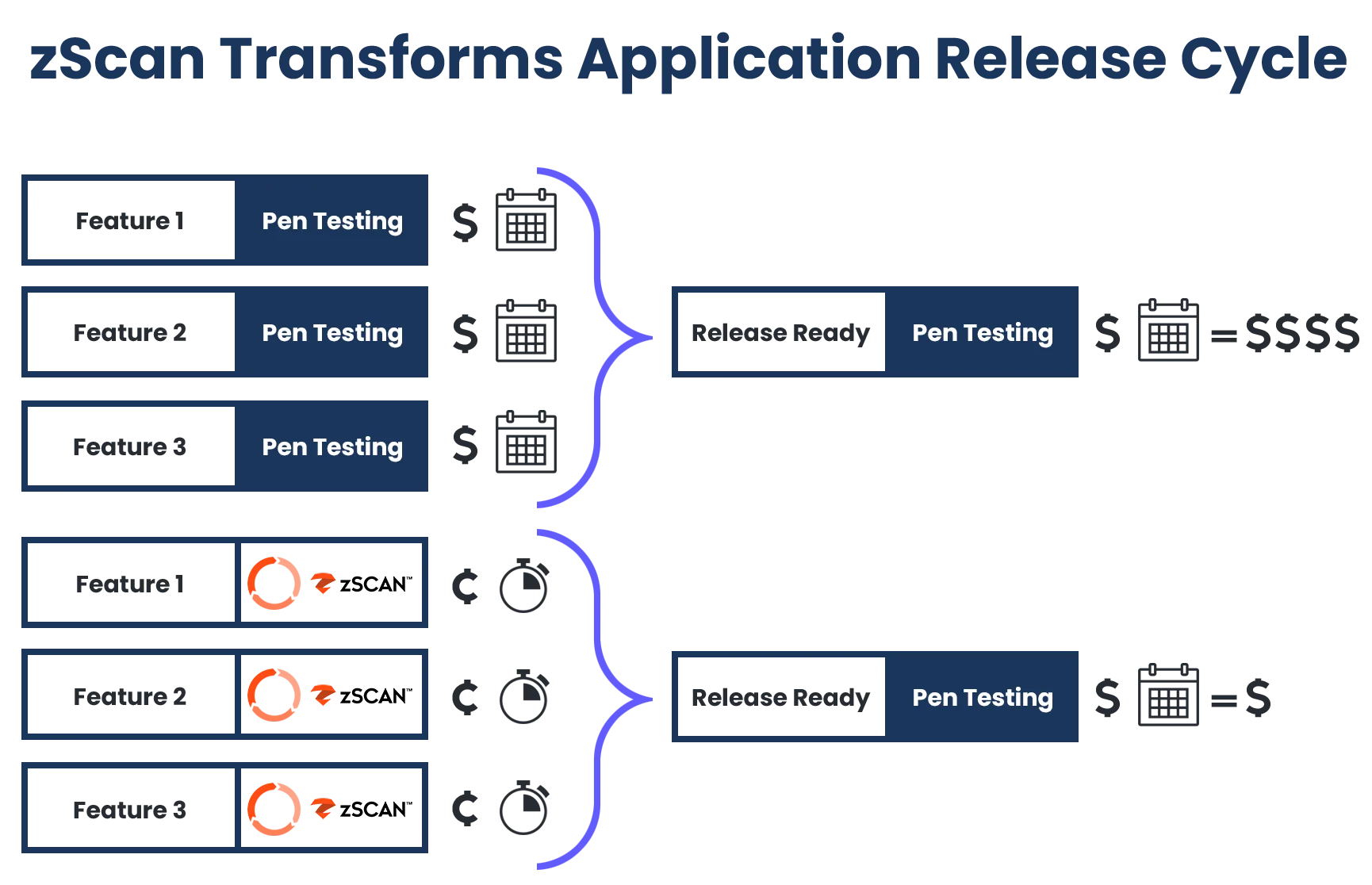
What sets zScan apart from pure vulnerability scanners is that it also validates whether security controls like anti-tampering, anti-reversing, and SSL pinning are actually implemented correctly. Part of the Zimperium Mobile Application Protection Suite (MAPS), zScan can be used standalone or alongside zShield (app shielding), zDefend (runtime protection), and zKeybox (key protection).
Zimperium was founded in 2010 and is headquartered in Dallas, TX. The company holds a Forrester Wave Leader position in Mobile Threat Defense, won the 2025 Mobile Breakthrough Award for “Mobile Security Solution of the Year,” and is a 2025 SPARK Matrix Leader for In-App Protection. A free 30-day trial is available.
What is Zimperium zScan?
zScan accepts APK, IPA, and AAB files uploaded directly or pulled from App Store and Google Play URLs. The scanner decompiles the binary and runs three types of analysis:
- Static Analysis (SAST): Examines decompiled code for security flaws, insecure API usage, and cryptographic issues
- Dynamic Analysis (DAST): Simulates runtime behavior to detect vulnerabilities and misconfigurations during execution
- Interactive Analysis (IAST): Combines static and dynamic testing under realistic runtime conditions
Unlike scanners that only find weaknesses, zScan also checks whether defensive measures are correctly implemented. If your team invested in certificate pinning, root detection, or code obfuscation, zScan confirms those protections are working as expected.
| Capability | Details |
|---|---|
| Vulnerability Detection | SAST+DAST+IAST analysis identifies security flaws, insecure API usage, and cryptographic issues in mobile binaries. |
| Security Control Validation | Verifies that anti-tampering, anti-reversing, SSL pinning, and root/jailbreak detection are correctly implemented. |
| Supply Chain Assessment | Generates SBOMs and flags third-party SDKs and libraries with known vulnerabilities or security concerns. |
What are Zimperium zScan’s key features?
| Feature | Details |
|---|---|
| Analysis Types | SAST + DAST + IAST |
| Scan Speed | 15-30 minutes |
| Input Formats | APK, IPA, AAB, App Store/Play Store URLs |
| Infrastructure | Cloud-based (no local setup required) |
| Report Formats | SARIF, PDF, JSON |
| CI/CD Plugins | GitHub Actions, GitLab CI, Jenkins, Harness, GoCD, Bitrise |
| Compliance | OWASP MASVS, PCI-DSS, HIPAA, GDPR, NIAP |
| Cross-Platform | Flutter, React Native, Xamarin, Cordova, Ionic |
| MAPS Suite | Works with zShield, zDefend, zKeybox |
| Trial | Free 30-day trial (unlimited apps) |
Anti-Tampering Validation
zScan verifies that anti-tampering controls are correctly implemented:
- Root/jailbreak detection
- Debugger detection
- Emulator detection
- Code integrity verification
- Hook detection
Organizations that use mobile hardening solutions (including Zimperium’s own zShield) can confirm these protections are actually working in production builds.
SSL Pinning Verification
zScan tests whether certificate pinning is properly implemented, including:
- Presence of pinning in network code
- Correct certificate or public key configuration
- Fallback behavior when pinning fails
- Pin rotation handling
Supply Chain Risk Detection
The platform generates Software Bills of Materials (SBOMs) and flags third-party SDKs and libraries with known vulnerabilities. This visibility into the software supply chain helps teams understand risk introduced by dependencies they didn’t write themselves.
Cross-Platform Support
zScan analyzes applications built with:
- Native: Swift, Objective-C (iOS), Kotlin, Java (Android)
- Cross-platform: Flutter, React Native, Xamarin
- Hybrid: Cordova, Ionic, PhoneGap
OWASP MASTG test ID alignment
zScan’s control-validation focus maps directly onto specific OWASP MASTG test IDs. Anti-tampering and anti-reversing checks cover MASTG-TEST-0048 (testing application binary protections) and MASTG-TEST-0049 (testing for reverse engineering). SSL pinning verification corresponds to MASTG-TEST-0050 (testing client-side anti-tampering controls and certificate-pinning enforcement). Root and jailbreak detection lines up with MASTG-TEST-0051. Each control is paired with the relevant MASVS-RESILIENCE control ID inside the report, so a zScan run produces an audit-ready evidence pack against MASVS L2+R rather than just a generic vulnerability list.
CI/CD Integration
Zimperium provides official plugins for GitHub Actions, GitLab CI, Jenkins, Harness, GoCD, and Bitrise. All integrations produce SARIF reports that can feed into code scanning dashboards.
GitHub Actions
The official Zimperium zScan GitHub Action integrates with GitHub Advanced Security (GHAS) to display findings directly in code scanning alerts.
name: Zimperium zScan

on:
  push:
    branches: [main, release/*]
  pull_request:

jobs:
  security-scan:
    runs-on: ubuntu-latest
    steps:
      - uses: actions/checkout@v4

      - name: Build APK
        run: ./gradlew assembleRelease

      - name: Run Zimperium zScan
        uses: zimperium/zscanmarketplace@v1.4
        timeout-minutes: 60
        with:
          console_url: https://zc202.zimperium.com
          client_id: ${{ secrets.ZSCAN_CLIENT_ID }}
          client_secret: ${{ secrets.ZSCAN_CLIENT_SECRET }}
          app_file: app/build/outputs/apk/release/app-release.apk
          team_name: Default

      - name: Upload SARIF
        uses: github/codeql-action/upload-sarif@v4
        with:
          sarif_file: app-release_zscan.sarif
GitLab CI
Zimperium provides an official GitLab plugin as a shell script:
zscan:
  stage: test
  needs: [build]
  script:
    - wget -O zScan.tar.gz https://github.com/Zimperium/zscan-plugin-gitlab/archive/refs/tags/v1.0.0.tar.gz
    - tar --strip-components=1 -xf zScan.tar.gz
    - chmod +x zScan.sh
    - ./zScan.sh
  variables:
    ZSCAN_CONSOLE_URL: "https://zc202.zimperium.com"
    ZSCAN_CLIENT_ID: $ZSCAN_CLIENT_ID
    ZSCAN_CLIENT_SECRET: $ZSCAN_CLIENT_SECRET
    ZSCAN_INPUT_FILE: "app/build/outputs/apk/release/*.apk"
    ZSCAN_REPORT_FORMAT: "sarif"
    ZSCAN_TEAM_NAME: "Default"
    ZSCAN_WAIT_FOR_REPORT: "true"
  artifacts:
    paths:
      - "*.sarif"
Jenkins
An official Jenkins plugin
(zscan-upload.hpi) is available from the Jenkins Marketplace or as a manual install:
- Navigate to Manage Jenkins > Manage Plugins > Advanced
- Search for “zScan” in the marketplace, or upload the
.hpifile manually - Configure server credentials in Manage Jenkins > System (Server URL, Client ID, Client Secret)
- Add the “Upload build artifacts to zScan” post-build action to your job
The plugin supports source file patterns (e.g., *.apk, *.ipa), optional report waiting (~10 minute timeout), SARIF output, and team assignment. Requires Java 17+ and API credentials with “zScan Builds - Upload” permission.
Other CI/CD Platforms
Zimperium also maintains official plugins for:
- Harness — Upload plugin for Harness CI pipelines
- GoCD — Binary upload plugin for GoCD pipelines
- Bitrise — Upload step for Bitrise mobile CI
Scanning Published Apps
zScan can pull and analyze applications directly from app stores using their public URLs. This is useful for competitive analysis, third-party app vetting, and validating that production deployments match what was tested during development.
Compliance
zScan validates applications against multiple compliance frameworks:
- OWASP MASVS: Mobile Application Security Verification Standard
- PCI-DSS: Payment Card Industry Data Security Standard
- HIPAA: Health Insurance Portability and Accountability Act
- GDPR: General Data Protection Regulation
- NIAP: National Information Assurance Partnership
 OWASP MASVS
 PCI-DSS
How do I get started with Zimperium zScan?
- Sign up for a trial — Zimperium offers a free 30-day trial with unlimited app scans at zimperium.com.
- Upload your app binary — Submit an APK, IPA, or AAB file, or provide an App Store or Google Play URL.
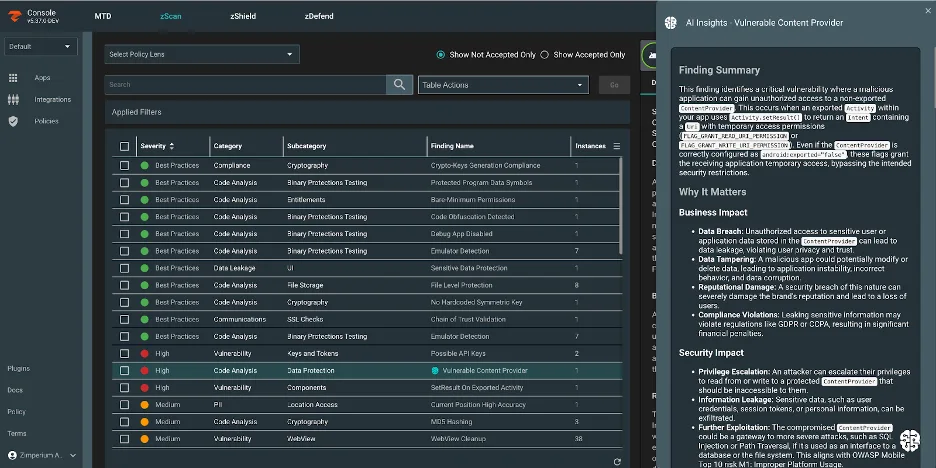
- Review findings — Each result includes the vulnerable code snippet, risk description, business impact, and remediation guidance. Reports available in SARIF, PDF, or JSON.
- Connect CI/CD — Install the GitHub Action, GitLab plugin, or Jenkins plugin to scan automatically on every build.
How much does Zimperium zScan cost?
Zimperium does not publish list pricing for zScan — every quote is custom and routed through sales. zScan is licensed per-app or per-organization, either standalone or bundled with the wider Zimperium MAPS suite (zShield for app hardening, zDefend for runtime threat detection, zKeybox for key protection). A free 30-day trial with unlimited scans is available for evaluation; production licensing is annual or multi-year. The MTD product (Zimperium MTD / zDefend) is licensed separately on a per-device basis and is a different SKU from zScan.
For teams that want public list prices, see the alternatives below — most of the open-source options publish their licensing terms openly.
When to Use Zimperium zScan
zScan fits best when you need to validate security controls, not just find vulnerabilities. If your team has invested in app hardening (certificate pinning, root detection, anti-tampering), zScan confirms those measures are correctly applied.
Consider zScan when:
- You need to verify that anti-tampering and anti-reversing controls are working
- SSL pinning implementation needs validation
- Supply chain visibility through SBOM analysis is a requirement
- You want to scan published apps from app stores for competitive analysis or third-party vetting
- Compliance reporting against OWASP MASVS, PCI-DSS, or HIPAA is needed
- You’re already using Zimperium zShield or other MAPS products
The platform works well for organizations in regulated industries (finance, healthcare, government) where demonstrating proper security control implementation is required for compliance.
Teams looking for other mobile security tools focused purely on vulnerability scanning without control validation may want to evaluate Oversecured or NowSecure as alternatives.
What are alternatives to Zimperium zScan?
A few mobile MAST tools cover overlapping ground:
- NowSecure — broader enterprise mobile security platform with deeper privacy and SBOM analysis, App Defense Alliance MASA authorization, and PTaaS. Better fit for buyers prioritizing privacy and regulatory reporting; less laser-focused on hardening-control validation.
- Data Theorem Mobile Secure — commercial full-stack platform that also covers cloud and APIs. Wider product surface; less specialized than zScan on validating that anti-tampering and SSL pinning are correctly applied.
- AppKnox — commercial mobile MAST aimed at BFSI customers with managed pen-test reports. Stronger on managed services; lighter on the control-validation angle.
- Quokka — binary-only MAST (formerly Kryptowire) that adds forced-path execution and NIAP-mapped reports. Better for exposing hidden app behavior; it does not center on validating hardening controls.
- Oversecured — commercial SAST-first scanner with high accuracy claims and working proof-of-concept exploits. Better when the goal is finding vulnerabilities in code; less suited to verifying hardening controls.
- MobSF — fully open-source MAST baseline. The right choice when budget or self-hosting is the constraint; lacks zScan’s automated supply-chain SBOM and integrated control-validation reporting.
zScan’s distinct angle is verifying that hardening applied by other tools (Guardsquare DexGuard, Appdome, Zimperium zShield) is actually working in production builds — most of these alternatives find vulnerabilities but do not validate defensive controls. For the broader picture, see the mobile security tools hub.