


ZAP (Zed Attack Proxy) is a widely used open-source web application security scanner. It’s free, Apache 2.0 licensed, and has no paid tiers or feature restrictions.
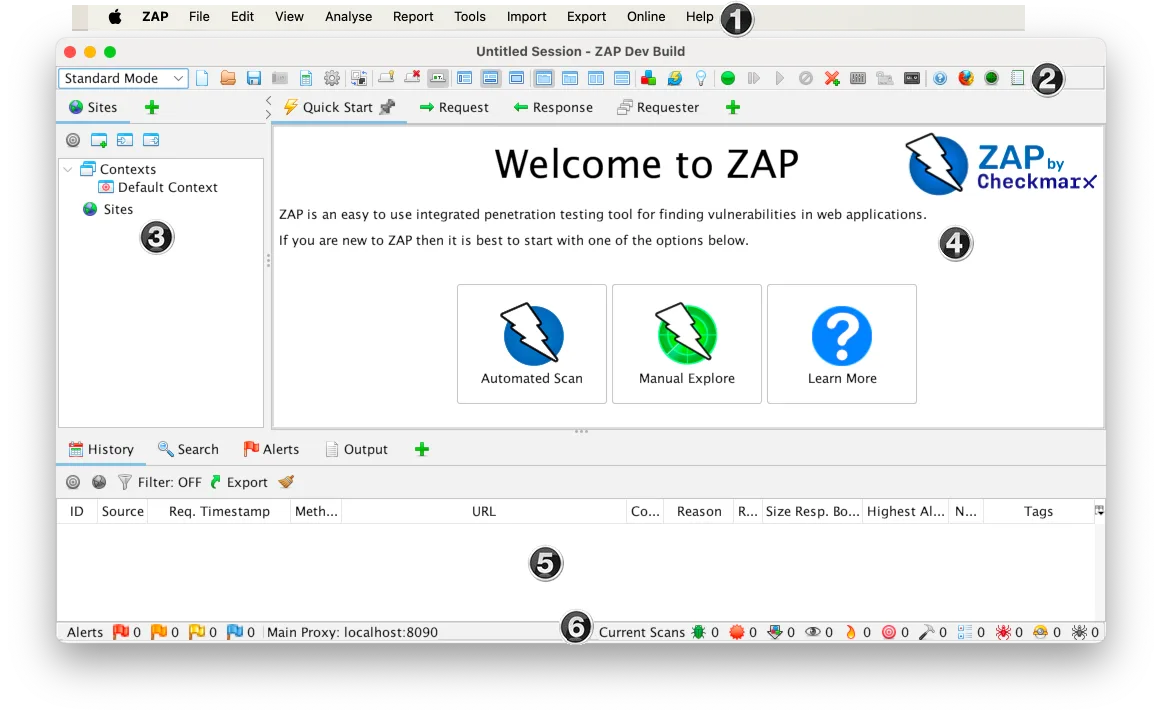
With 15,300+ GitHub stars, 2,500+ forks, and 229+ contributors, ZAP is a go-to free DAST tools choice for security teams, pentesters, and developers. Version 2.17.0 shipped in December 2025, written primarily in Java (73% of the codebase).
In September 2024, Checkmarx partnered with the ZAP project and hired all three project leaders — Simon Bennetts, Rick Mitchell, and Ricardo Pereira. ZAP remains free and open source. Checkmarx provides funding and resources for continued development.
What is ZAP?
ZAP sits between your browser and the target application as an intercepting proxy. All HTTP/HTTPS traffic passes through ZAP, where you can inspect, modify, and replay requests in real-time.
Beyond manual testing, ZAP includes automated scanning: a spider that crawls the application, an AJAX spider that uses a headless browser for JavaScript-heavy pages, a passive scanner that analyzes traffic without sending extra requests, and an active scanner that fires attack payloads at discovered endpoints.
The tool earned OWASP Flagship Project status and has been a GitHub Top 1000 project. The OWASP Testing Guide lists ZAP as a reference tool for dynamic application security testing.
| Feature | Details |
|---|---|
| License | Apache 2.0 (free, no restrictions) |
| GitHub stars | 15,300+ |
| Contributors | 229+ |
| Language | Java (73%) |
| Latest version | 2.17.0 (December 2025) |
| API testing | REST, GraphQL, SOAP |
| Automation | YAML-based framework |
| Desktop platforms | Windows, macOS, Linux |
| Docker images | zap-stable, zap-weekly |
| CI/CD | Official GitHub Actions, GitLab templates |
| Output formats | HTML, JSON, XML, Markdown, SARIF |
| Maintained by | Checkmarx (all 3 project leaders employed) |
What are ZAP (Zed Attack Proxy)’s key features?
| Capability | Details |
|---|---|
| Intercepting Proxy | Man-in-the-middle proxy that captures all HTTP/HTTPS traffic. Inspect requests and responses, modify parameters and headers, replay requests, and record authentication sequences. SSL/TLS decryption with ZAP’s CA certificate. |
| Automated Scanning | Traditional spider + AJAX spider (headless browser) for crawling. Passive scanner analyzes proxied traffic. Active scanner fires attack payloads at every discovered endpoint. Configurable scan policies control what gets tested. |
| Automation Framework | Define entire scan workflows in YAML files — contexts, authentication, spidering, scanning, and reporting. Run them from CLI or Docker. Treat your scan configuration as code in version control. |
Intercepting Proxy
ZAP’s core is the man-in-the-middle proxy. Configure your browser to route traffic through ZAP and you can:
- Inspect every request and response in real-time
- Modify parameters, headers, and request bodies before they reach the server
- Replay requests with altered values (fuzzing, parameter tampering)
- Record authentication sequences for automated replay
- Decrypt SSL/TLS traffic with ZAP’s installed CA certificate
Spider and Active Scanner
ZAP combines two crawling approaches:
- Traditional Spider: Follows HTML links, submits forms, extracts URLs from JavaScript. Fast but misses dynamically generated content.
- AJAX Spider: Launches a headless browser (Firefox or Chrome) that executes JavaScript. Catches SPA routes, client-side navigation, and AJAX endpoints. Slower but more thorough for modern apps.
After crawling, the Active Scanner fires attack payloads against every discovered parameter and endpoint. The Passive Scanner runs continuously in the background, analyzing all proxied traffic for security issues without sending additional requests.
API Scanning
ZAP imports API definitions and tests each endpoint:
# Import and scan an OpenAPI spec
zap-api-scan.py -t https://example.com/openapi.json -f openapi

# GraphQL scanning
zap-api-scan.py -t https://example.com/graphql -f graphql

# SOAP WSDL scanning
zap-api-scan.py -t https://example.com/service.wsdl -f soap
Pro tip: ZAP outputs SARIF natively — pass -I to the scan script to write a report_json.json, then upload it to GitHub, GitLab, or Azure DevOps as a code scanning artifact so findings appear directly in pull request annotations without extra plugins.
Automation Framework
The YAML-based automation framework is how most teams integrate ZAP into CI/CD:
env:
  contexts:
    - name: "Default Context"
      urls:
        - "https://example.com"
      authentication:
        method: "form"
        parameters:
          loginUrl: "https://example.com/login"
          loginRequestData: "username={%username%}&password={%password%}"
      users:
        - name: "testuser"
          credentials:
            username: "test@example.com"
            password: "testpass123"

jobs:
  - type: spider
    parameters:
      context: "Default Context"
      user: "testuser"
      maxDuration: 5

  - type: spiderAjax
    parameters:
      context: "Default Context"
      maxDuration: 5

  - type: passiveScan-wait
    parameters:
      maxDuration: 10

  - type: activeScan
    parameters:
      context: "Default Context"
      user: "testuser"

  - type: report
    parameters:
      template: "traditional-html"
      reportFile: "zap-report.html"
Add-On Marketplace
ZAP’s marketplace has hundreds of extensions:
- Additional scan rules for specific technologies
- Import/export formats (HAR, OpenAPI, Postman)
- Reporting templates
- Authentication handlers
- Custom scripting (JavaScript, Python, Zest)
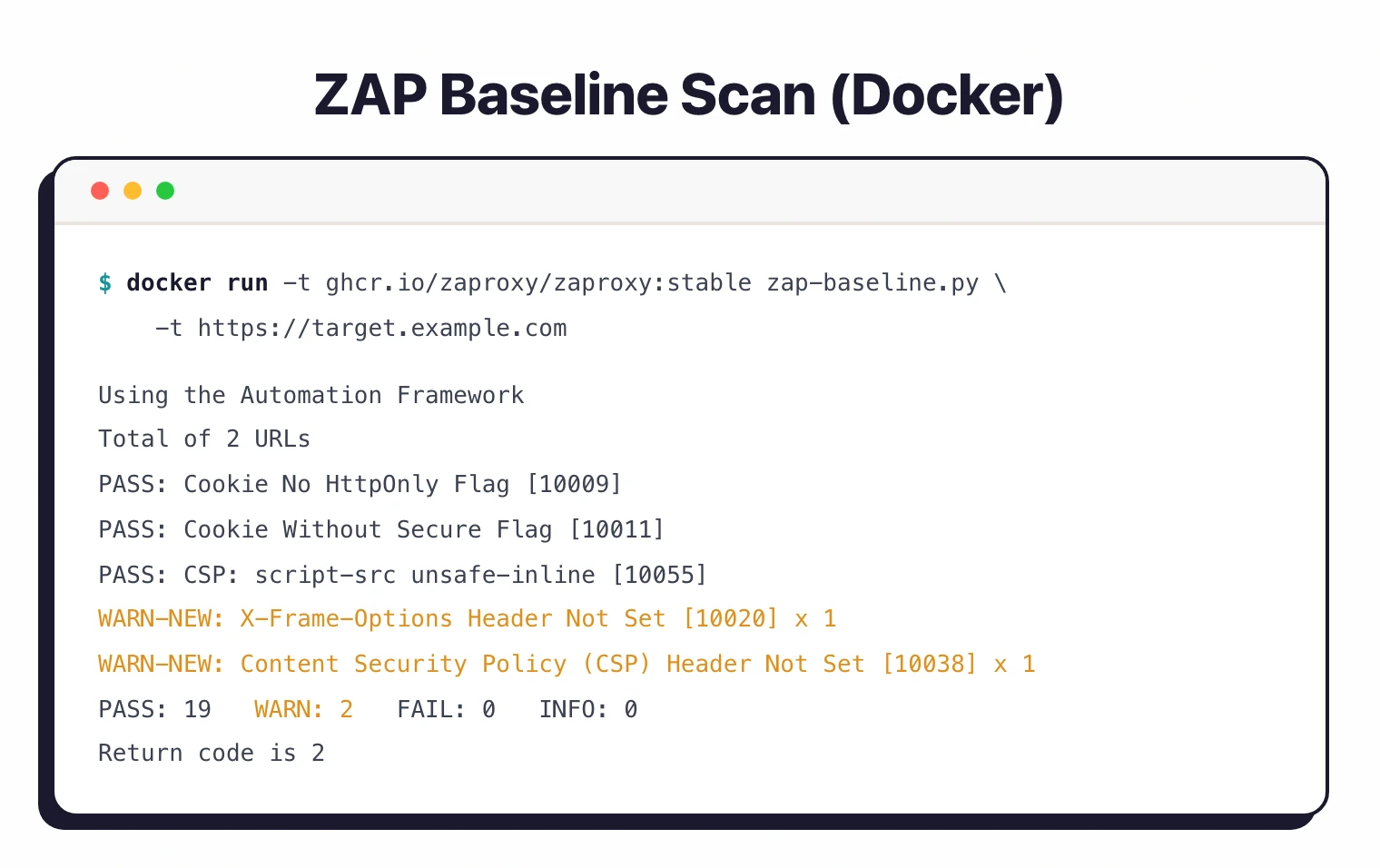
Pro tip: For CI/CD pipelines, start with zap-baseline.py — it runs a passive-only scan that completes in minutes without sending attack traffic. Reserve zap-full-scan.py for scheduled nightly or weekly runs where active scanning won't disrupt production.
Installation
Desktop
Download from zaproxy.org/download/ :
- Windows: MSI installer or portable ZIP
- macOS: DMG installer
- Linux: DEB, RPM, Snap (
sudo snap install zaproxy --classic), or TAR.GZ
Docker
# Stable image
docker pull zaproxy/zap-stable

# Baseline scan (passive only, fast)
docker run -t zaproxy/zap-stable zap-baseline.py \
  -t https://example.com

# Full scan (active scanning)
docker run -t zaproxy/zap-stable zap-full-scan.py \
  -t https://example.com -j

# API scan
docker run -t zaproxy/zap-stable zap-api-scan.py \
  -t https://example.com/openapi.json -f openapi

# Daemon mode for API access
docker run -u zap -p 8080:8080 zaproxy/zap-stable \
  zap.sh -daemon -host 0.0.0.0 -port 8080
Package Managers
# macOS
brew install --cask zap

# Linux (Snap)
sudo snap install zaproxy --classic

# Windows (Chocolatey)
choco install zap
How do I get started with ZAP (Zed Attack Proxy)?
- Install ZAP — Download the desktop app or pull the Docker image. Desktop is best for learning; Docker is best for CI/CD.
- Configure your browser — Set your browser to use ZAP as a proxy (default: localhost:8080). Install ZAP’s CA certificate for HTTPS interception.
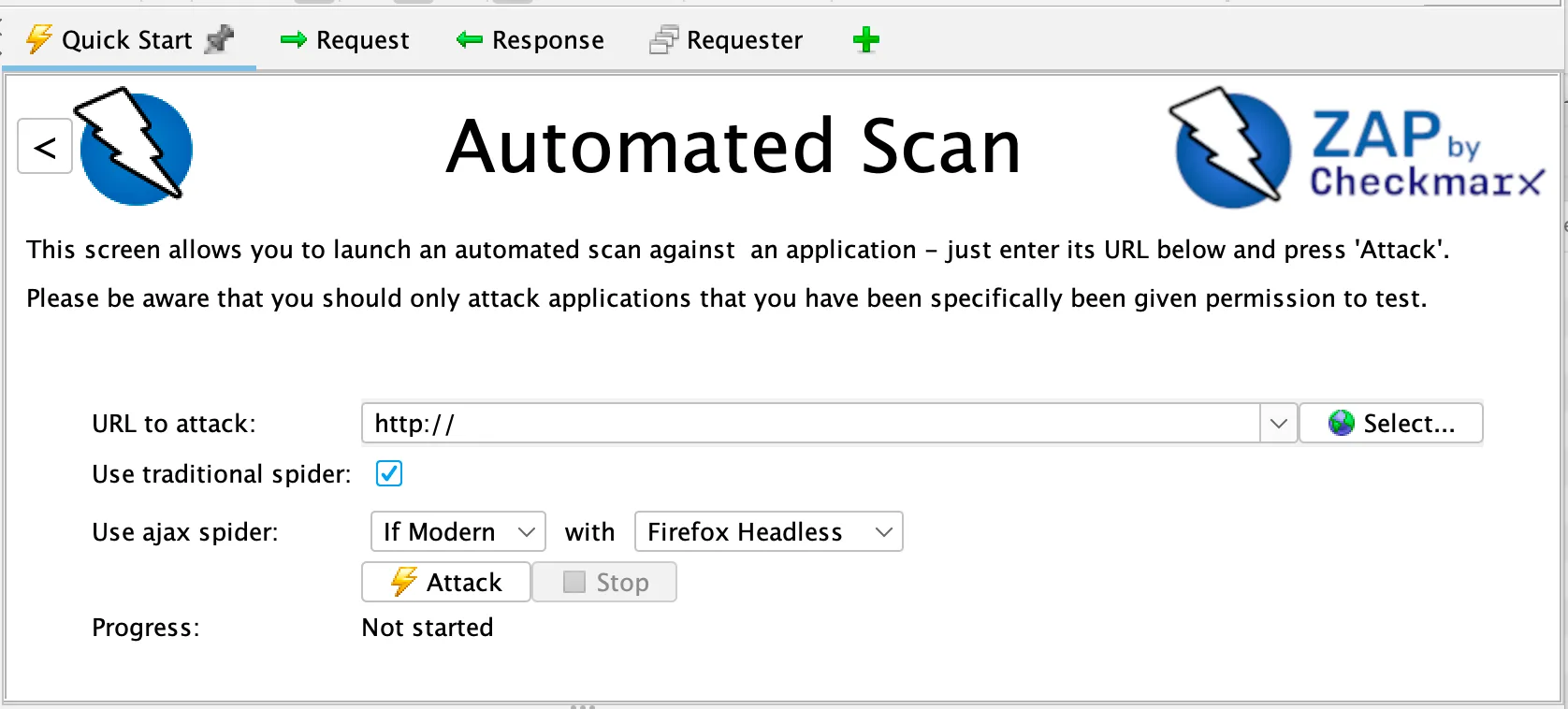
- Spider the application — Use the Quick Start tab to enter a URL and launch an automated scan. ZAP crawls with both the traditional and AJAX spider.
- Review findings — Alerts appear in the bottom panel, color-coded by severity (red = high, orange = medium, yellow = low). Click any alert for details, evidence, and remediation guidance.
- Export results — Generate HTML reports for stakeholders, JSON for automation, or SARIF for GitHub/GitLab code scanning integration.
What does ZAP (Zed Attack Proxy) integrate with?
 GitHub Actions
 GitLab CI
 Jenkins
 Azure DevOps
GitHub (SARIF)
GitLab (SARIF)
Azure DevOps (SARIF)
Azure DevOps
GitHub (SARIF)
GitLab (SARIF)
Azure DevOps (SARIF) DefectDojo
 ThreadFix
 Jira
JiraCI/CD Integration
GitHub Actions
name: ZAP Security Scan
on:
  push:
    branches: [main]
  pull_request:

jobs:
  zap-baseline:
    runs-on: ubuntu-latest
    steps:
      - uses: actions/checkout@v4
      - name: Start application
        run: docker-compose up -d && sleep 30
      - name: ZAP Baseline Scan
        uses: zaproxy/action-baseline@v0.15.0
        with:
          target: 'http://localhost:8080'
          rules_file_name: '.zap/rules.tsv'
          cmd_options: '-a'
      - uses: actions/upload-artifact@v4
        if: always()
        with:
          name: zap-report
          path: report_html.html
GitLab CI
zap-baseline:
  stage: security
  image: zaproxy/zap-stable
  script:
    - mkdir -p /zap/wrk
    - zap-baseline.py -t $CI_ENVIRONMENT_URL
        -g gen.conf -r zap-report.html
        -J zap-report.json || true
  artifacts:
    paths:
      - zap-report.html
    reports:
      dast: zap-report.json
ZAP pricing and licensing
ZAP is free. There are no paid tiers, no feature gates, no scan caps, and no “Pro” upsell. The full feature set ships under the Apache 2.0 license, which permits commercial use, modification, and redistribution with attribution.
Checkmarx funds development and employs the project leaders, but the funding does not change the licensing model. The codebase remains open source on GitHub, and binaries on zaproxy.org are free to download.
If you see a paid product that uses the ZAP engine, that is a third-party commercial wrapper — for example, StackHawk builds a managed CI/CD experience on top of ZAP’s scanning engine. ZAP itself, the core scanner, costs nothing.
ZAP vs Burp Suite
| Aspect | ZAP | Burp Suite Pro |
|---|---|---|
| Cost | Free | $475/year per user |
| License | Apache 2.0 | Proprietary |
| Detection accuracy | Good | Slightly better |
| CI/CD integration | Excellent (official Actions) | Good (Enterprise only) |
| Extensibility | Open marketplace | BApp Store |
| API scanning | REST, GraphQL, SOAP | REST, GraphQL, SOAP |
| Manual testing | Full proxy + tools | More polished UI |
| Community | Large open-source community | Strong commercial support |
When to Use ZAP
ZAP is the right choice when you want capable DAST scanning without licensing costs. The automated scanning, API testing, and CI/CD integration are genuinely good — not just “good for free software.”
Good fit for:
- Teams that need DAST without budget for commercial tools (see the free DAST tools roundup)
- CI/CD pipelines needing automated security scanning with official GitHub Actions
- Security professionals learning pentesting techniques
- Open-source projects that want OSS-only tooling
- Manual penetration testing alongside automated scanning
- Organizations that want scan configuration as code (YAML automation framework)
Not the best fit if:
- You need vendor support SLAs and guaranteed response times
- You want managed scanning (enterprise tools like Invicti or Veracode DAST handle that)
- You need executive-level compliance dashboards out of the box
- Your team has no appetite for learning a tool with a steeper initial learning curve
ZAP alternatives
ZAP is not the only DAST scanner worth running. The right alternative depends on whether you need a polished commercial tool, a different free engine, or a developer-first wrapper.
- Burp Suite Professional — paid (~$475/year per user). The reference manual-testing toolkit, with a more polished UI and slightly higher detection rates in independent benchmarks.
- StackHawk — commercial managed wrapper that uses the ZAP engine under the hood. Trades flexibility for a dev-friendly YAML config and native CI/CD integrations.
- Nuclei — free template-based scanner. Fast checks for known CVEs and misconfigurations across HTTP, DNS, TCP, and SSL. Complementary to ZAP rather than a direct replacement.
- Wapiti — free Python black-box scanner. Smaller scope than ZAP but lower config burden.
For a side-by-side comparison, see the ZAP alternatives roundup and the head-to-head Burp Suite vs ZAP comparison .
History
ZAP started as a fork of Paros Proxy in 2010. Simon Bennetts, the original project lead, has said that by 2014 only about 20% of ZAP’s code came from Paros — the rest was built from scratch.
The project achieved OWASP Flagship status.
In September 2024, Checkmarx partnered with ZAP and hired all three project leaders. Checkmarx committed to keeping ZAP free and open source while providing resources for continued development.