


Syhunt Dynamic is a desktop DAST scanner that runs on Windows, macOS, and Linux.
It detects over 7,000 web application vulnerabilities across 75+ categories through automated crawling and injection testing.
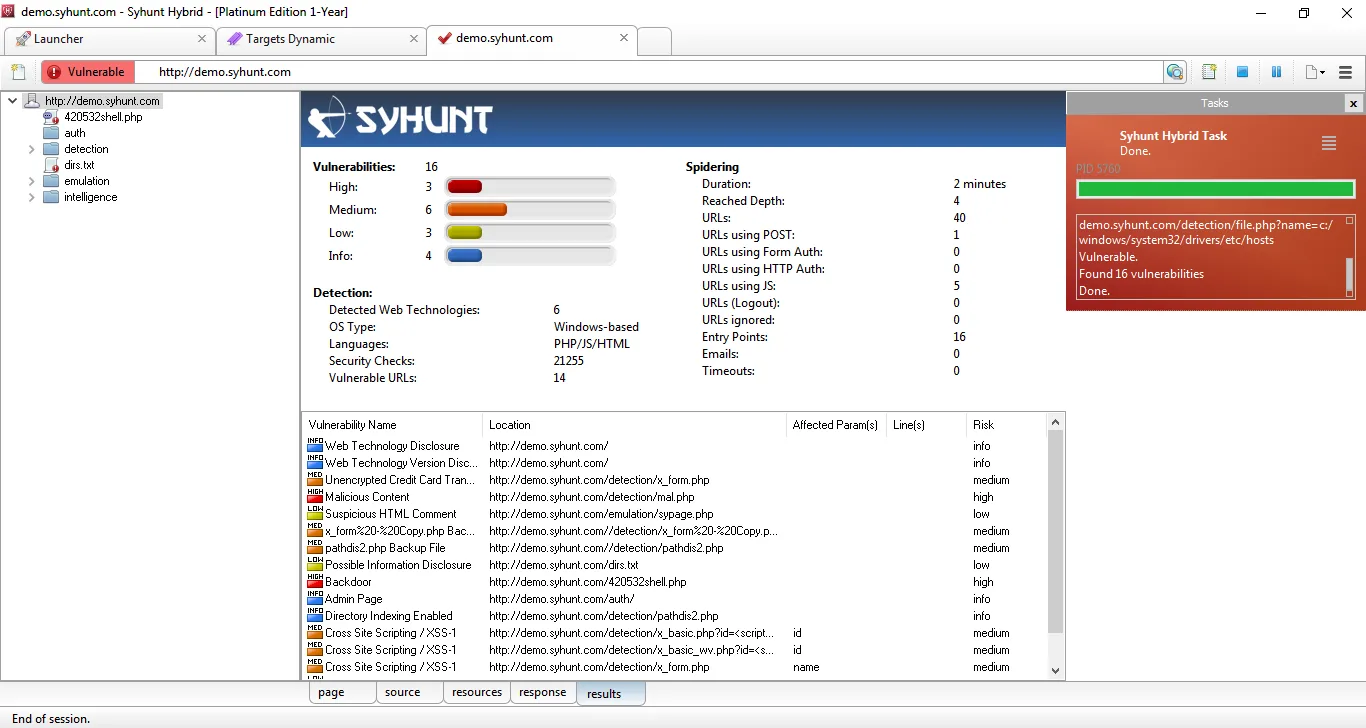
The scanner handles traditional web applications and APIs alike. It supports OpenAPI, Swagger, GraphQL, API Blueprint, RAML, and Postman Collections for structured API testing.
Syhunt is a Brazilian security company.
The product uses what Syhunt calls “Augmented Dynamic Analysis” — combining standard DAST with out-of-band (OAST) detection techniques.
What is Syhunt Dynamic?
Syhunt Dynamic crawls deployed web applications, maps their structure, and fires automated attack payloads at discovered endpoints. No source code access needed.
Point it at a URL and the scanner discovers pages, forms, JavaScript-generated content, and API endpoints.
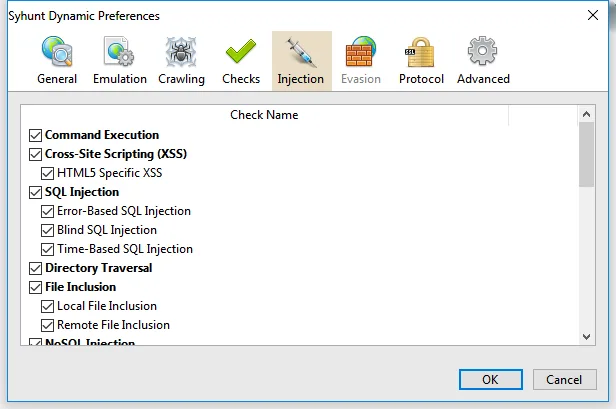
It then runs 581+ injection checks across 30+ attack categories to find SQL injection, XSS, path traversal, command execution, and other flaws.
These vulnerability classes align with the OWASP Top 10 , which identifies injection and broken access control as the most common web application risks.
The tool ships as a standalone desktop application with a command-line interface.
This makes it usable both as a GUI tool for manual assessments and as a CLI tool for CI/CD automation.
| Feature | Details |
|---|---|
| Vulnerability checks | 7,000+ across 75+ categories |
| Injection checks | 581+ API-specific |
| Platforms | Windows 10/11, macOS, 64-bit Linux |
| API formats | OpenAPI v2/v3, Swagger, GraphQL, Postman, RAML, WADL |
| Detection method | DAST + OAST (out-of-band) |
| Authentication | Basic, NTLM, form-based, session handling |
| JS engine | Chrome, Firefox, IE emulation |
| Report formats | HTML, PDF, JSON, XML, CSV |
| Compliance mapping | OWASP Top 10, PCI DSS, HIPAA, ISO 27001, CWE/SANS Top 25 |
| CI/CD | GitLab, Jenkins, GitHub |
What are Syhunt Dynamic’s key features?
| Capability | Details |
|---|---|
| Deep Crawling Engine | Maps website structure by following links, submitting forms, emulating JavaScript (Chrome/Firefox/IE behavior), and simulating user interactions like key presses and mouse clicks. Handles HTML5, CSS3, and XHR requests. |
| 581+ Injection Checks | Tests for SQL injection, XSS, command execution, file inclusion, XXE, and more across REST APIs. Supports both standard detection and out-of-band (OAST) attack techniques for finding blind vulnerabilities. |
| Multi-Format API Scanner | Imports OpenAPI v2/v3, Swagger v1/v2/v3, GraphQL with REST annotations, API Blueprint, RAML, WADL, Google Discovery, I/O Docs, and Postman Collections v1.0/v2.0/v2.1. |
Vulnerability Detection
Syhunt covers the standard DAST tools vulnerability categories plus a few less common ones:
- SQL Injection: Error-based, blind, and time-based for MySQL, PostgreSQL, MSSQL, Oracle
- Cross-Site Scripting: Reflected, stored, and DOM-based XSS
- Path Traversal: Directory traversal and local file inclusion
- Command Execution: OS command injection and code injection
- XXE: XML External Entity injection
- OAST Detection: Out-of-band attacks that confirm blind vulnerabilities through external callbacks
- Server Misconfiguration: Security headers, exposed files, default credentials
JavaScript Analysis
The scanner emulates Chrome, Firefox, and IE browser engines to render JavaScript-heavy pages. It handles:
- Single-page application routes
- AJAX requests and XHR callbacks
- Dynamically generated forms and links
- Auto form filling with simulated user interactions (key presses, mouse clicks)
- HTML5 and CSS3 parsing
API Security Scanner
The API scanner accepts definitions in nine different formats. Once imported, it tests every endpoint for injection vulnerabilities, authentication bypass, and configuration weaknesses.
Supported web technologies include ASP.NET, Java/JSP, Node.js, PHP, Ruby, Python, Perl, and Lua.
Compliance Reporting
Reports map findings to compliance frameworks. According to NIST SP 800-53, organizations handling federal data must implement regular vulnerability assessments, and mapped reporting helps satisfy those requirements:
- OWASP Top 10
- PCI DSS
- HIPAA
- ISO/IEC 27001
- CWE/SANS Top 25
- CVSS v3 scoring with CVE and CWE references
What does Syhunt Dynamic integrate with?
 GitLab
 Jenkins
 GitHub
 JIRA
GitHub Issues
GitLab Issues
JIRA
GitHub Issues
GitLab Issues Imperva SecureSphere
 F5 BIG-IP ASM
How do I get started with Syhunt Dynamic?
- Download the installer — Get the Windows, macOS, or Linux package from the Syhunt website. Windows uses a standard setup wizard; macOS is a DMG; Linux is a tar.gz.
- Activate your license — Enter your license key on first launch. A Community edition is available for basic scanning.
- Configure your target — Point the scanner at a URL. Set authentication if needed (Basic, NTLM, or form-based login). Import API definitions if testing APIs.
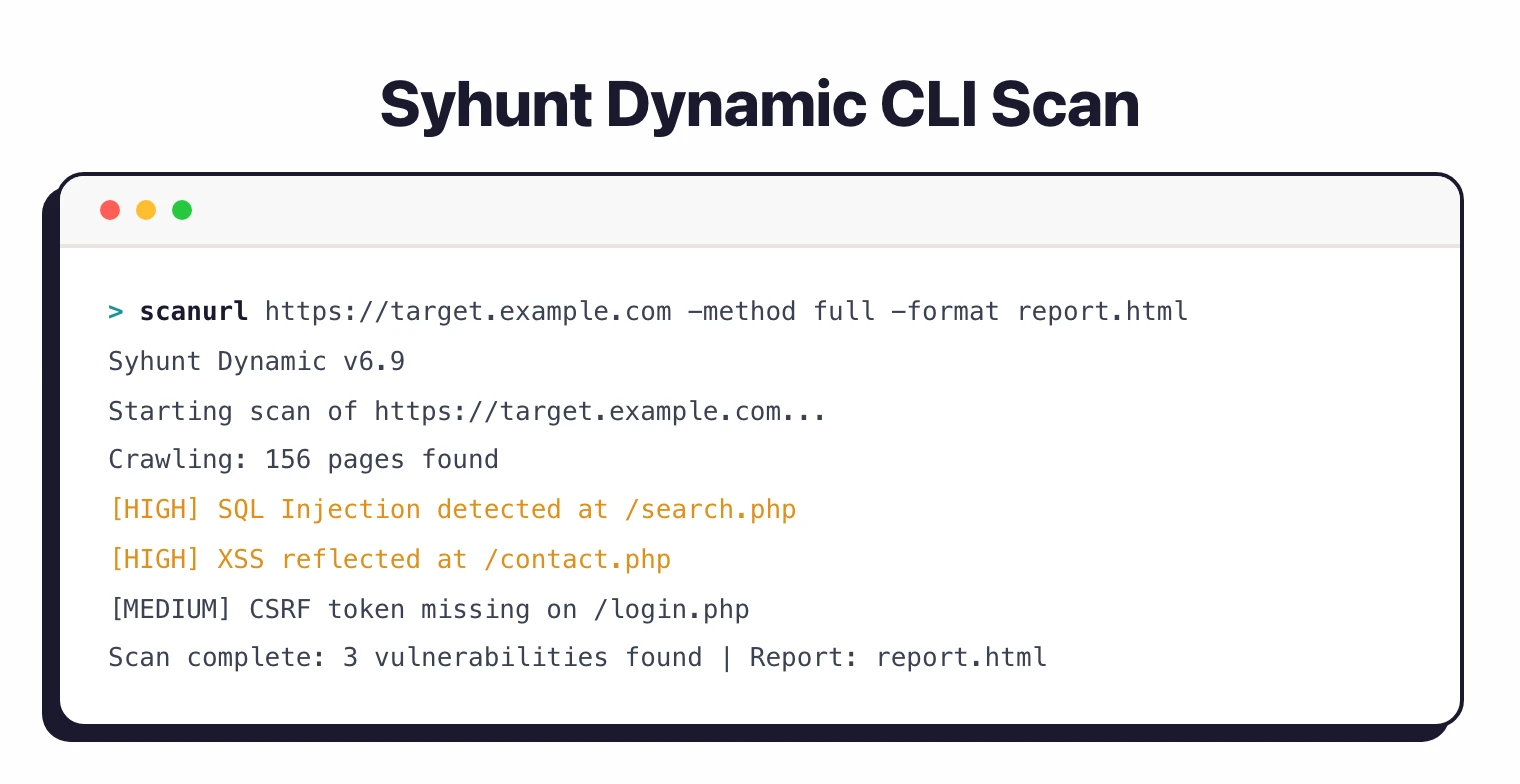
- Run the scan — Launch from the GUI or use the CLI:
scanurl https://example.com. Results appear in the dashboard with CVSS scores and remediation guidance.
Command-Line Usage
# Basic web application scan
scanurl https://example.com

# Scan with authentication
scanurl https://example.com \
  -atype:Form \
  -auser:admin \
  -apass:secret

# Generate HTML report
scanurl https://example.com \
  -rout:report.html

# Generate JSON output for CI/CD integration
scanurl https://example.com \
  -rout:results.json
How much does Syhunt Dynamic cost?
Syhunt does not publish list prices on syhunt.com. Buyers contact sales for a quote, and the team typically scopes pricing by edition (Standard, Pro, Enterprise) and per-target / per-seat counts.
A free Community edition exists for limited personal or evaluation use. For production scanning, paid editions unlock the full vulnerability check set, API scanner formats, virtual patching exports, and compliance reports.
If you need a budget number for procurement, request a quote directly through syhunt.com and benchmark it against the Acunetix and Burp Suite Professional list prices, which are publicly disclosed. Syhunt typically positions below enterprise platforms like Invicti .
When to Use Syhunt Dynamic
Syhunt fits teams that want a desktop DAST scanner with cross-platform support and API testing built in.
Nine API definition formats is more than most competitors support, which matters if your organization has mixed API documentation standards.
It works well for:
- Security professionals who prefer desktop tools over SaaS
- Organizations needing compliance-mapped reports (PCI DSS, HIPAA, ISO 27001)
- Teams testing APIs documented in various formats (OpenAPI, Postman, RAML, etc.)
- Environments where virtual patching integration (Imperva, F5) is valuable
It’s not the best fit if you need cloud-native SaaS delivery, continuous monitoring, or deep JavaScript SPA testing.
For those needs, look at tools like ZAP , Nuclei , or commercial SaaS DAST platforms like Acunetix .
For a broader understanding of dynamic testing approaches, see the guide on what is DAST .
What are alternatives to Syhunt Dynamic?
Syhunt Dynamic competes in a crowded desktop / commercial DAST market. The closest peers each target a slightly different buyer profile.
Acunetix is the most direct alternative: a Windows-first commercial DAST scanner with strong crawl coverage, API support, and published list pricing — useful when procurement requires a budget number up-front. Acunetix lacks Syhunt’s nine API definition formats but adds AcuSensor IAST agents for PHP, Java, and .NET.
Invicti is the enterprise step-up. Proof-based scanning lowers false-positive triage, the platform integrates with broader AppSec workflows, and the pricing reflects that scope.
Burp Suite Professional is the manual-tester standard. If your scanning is half automated and half pentesting, Burp Pro provides the intercepting proxy, fuzzer, and extension marketplace that Syhunt does not.
Wapiti is the free open-source counterpart. It runs on Linux, hits the OWASP Top 10 well, and costs nothing — but lacks Syhunt’s compliance reporting, virtual-patching exports, and API-format breadth.
For a wider list, see the full DAST tools hub.
Syhunt Product Suite
Syhunt Dynamic is one part of a larger security toolkit:
- Syhunt Hybrid — Combines SAST and DAST in a single tool
- Syhunt Code — Static analysis for source code vulnerabilities
- Syhunt API — Dedicated API security auditing
- Syhunt Mobile — Android and iOS application security testing