
38 Best SCA Tools (2026)
Independent ranking — no vendor pays to appear here. See methodology.
Independent comparison of every major SCA platform — reachability analysis, supply chain attack detection, SBOM generation, and enterprise license compliance.
At a glance
The best SCA tools in 2026: Snyk, Black Duck, Endor Labs, Socket, and Trivy.
- Best developer experience: Snyk Open Source — IDE and pull-request integration with automated fix PRs
- Best enterprise license and policy depth: Black Duck — deep license compliance and governance for regulated teams
- Best reachability analysis: Endor Labs — function-level reachability that cuts false positives
- Best supply-chain attack detection: Socket — flags malicious packages by behavior, not just known CVEs
- Best free scanner: Trivy — open-source scanning across dependencies, containers, and IaC
I evaluated 38 software composition analysis tools using publicly verifiable evidence — vendor docs, GitHub activity, vulnerability-database coverage, and supply-chain detection behavior. No vendor paid to appear on this page.
Software Composition Analysis (SCA) scans every open-source library and third-party dependency in your application, matches each one against vulnerability databases, and checks license compliance. For the full primer, see what is SCA .
This page compares the full SCA market — free, freemium, and enterprise — weighted toward what actually separates these tools in 2026: reachability analysis, supply chain attack detection, and license-policy depth. No vendor paid to appear.
My headline picks are Snyk for developer experience, Black Duck for license compliance, Endor Labs for reachability, Socket for supply chain attack detection, and Trivy for free scanning. There is no single best SCA tool — the right one depends on what you optimize for.
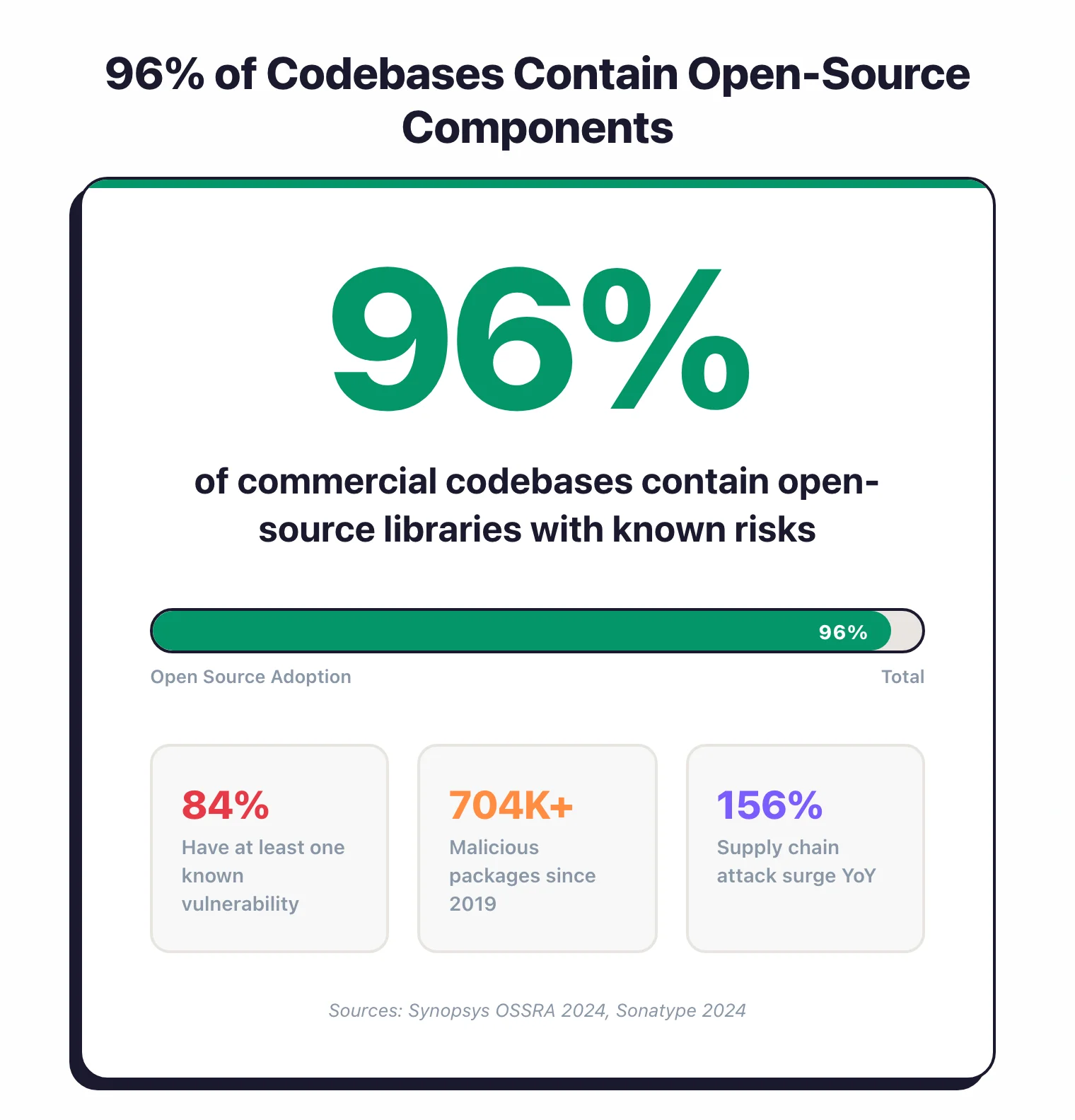
The scale makes manual tracking impossible. According to Synopsys’ 2024 OSSRA report, 96% of commercial codebases contain open-source components, and 84% of those contain at least one known vulnerability. Sonatype’s 2024 report found supply chain attacks surged 156% year-over-year, with over 704,102 malicious packages identified since 2019.
I maintain the full data roundup in supply chain attack statistics .
The Best SCA Tools (2026)
All 38 active SCA tools side by side, grouped by license type. BluBracket (acquired by HashiCorp in 2023), Phylum (acquired by Veracode in 2025), and Qwiet AI (acquired by Harness in 2025) are listed separately at the bottom.
| Tool | License | Standout |
|---|---|---|
| Free / Open Source (12) | ||
| Bumblebee NEW | Free (OSS) | Read-only endpoint package inventory; flags exposure to compromised releases (Perplexity AI) |
| CDXgen | Free (OSS) | CycloneDX SBOM generator for 20+ languages |
| CVE Lite CLI NEW | Free (OSS) | OWASP Lab Project; JS/TS lockfile scanning with offline advisory DB |
| Dependabot | Free (OSS) | GitHub-native dependency security; 30+ ecosystems |
| Dependency-Track | Free (OSS) | SBOM-first vulnerability management; OWASP flagship |
| Grype | Free (OSS) | Fast container vulnerability scanner by Anchore |
| OSV-Scanner | Free (OSS) | Google-backed OSV database scanner |
| OWASP Dependency-Check | Free (OSS) | OWASP-maintained; uses NVD database; multi-platform |
| Renovate | Free (OSS) | Automated dependency updates; 90+ package managers |
| Syft | Free (OSS) | SBOM generation tool; CycloneDX and SPDX output |
| Trivy | Free (OSS) | All-in-one scanner: dependencies, containers, IaC, secrets |
| Freemium (7) | ||
| Snyk Open Source | Freemium | Auto-remediation PRs; IDE + CI/CD integration; SBOM |
| Arnica | Freemium | Pipelineless SCA with package reputation |
| Debricked | Freemium | Developer-friendly; now part of OpenText |
| FOSSA | Freemium | License compliance focus; used by Splunk, Confluent, UiPath |
| GitGuardian | Freemium | Secrets detection + SCA; supply chain security platform |
| Interlynk | Freemium | SBOM management with VEX and supplier SBOM collection |
| SCANOSS | Freemium | Lightweight; multiplatform (Linux, Windows, macOS) |
| Commercial (19) | ||
| Aikido | Commercial | All-in-one (SCA, SAST, DAST, IaC, secrets); free tier available |
| Anchore | Commercial | SBOM-first container security platform |
| Black Duck | Commercial | SBOM + license compliance; now independent (ex-Synopsys) |
| CAST Highlight | Commercial | Chrome extension for repo scanning; SBOM export to multiple formats |
| Chainguard | Commercial | Zero-CVE hardened container images |
| Checkmarx SCA | Commercial | Part of Checkmarx One; supply chain risk + behavioral analysis |
| Contrast SCA | Commercial | Runtime library prioritization; class-level execution tracking |
| Crash Override NEW | Commercial | Build-time provenance; SLSA L3 attestation and observed SBOMs |
| Endor Labs NEW | Commercial | Reachability analysis; dependency lifecycle management |
| JFrog Xray | Commercial | Strong IDE/CI/CD and binary management integration |
| Mend SCA | Commercial | Forrester Wave Strong Performer; auto-remediation; formerly WhiteSource |
| Nexus Lifecycle | Commercial | SDLC integration; part of Sonatype platform |
| Revenera Code Insight | Commercial | License compliance and IP protection leader |
| Seal Security NEW | Commercial | Backported sealed patches; fixes CVEs in place without version upgrades |
| Socket NEW | Commercial | Supply chain attack detection; analyzes package behavior |
| SonarQube | Commercial | Code quality platform with SCA; free Community Build |
| Veracode SCA | Commercial | Part of Veracode suite; enterprise vulnerability identification |
| Acquired (3) | ||
| BluBracket ACQUIRED | N/A | Acquired by HashiCorp in 2023 |
| Phylum ACQUIRED | N/A | Acquired by Veracode in Jan 2025; standalone product sunset |
| Qwiet AI ACQUIRED | N/A | Acquired by Harness in Sep 2025; now part of Harness STO |
Snyk Open Source and Black Duck hold the largest commercial share; Endor Labs and Socket are the fastest-rising challengers. Below I break down the tools worth shortlisting, then how I evaluate them.
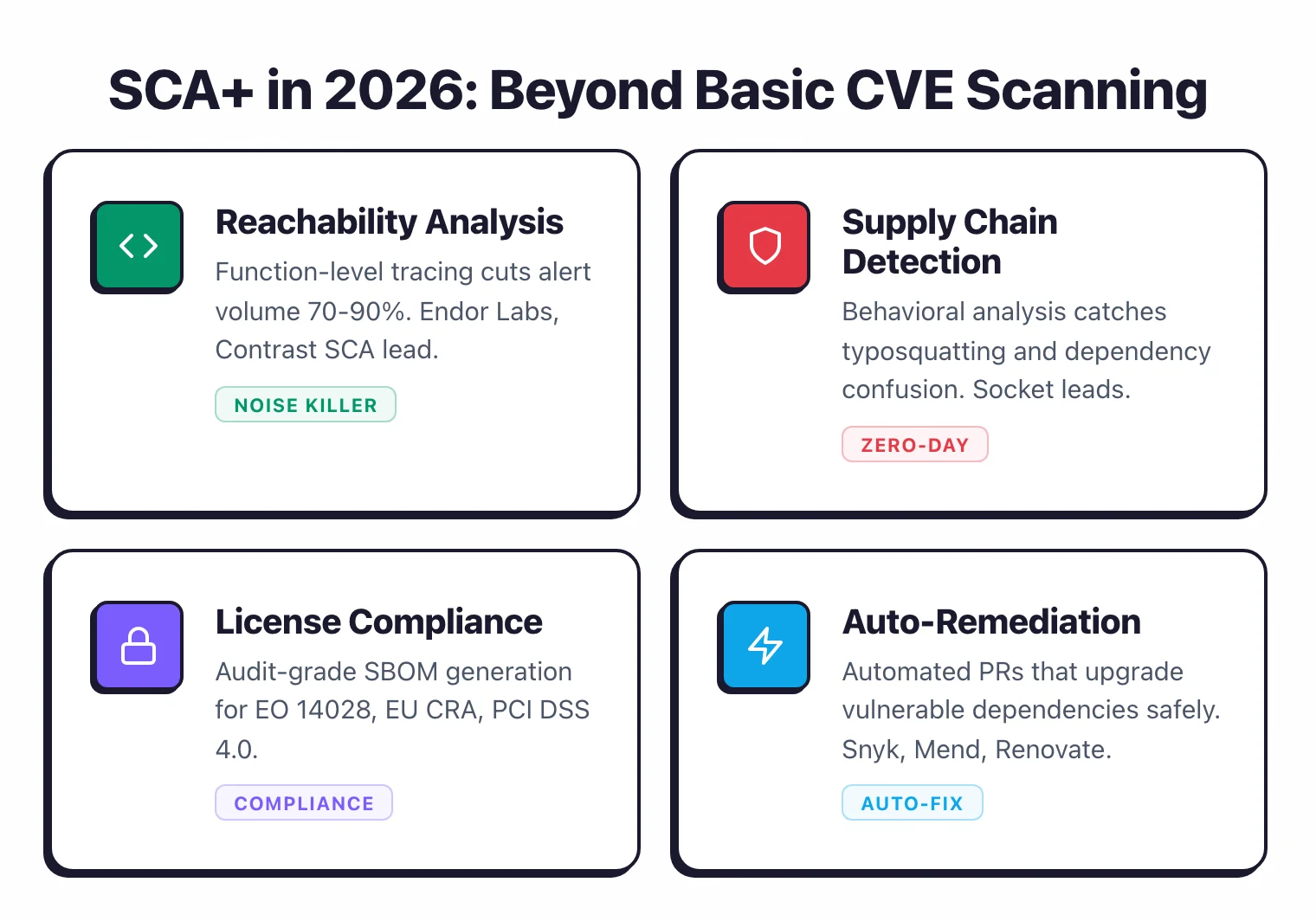
The category is moving past basic vulnerability scanning toward what some analysts call “SCA+”: CVE detection, reachability analysis, supply chain threat detection, and SBOM management bundled together. Reachability in particular has gone from differentiator to table stakes — the real question is how deep it goes.
Acquisitions keep reshaping the field. Debricked was folded into OpenText’s Fortify portfolio as OpenText Core SCA, Veracode absorbed Phylum’s malicious-package detection in January 2025, and Harness acquired Qwiet AI in September 2025.
1. Snyk Open Source — Best for developer experience
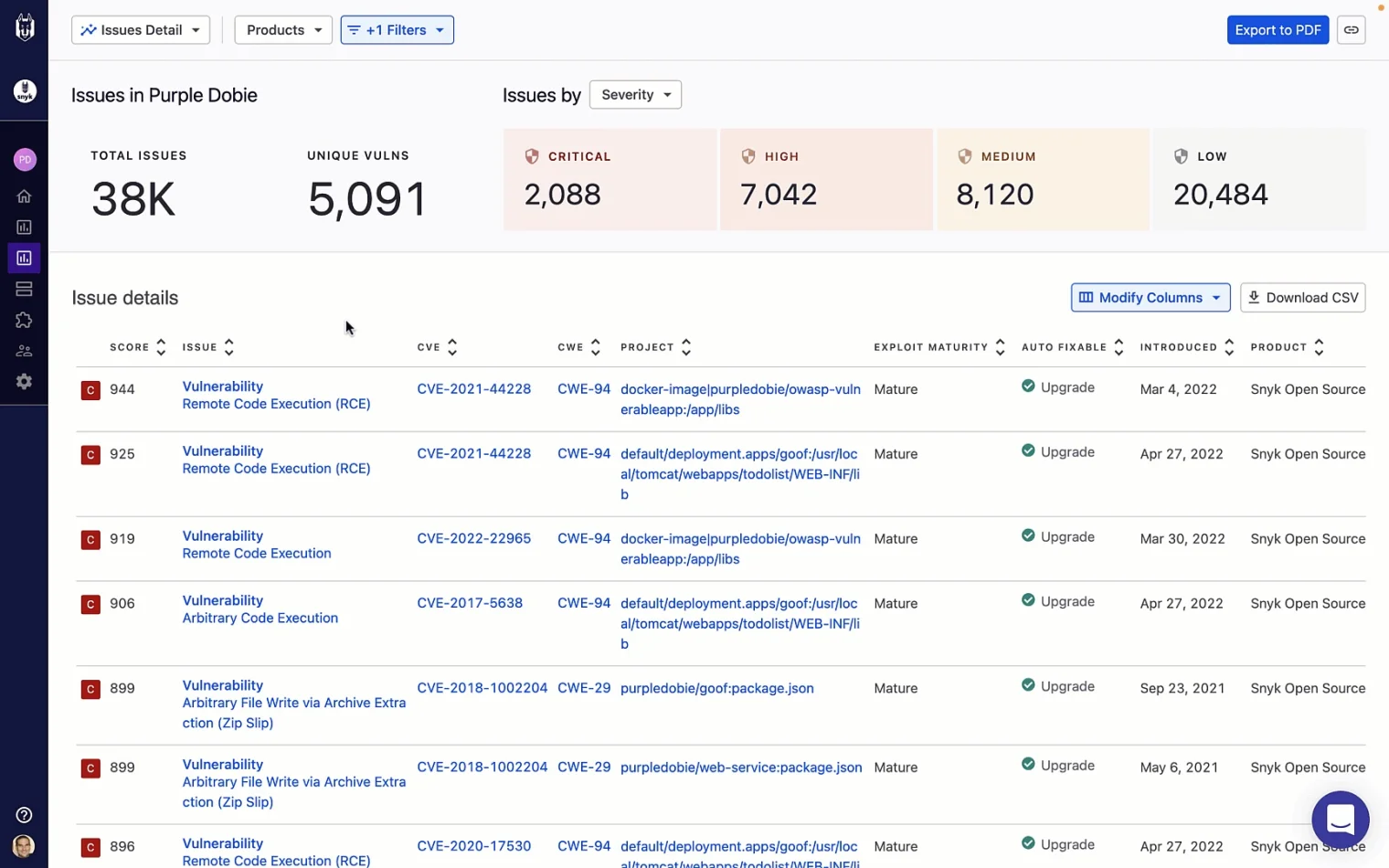
Snyk Open Source is a developer-first SCA that matches dependencies against its own vulnerability database, which often flags issues before they reach the NVD. It opens auto-fix pull requests, plugs into IDEs and CI/CD, and works across every major Git provider.
Snyk Open Source is the best SCA tool for developer experience — it meets developers in the IDE and the pull request, where the work already happens.
- License: Freemium (free tier for individuals; paid plans scale by contributing developer)
- Ecosystems: Broad; GitHub, GitLab, Bitbucket, Azure DevOps
- Reachability: Yes (package and cross-file reachability scoring)
- Deployment: SaaS + CLI
- Standout: Proprietary database detects issues ~47 days faster than NVD-only sources (Snyk)
2. Black Duck — Best for enterprise license compliance
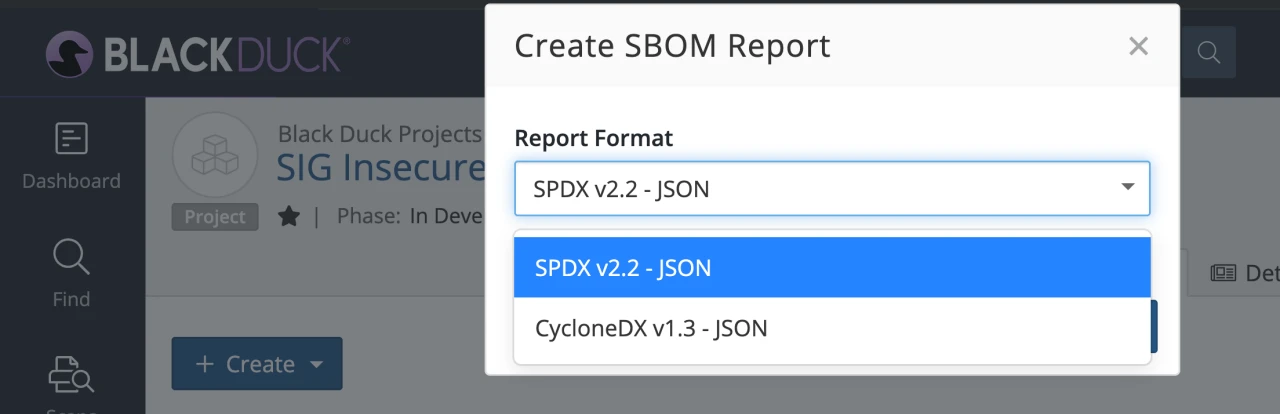
Black Duck pairs one of the industry’s largest open-source vulnerability databases with the deepest license-compliance and attribution tooling for regulated teams. It generates audit-grade SBOMs in CycloneDX and SPDX, and can fingerprint binaries when source is not available.
Black Duck is the best SCA tool for enterprise license compliance and audit-grade governance. Where Snyk wins on developer experience, Black Duck wins on legal and audit depth.
- License: Commercial (contact sales)
- Ecosystems: Broad; binary and snippet scanning for source-less artifacts
- Reachability: Limited (governance and compliance focus)
- Deployment: SaaS + self-hosted
- Standout: Audit-grade SBOM and attribution reports for EO 14028 and the EU CRA
3. Mend SCA — Best for auto-remediation at scale
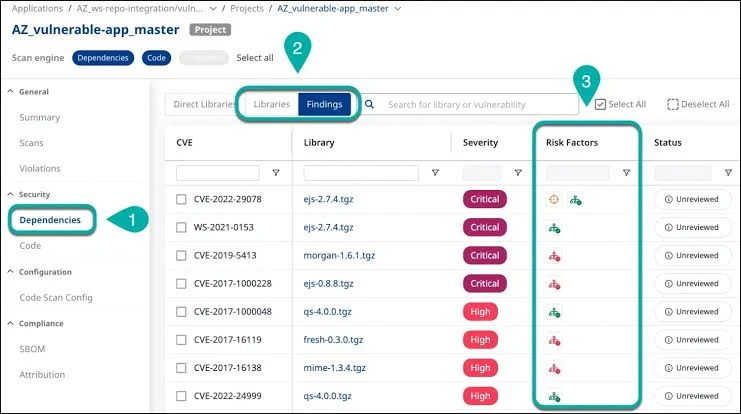
Mend SCA (formerly WhiteSource) leads on automated remediation — it opens upgrade pull requests and traces whether a vulnerable function is actually called, which cuts the noise. It owns the Renovate update project, so dependency updates and vulnerability fixes ship from one platform.
Mend SCA is the best fit for large teams automating remediation across many repositories. Where Snyk optimizes for developer self-service, Mend optimizes for centralized control.
- License: Commercial (contact sales)
- Ecosystems: 200+ programming languages
- Reachability: Yes (effective-usage analysis)
- Deployment: SaaS + self-hosted
- Standout: Bundles Renovate-driven auto-remediation pull requests
4. Endor Labs — Best for function-level reachability
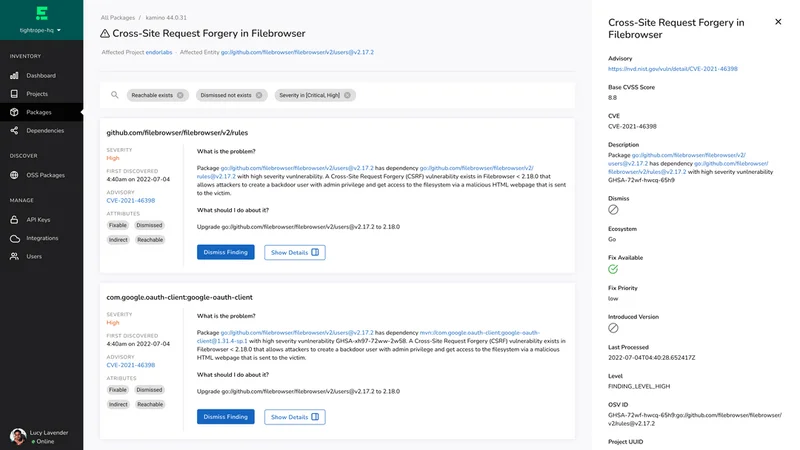
Endor Labs builds a call graph across your code and dependency tree to trace whether a vulnerable function is reachable from any entry point — statically, without running the application. It reports up to 97% noise reduction versus raw CVE counts, across 40+ languages.
Endor Labs is the best SCA tool for cutting alert noise when your team is drowning in unreachable CVEs.
- License: Commercial (contact sales)
- Ecosystems: 40+ languages
- Reachability: Yes (function-level, static call graph)
- Deployment: SaaS + CI
- Standout: Up to 97% alert-noise reduction (Endor Labs); customers include OpenAI, Snowflake, Atlassian
5. Socket — Best for supply chain attack detection
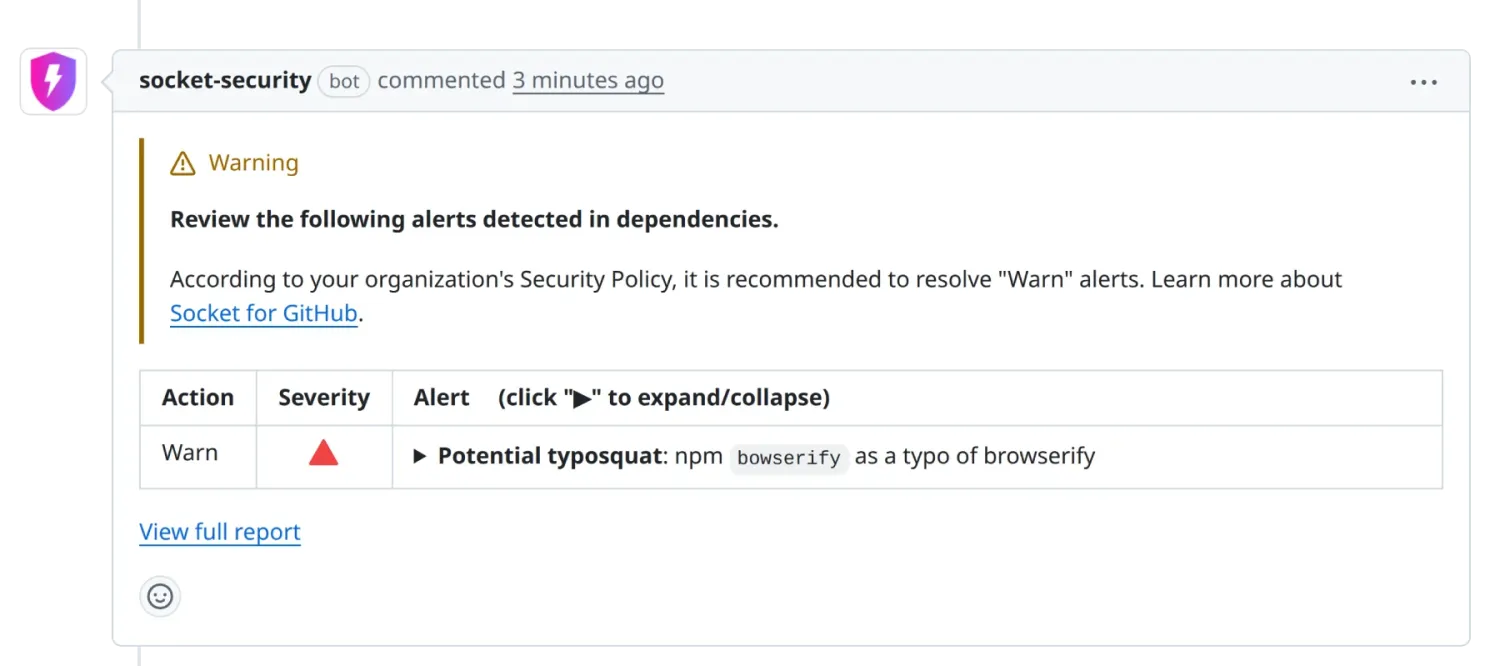
Socket flags malicious packages by analyzing behavior — install scripts, network calls, filesystem access — rather than waiting for a CVE. That catches typosquatting and dependency-confusion attacks that CVE-based scanners miss entirely.
Socket is the best SCA tool for supply chain attack detection, especially if you pull heavily from npm or PyPI. For the layers beyond SCA — signing, provenance, build integrity — see the supply chain security tools stack.
- License: Commercial (free tier for open source and small teams)
- Ecosystems: npm, PyPI, and other high-risk registries
- Reachability: Yes (precomputed reachability on paid tiers; behavioral detection is the core model)
- Deployment: SaaS + GitHub app
- Standout: Behavioral detection before a CVE is ever assigned
6. FOSSA — Best for license-detection accuracy
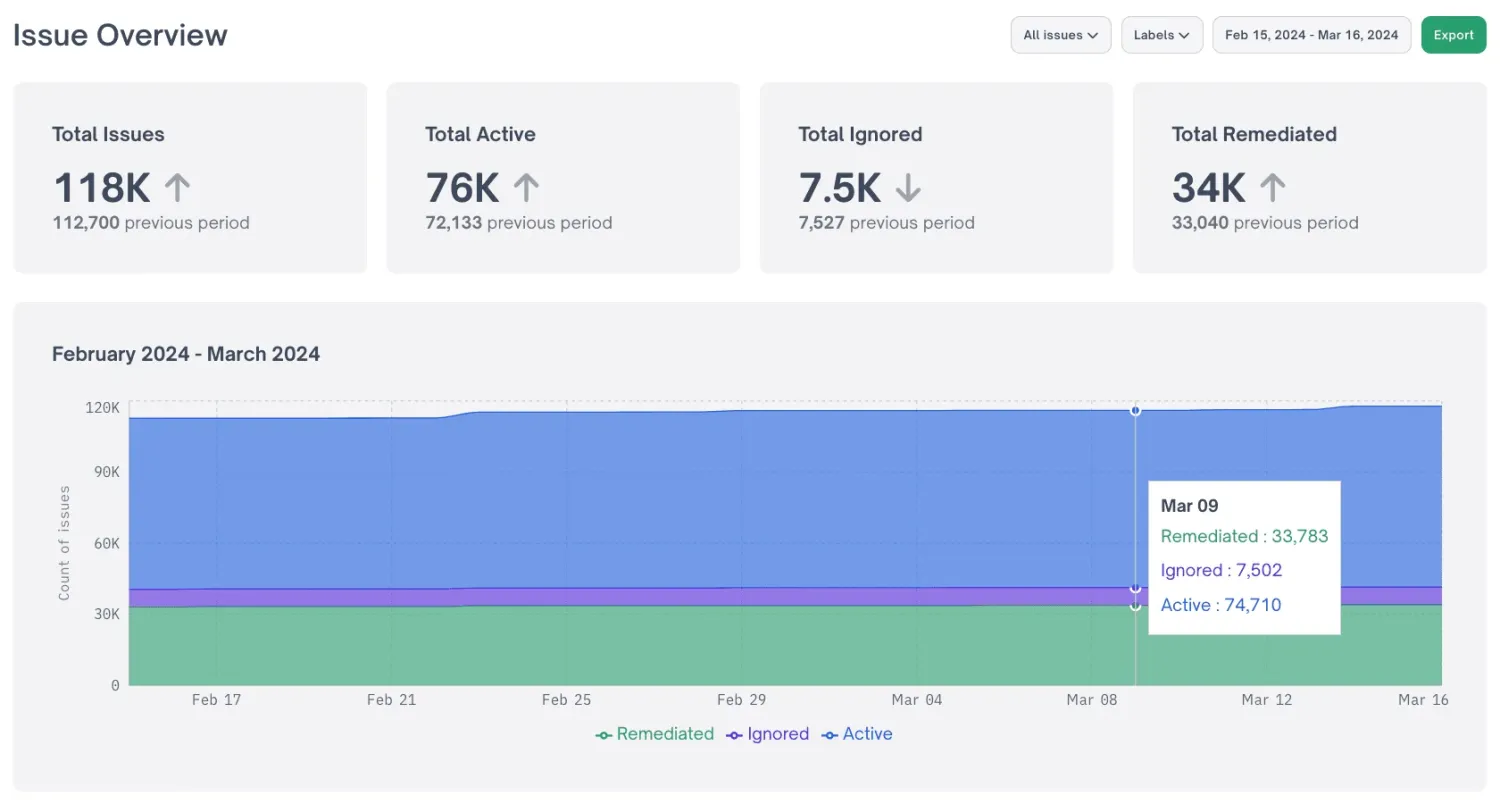
FOSSA leads on license compliance with 99.8% detection accuracy and full-text analysis that catches modified licenses. Its policy engine was designed with open-source licensing attorneys, and it generates audit-grade attribution reports.
FOSSA is the best SCA tool for license-detection accuracy when legal risk matters as much as security risk.
- License: Freemium (free tier; paid for policy and reporting)
- Ecosystems: Broad; SBOM in CycloneDX and SPDX
- Reachability: Limited (vulnerability reachability on top of license focus)
- Deployment: SaaS
- Standout: 99.8% license-detection accuracy; used by Splunk, Confluent, UiPath
7. JFrog Xray — Best for Artifactory and JFrog shops
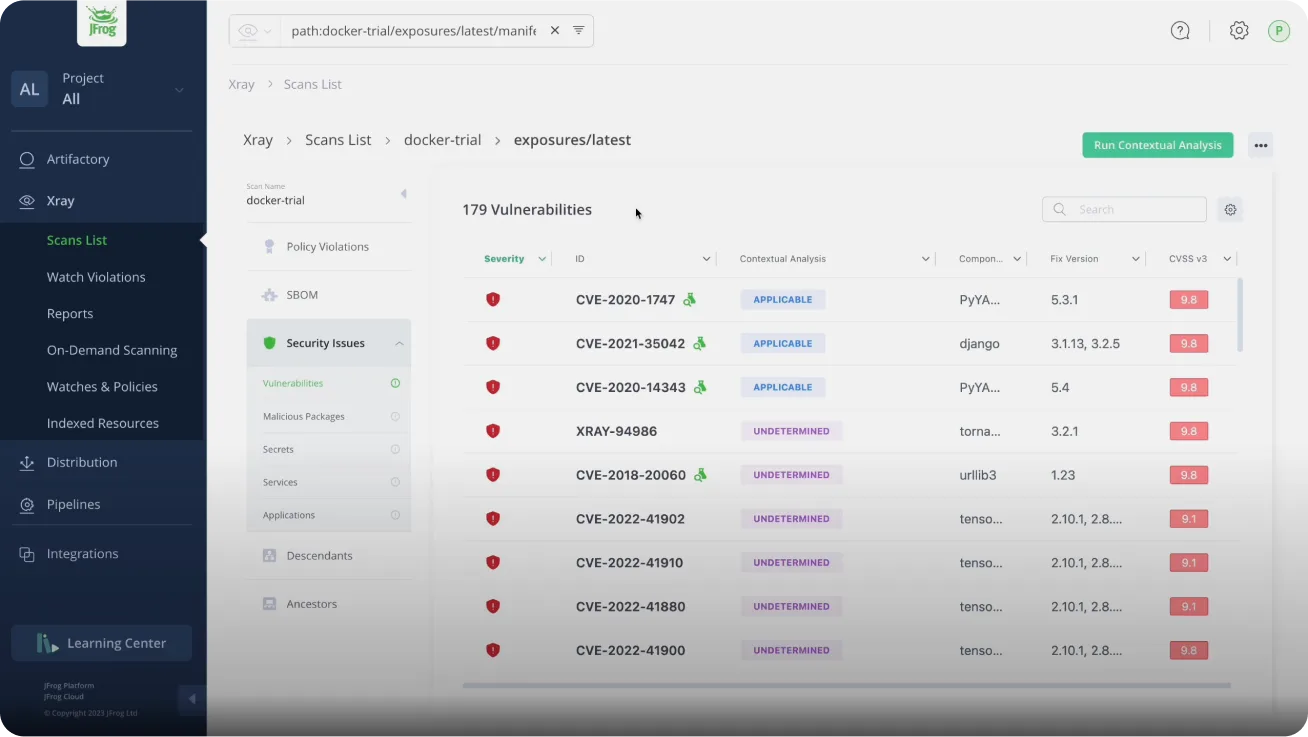
JFrog Xray scans binaries in the registry before artifacts reach any environment, integrating directly with Artifactory policies. It blocks vulnerable or non-compliant artifacts from being consumed downstream.
JFrog Xray is the best SCA tool for teams already standardized on Artifactory.
- License: Commercial (contact sales)
- Ecosystems: Binary and registry-level across Artifactory-supported package types
- Reachability: No (registry and binary-level gating)
- Deployment: SaaS + self-hosted
- Standout: Native Artifactory integration; binary scanning before consumption
8. Trivy — Best free all-in-one scanner
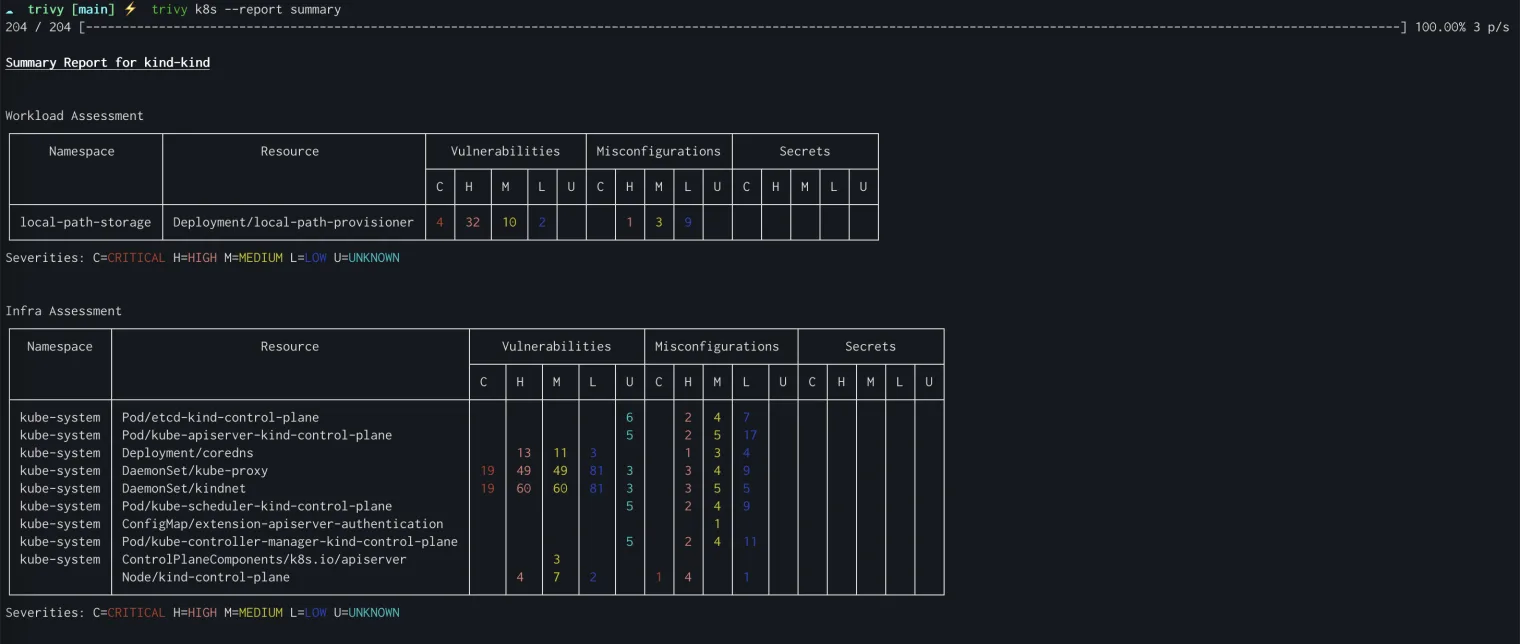
Trivy scans dependencies, container images, filesystems, and IaC from a single binary, which makes it the default free scanner in most CI pipelines. It covers 11+ language ecosystems and emits SARIF for code-scanning dashboards.
Trivy is the best free all-in-one SCA scanner; for how it stacks up against Grype and OSV-Scanner, see my open source SCA tools guide .
- License: Free (Apache 2.0)
- Ecosystems: 11+ language ecosystems plus OS packages, containers, and IaC
- Reachability: No
- Deployment: CLI + CI (Docker, GitHub Actions)
- Standout: One binary for dependencies, containers, IaC, and secrets
9. Grype (with Syft ) — Best free SBOM-driven matching
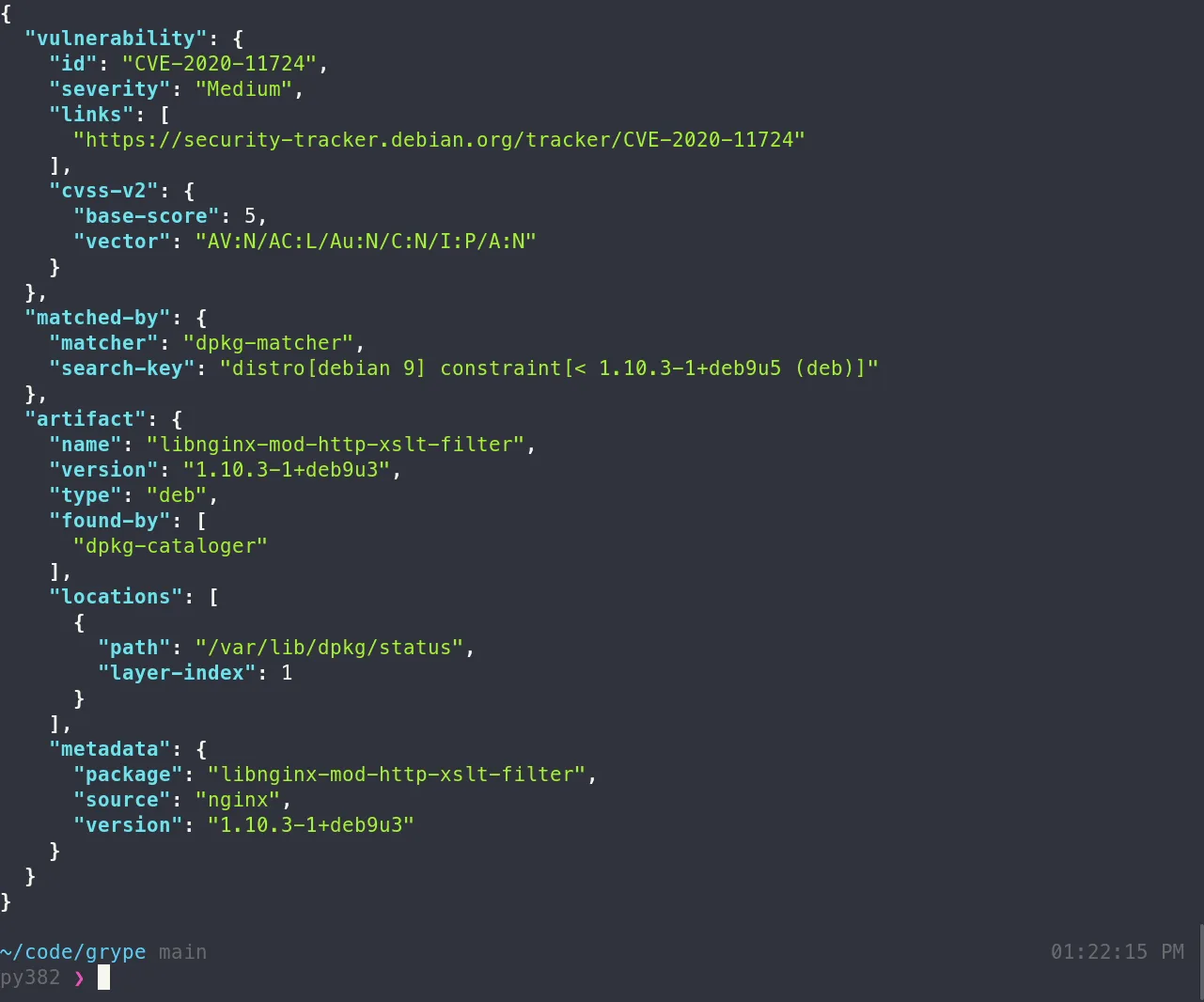
Grype is a focused vulnerability matcher with lower false positives, and it pairs with Syft for SBOM generation — generate the SBOM once, then scan it. Together they give a full open-source supply-chain stack at zero cost.
See the open source SCA tools guide for how the free tools stack up head to head.
- License: Free (OSS, by Anchore)
- Ecosystems: Container images and language packages; consumes Syft SBOMs
- Reachability: No
- Deployment: CLI + CI
- Standout: Distro-aware matching plus an SBOM-in workflow with Syft
10. OSV-Scanner — Best free multi-ecosystem scanner
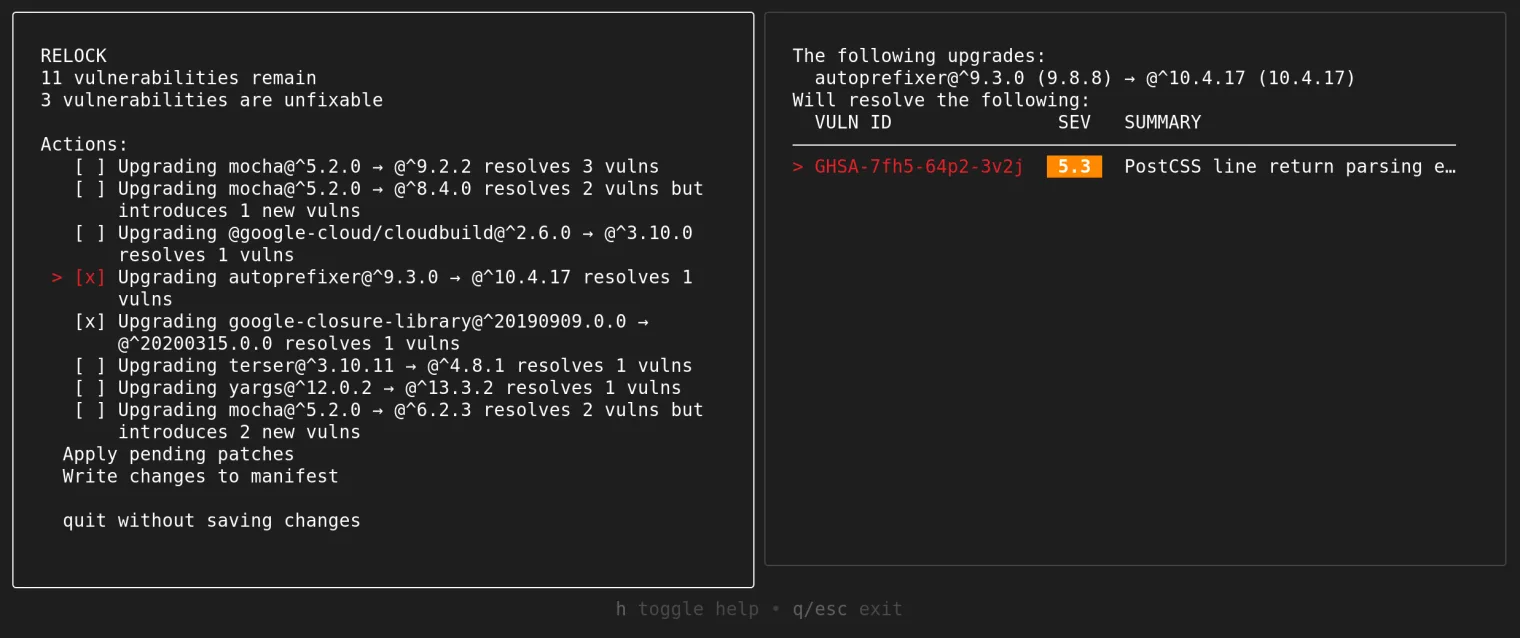
OSV-Scanner is a free, multi-ecosystem scanner that queries Google’s OSV.dev database with ecosystem-specific matching, which keeps false positives lower than CPE-based tools. It covers C/C++, Go, Python, Rust, npm, Maven, and more, with guided remediation for some ecosystems.
A strong free default — compared head-to-head in the open source SCA tools guide .
- License: Free (OSS, Google-backed)
- Ecosystems: npm, Maven, PyPI, Go, Rust, C/C++, and more
- Reachability: Limited (guided remediation on npm and Maven)
- Deployment: CLI + CI
- Standout: Ecosystem-specific OSV.dev matching means fewer false positives
11. Dependabot — Best for GitHub-native teams
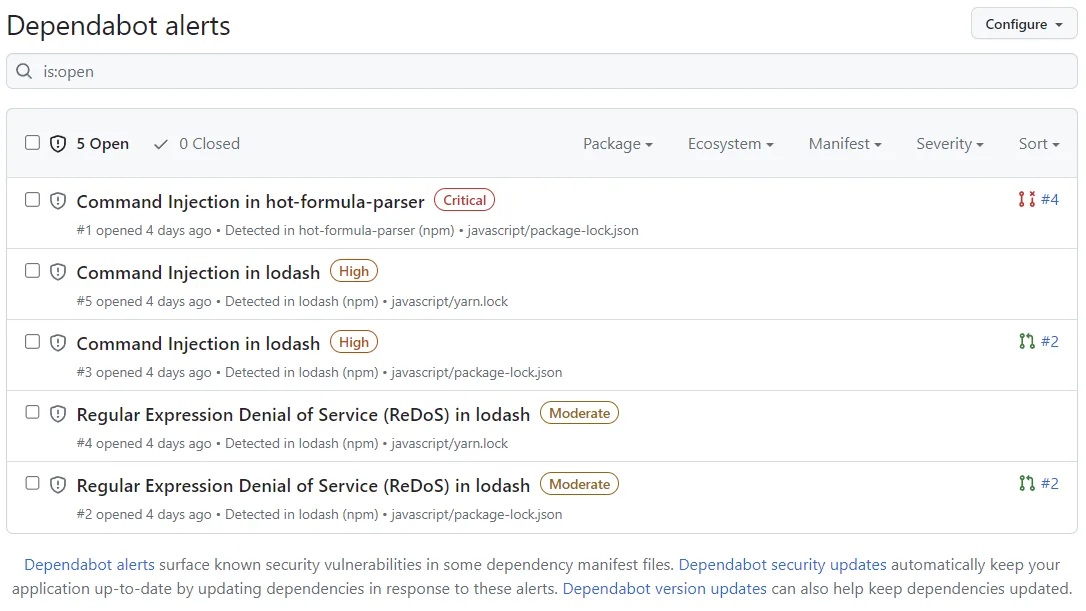
Dependabot is built into every GitHub repository at no cost and opens pull requests for vulnerable or outdated dependencies across 30+ ecosystems. Paired with GitHub Advanced Security, it adds secret scanning and CodeQL in the same interface.
Dependabot is the best SCA tool for teams that live entirely in GitHub and want zero setup.
- License: Free (built into GitHub)
- Ecosystems: 30+ (GitHub only)
- Reachability: No
- Deployment: GitHub-native
- Standout: Zero-setup security and update PRs for GitHub repositories
12. Renovate — Best for automated dependency updates
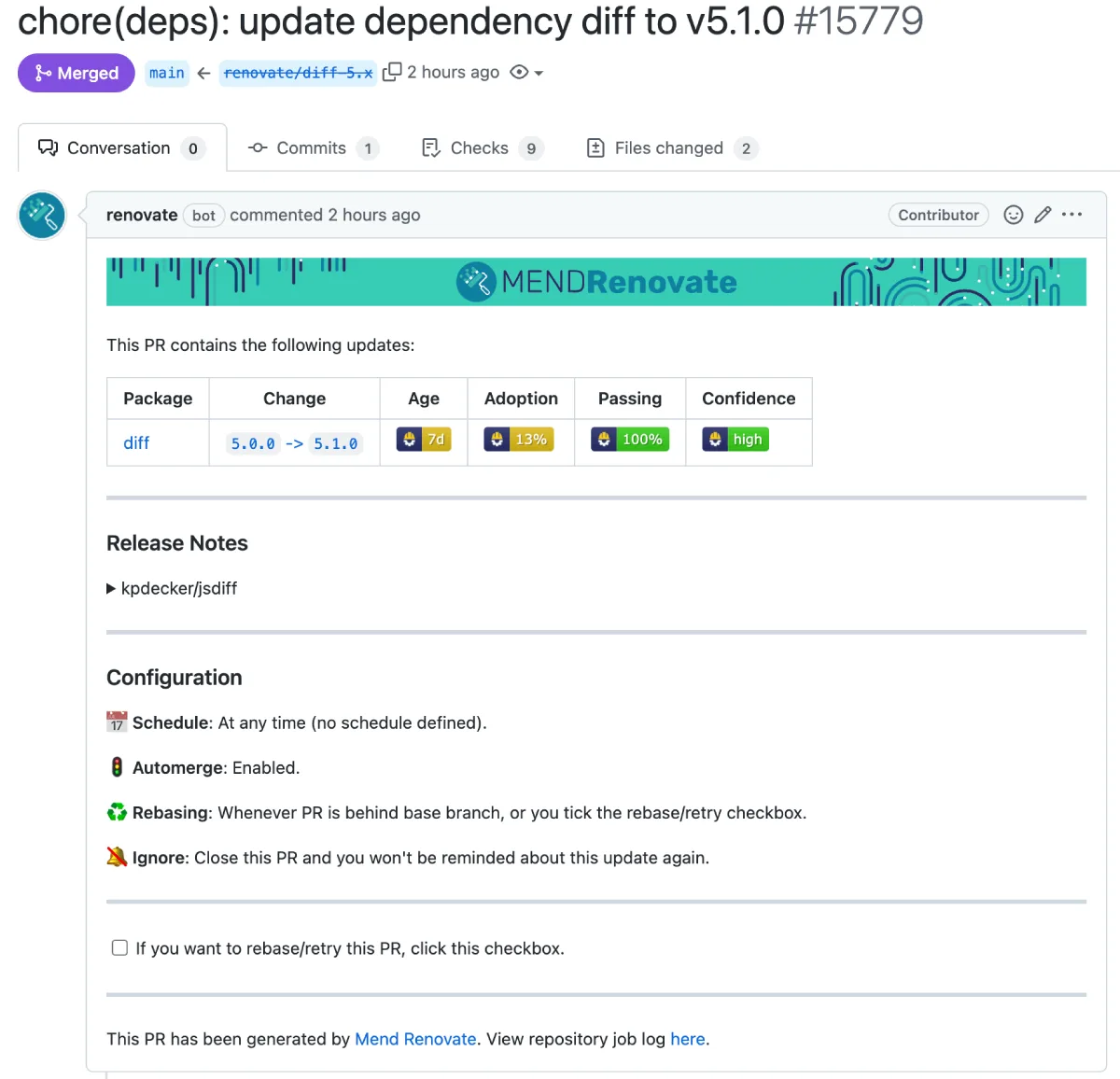
Renovate automates dependency updates across 90+ package managers and works on GitHub, GitLab, Bitbucket, and Azure DevOps. It offers far more configuration control than Dependabot — grouping, scheduling, and auto-merge rules.
Renovate is the best tool for automated dependency updates across many package managers and Git hosts.
- License: Free (OSS, Mend-maintained)
- Ecosystems: 90+ package managers; multi-Git-host
- Reachability: No (update automation, not scanning)
- Deployment: Self-hosted plus a hosted app
- Standout: 90+ package managers with deep update-rule control
For JavaScript copied outside package manifests, evaluate Retire.js as a focused additional input.
How SCA Works
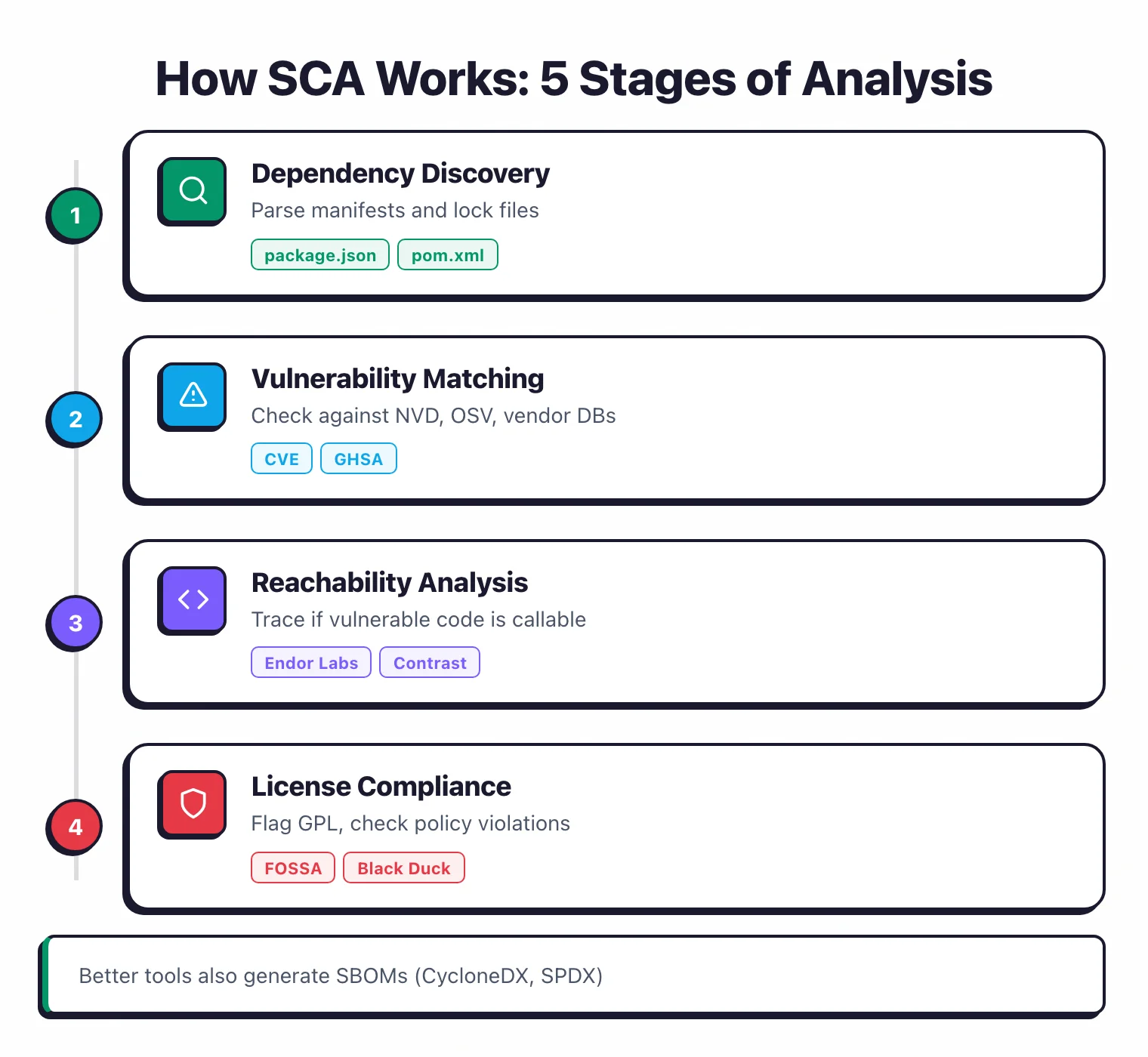
At a high level, SCA runs through five stages: dependency discovery, vulnerability matching, reachability analysis, license compliance checking, and SBOM generation.
The tool finds every open-source component in your application (including transitive dependencies), checks each one against vulnerability databases like the NVD and OSV, and reports what it finds.
The better tools then go a step further: they trace whether vulnerable code is actually callable from your application, and they flag license risks before legal gets involved.
Dependency Discovery
The tool reads your manifest files (package.json, pom.xml, Gemfile.lock, requirements.txt, go.mod) or your source code and builds a full dependency tree. That means both direct dependencies and transitive ones (the dependencies of your dependencies).
Vulnerability Matching
Every component and version gets checked against vulnerability databases: NVD, OSV, GitHub Advisory Database, and vendor-specific sources. OWASP Dependency-Check uses NVD directly. Commercial tools like Snyk Open Source and Mend run their own curated databases that tend to pick up issues faster.
Reachability Analysis
The smarter tools don't stop at matching. They trace whether the vulnerable code path in a library is actually reachable from your application. Endor Labs and Contrast SCA can tell you if a vulnerability in a dependency actually matters to your specific codebase. These vendors report that reachability analysis typically cuts alert volume by 70-90%.
License Compliance
SCA tools check every dependency's license against your organization's policies. Copyleft licenses like GPL can force you to open-source your own code. Permissive licenses like MIT and Apache 2.0 are usually fine for commercial use. FOSSA and Black Duck are the strongest options here.
SBOM Generation
Most SCA tools can export a Software Bill of Materials in CycloneDX or SPDX format. This is now a compliance requirement in many contexts: the US Executive Order on Cybersecurity (2021) requires SBOMs for software sold to federal agencies. Black Duck, Snyk Open Source, and Endor Labs all handle SBOM generation.
Why does dependency resolution matter for SCA?
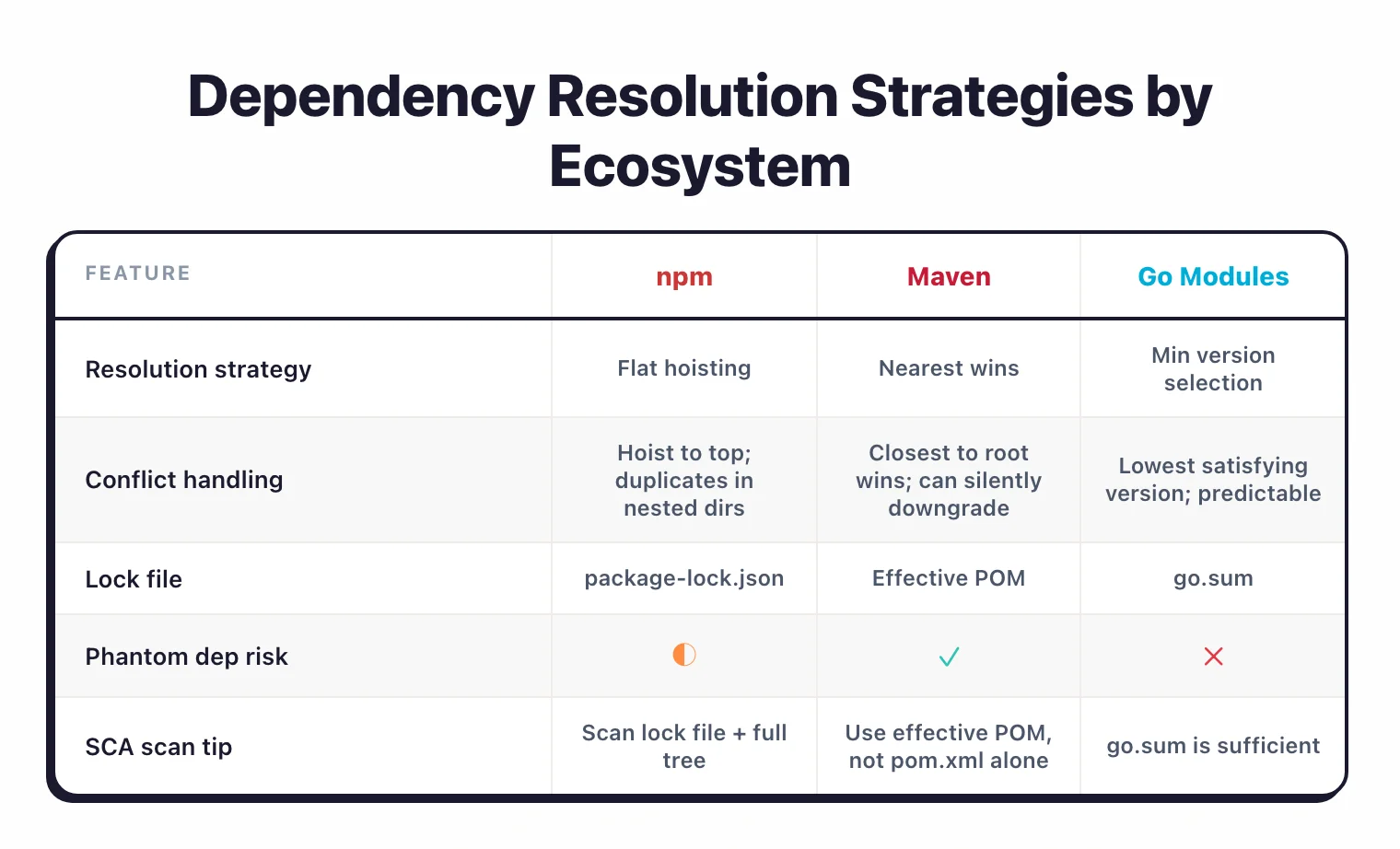
Dependency discovery works differently across ecosystems, and the resolution strategy directly affects which vulnerabilities your SCA tool can detect. npm uses a flattened node_modules structure where transitive dependencies get hoisted to the top level when possible, so your project can end up with multiple versions of the same package.
Maven resolves conflicts with a “nearest wins” strategy: the version closest to your project in the dependency tree takes precedence, which can silently downgrade a dependency to a vulnerable version.
Go modules use minimum version selection, always picking the lowest version that satisfies all constraints. More predictable, but it can mean you stay on older versions longer.
Lock files are essential for accurate SCA results. A manifest file (package.json, requirements.txt) declares what you want; a lock file (package-lock.json, poetry.lock, go.sum) records what you actually got.
Without a lock file, the SCA tool has no way of knowing exactly which versions of transitive dependencies are installed.
Some tools fall back to resolving the dependency tree themselves, but the result may not match what actually runs in production. Commit your lock files and scan them, not just the manifest.
There is also the problem of phantom dependencies — packages that work in your project but are not explicitly declared in your manifest. This happens when a package you depend on brings in a transitive dependency, and your code imports that transitive dependency directly.
If your declared dependency drops that transitive dependency in a future version, your build breaks. Some SCA tools flag phantom dependencies, but many do not.
What happens when manifest files are not available?
When manifest files are not available, tools like Black Duck and OWASP Dependency-Check can do binary and snippet scanning instead.
They fingerprint compiled code (JAR files, DLLs, binaries) and match those fingerprints against known open-source components.
This is the only option for vendor risk assessments where you receive software without source code, and it also helps verify that what shipped to production actually matches what was scanned in CI.
Finite State built its whole platform on that premise for connected devices. It unpacks shipped firmware and compiled binaries to build the component inventory, rather than reading the manifests a build declares — the case where conventional SCA has nothing to parse.
How I Evaluate SCA Tools
I weigh SCA tools against six criteria that reflect how teams actually use them in production. The right tool depends on which of these matters most for your stack.
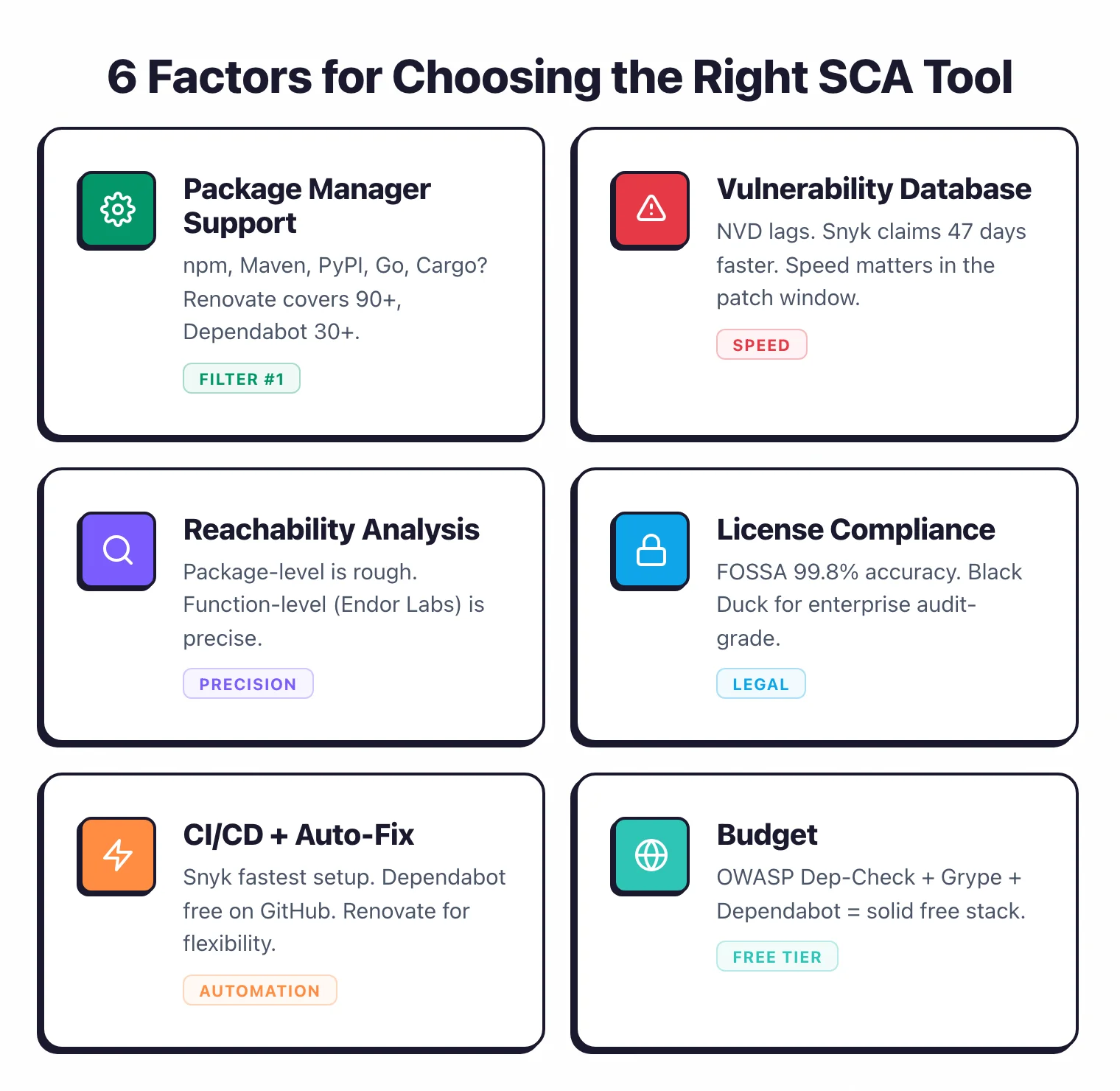
Ecosystem and package-manager coverage. Does it cover the ecosystems you use — npm, Maven, PyPI, NuGet, Go, RubyGems — plus less common ones like Cargo, Hex, or Pub? Renovate leads with 90+ package managers and Dependabot covers 30+. In a polyglot shop, breadth is a hard filter.
Advisory database depth and latency. How many sources does it aggregate (NVD, OSV, GitHub Advisory, vendor advisories) and how fast does it surface new disclosures? OWASP Dependency-Check relies on NVD, which can lag; Snyk Open Source claims to detect issues ~47 days faster, and Black Duck Security Advisories also surface ahead of NVD.
Reachability analysis. Does it trace whether vulnerable code is actually callable from your application? Function-level reachability (Endor Labs , 40+ languages) is far more precise than package-level filtering, and Contrast SCA uses runtime instrumentation for the same goal.
Fix-PR quality and CI/CD fit. Auto-remediation PRs save real time, but only if they pass tests and handle transitive dependencies cleanly. Snyk Open Source is fast to drop into a pipeline, Mend is strong on auto-remediation across many repos, and Seal Security backports fixes without upgrading versions.
License compliance and SBOM. Can it enforce custom license policies (not just SPDX detection), generate audit-grade attribution, and export CycloneDX or SPDX SBOMs? FOSSA leads on accuracy and Black Duck has the deepest enterprise feature set here.
Container coverage and pricing transparency. Manifest scanning and container scanning are different problems — Grype , Trivy , and Anchore cover base-image vulnerabilities that manifest-level tools miss. I also weigh whether the vendor publishes pricing or hides basic information behind a sales call. No vendor pays to appear, rank higher, or be excluded.
Common SCA Mistakes
Having an SCA tool is not the same as using it well.
The most common mistakes I see are scanning only direct dependencies, treating every CVE as equally urgent, and ignoring license compliance until legal gets involved. Any of these can undermine an otherwise solid dependency management strategy.
Only scanning direct dependencies. If your SCA tool only checks what is in your manifest file (package.json, pom.xml) without resolving the full dependency tree, you miss the transitive dependencies where most vulnerabilities actually live.
Make sure your tool resolves lock files and scans the complete graph. A direct dependency with zero CVEs can pull in dozens of transitive packages that do have known issues.
Treating all CVEs as equally urgent. A critical-severity CVE in a function your code never calls is less dangerous than a medium-severity CVE in a code path that runs on every request. Without reachability context, teams either try to fix everything (burnout) or ignore everything below a CVSS threshold (missed real risks).
Tools like Endor Labs and Contrast SCA help prioritize based on actual exploitability.
Letting vulnerability databases go stale. The NVD publishes over 100 new CVEs per day.
If your OWASP Dependency-Check instance is running with a stale database because the NVD API key expired or the update job stopped, you are scanning against old data. Commercial tools handle updates automatically.
Self-hosted and open-source tools need you to stay on top of this.
Ignoring license compliance. Vulnerability scanning gets all the attention, but license violations carry real legal risk.
If your commercial application includes a GPL-licensed component, you may be obligated to release your source code.
According to Synopsys’ 2024 OSSRA report, 53% of audited codebases contained license conflicts. Set up license policies early. Untangling license obligations after shipping is a nightmare.
Skipping container base images. Your Dockerfile starts with FROM node:18-alpine or FROM python:3.11-slim.
Those base images contain OS-level packages (openssl, zlib, curl) with their own vulnerabilities.
Manifest-level SCA does not catch these. Tools like Grype , Trivy , Anchore , and Black Duck scan container images and surface OS-level vulnerabilities that would otherwise slip through.
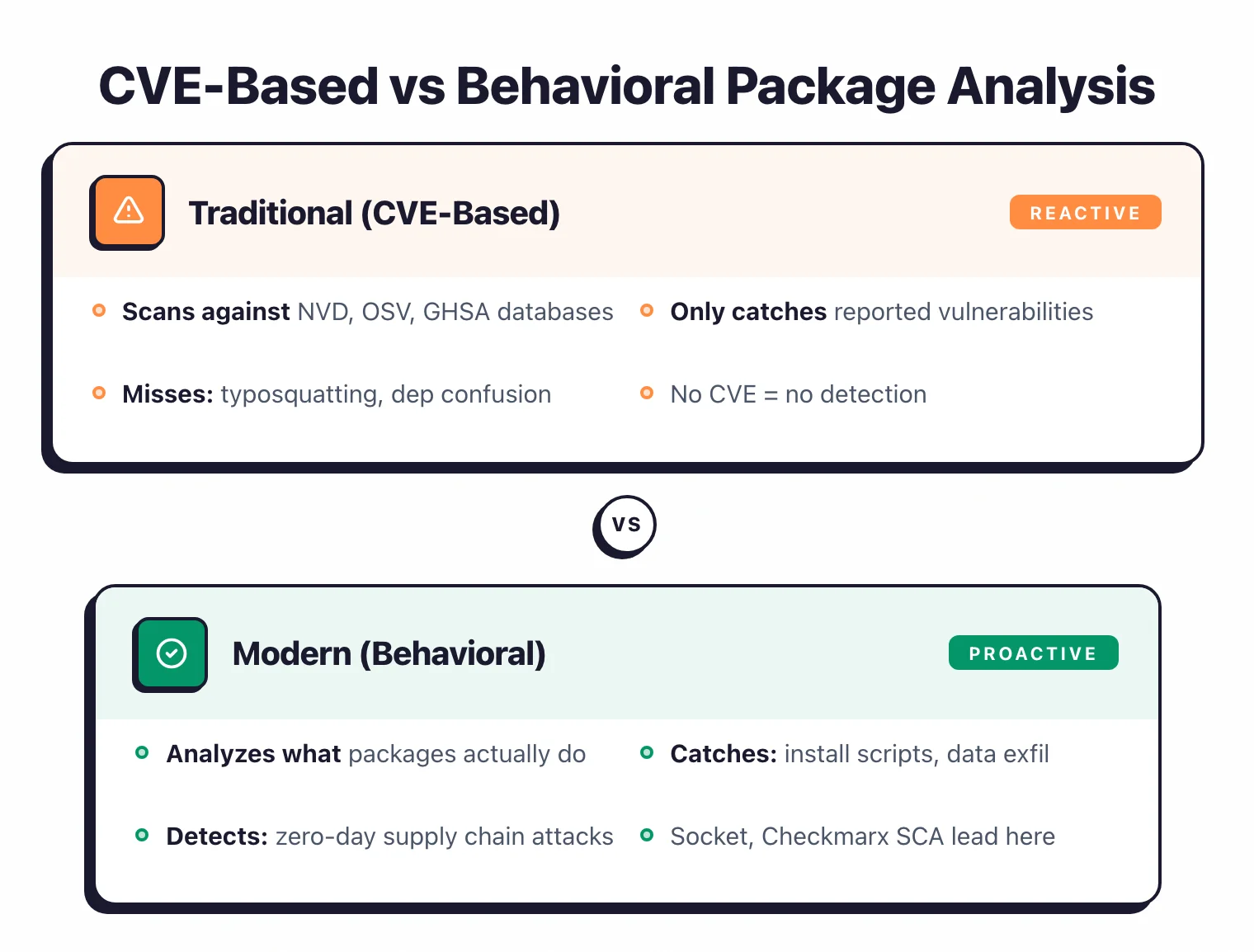
Relying only on CVE databases. CVE-based scanning only catches vulnerabilities that have been reported, assigned a CVE number, and added to a database.
Malicious packages published through typosquatting or dependency confusion have no CVE.
They are deliberate attacks, not bugs. Supply-chain-aware tools like Socket and behavioral analysis in Checkmarx SCA fill this gap by analyzing what packages actually do, rather than waiting for someone to file a report.
Reachability Analysis in SCA: What It Means
Reachability analysis answers a different question than traditional CVE scanning. Instead of asking “does this dependency have a known vulnerability?”, it asks “is the vulnerable function in this dependency actually callable from my code?”
The distinction matters enormously for triage. A library can have a critical-severity CVE in a function your application never invokes — without reachability context, that shows up as an urgent finding. With reachability, it gets deprioritized automatically.
Function-level reachability is the most precise form. Endor Labs builds a call graph across your entire codebase and the dependency tree, tracing whether vulnerable functions are reachable from any entry point in your application.
The company reports up to 97% noise reduction compared to raw CVE counts — meaning roughly 97 out of 100 reported vulnerabilities are not reachable and can be deprioritized. This operates statically, without requiring a running application.
Cross-file reachability goes further. Snyk Open Source extends reachability analysis across file boundaries, tracking whether a vulnerable code path can be triggered from user-controlled input.
Contrast SCA takes a runtime approach: it instruments the application at execution time and tracks which library classes are actually loaded, giving a data-driven answer rather than a static approximation.
For teams, that shifts SCA from a fire-hose of alerts to a prioritized list of what actually needs fixing — which is what makes SCA sustainable at scale.
For function-level reachability, Endor Labs is the most precise (a static call graph across 40+ languages); Snyk Open Source adds cross-file reachability; and Contrast SCA takes a runtime approach.
The Bottom Line
So which one do you pick?
There is no single best SCA tool. It comes down to your stack, your compliance needs, and your budget.
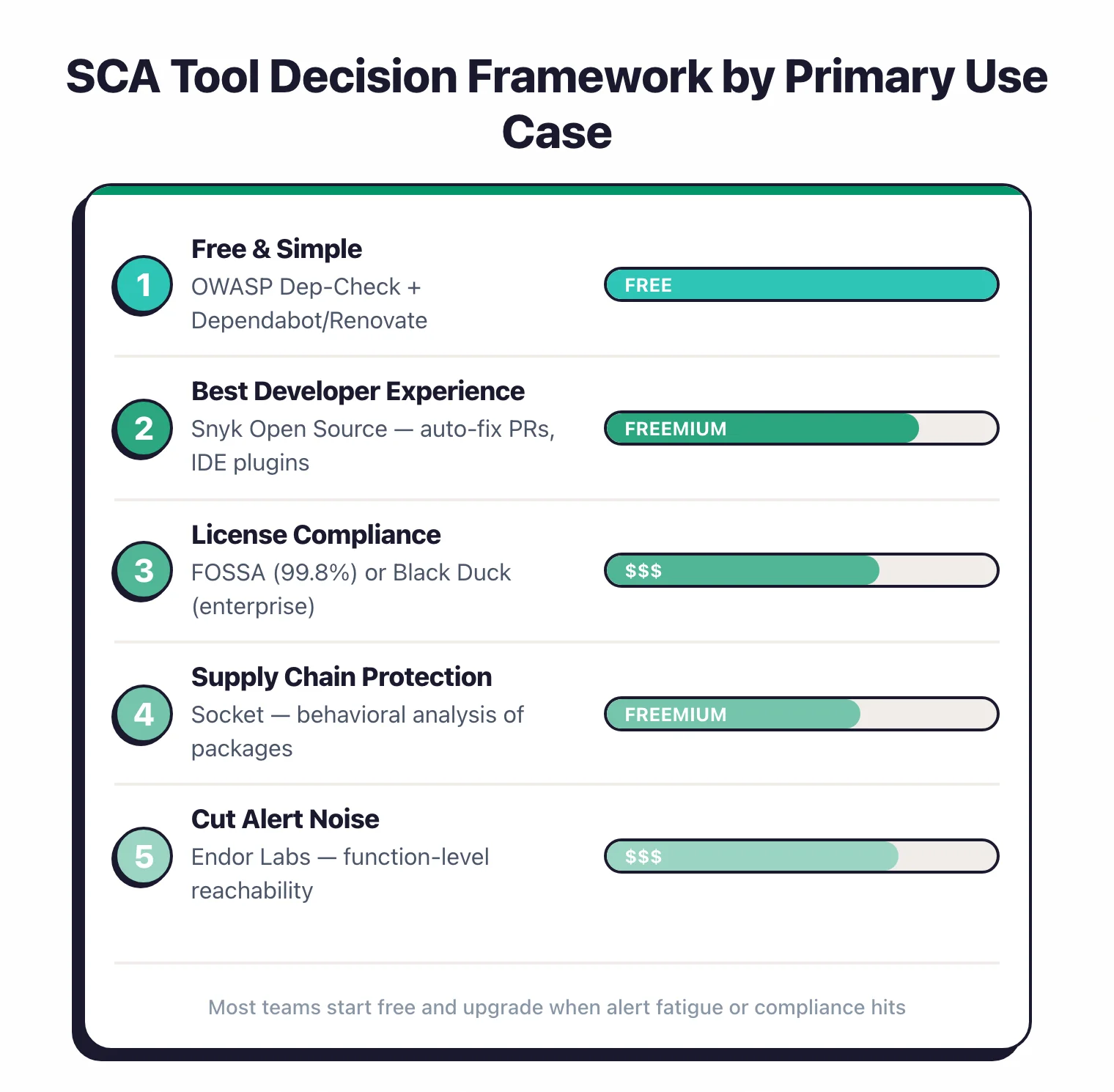
Developer-first teams across mixed Git providers? Snyk Open Source is the practical default — auto-fix PRs, IDE plugins, a fast vulnerability database, and support for every major Git provider. Mend is the choice when you need auto-remediation automated across many repositories.
GitHub-only and cost-sensitive? Start with Dependabot for free automated PRs and OSV-Scanner in CI for vulnerability reporting. Add Socket if you depend heavily on npm packages. Total cost: zero.
Drowning in alerts? Endor Labs first — function-level reachability across 40+ languages eliminates most of the noise. Contrast SCA is the alternative if you want runtime instrumentation instead of static call-graph analysis.
License compliance is critical? Black Duck for audit-grade SBOM generation and attribution reports, especially if you need to comply with US EO 14028 or the EU Cyber Resilience Act. FOSSA is a strong alternative with a better developer UX and published pricing.
Supply chain attacks worry you most? Socket for behavioral analysis of packages before they enter your codebase, with behavioral detection in Checkmarx SCA as a platform-native option.
All-in on JFrog? JFrog Xray is the only sensible choice — it scans binaries in the registry before they reach any environment and blocks vulnerable artifacts downstream.
Free and open source? Trivy , Grype , and OSV-Scanner cover most projects at zero cost. For the full free-tier comparison, see the open source SCA tools guide .
Best SCA tool by ecosystem:
- Java / Maven: Snyk and Black Duck have the deepest advisory coverage; OWASP Dependency-Check is the standard free option — full picks in the Java guide .
- Node.js / npm: Socket leads on malicious-package detection, with Snyk and OSV-Scanner for CVE coverage — full picks in the Node.js guide .
- Python / PyPI: Socket for malicious packages and OSV-Scanner for free CVE coverage — full picks in the Python guide .
- Go modules: OSV-Scanner is the strongest fit — Google-backed and native to the Go ecosystem.
Whichever you shortlist, run a proof-of-concept scan on your own dependency tree first. The tool that surfaces real, reachable risk with the least noise is the one worth paying for.
Frequently Asked Questions
What is SCA (Software Composition Analysis)?
Is SCA the same as dependency scanning?
What is the difference between SCA and SAST?
How do enterprise SCA platforms differ from basic dependency scanners?
What is reachability analysis in SCA?
Can SCA tools detect supply chain attacks?
What is an SBOM and why does it matter?
How often should I scan dependencies?
Can SCA tools scan container images?
What is the difference between Dependabot and Snyk Open Source?
What is the best free SCA tool in 2026?
Do I need SCA if I already have SAST?
Does SCA work for npm packages specifically?
Can SCA detect malicious packages, not just vulnerable ones?
Which SCA tools are open-source-friendly?
Related SCA Resources
Explore Other Categories
SCA covers one aspect of application security tools. Browse other categories below.

Written & maintained by
Suphi CankurtEight years on the vendor side of application-security sales — thousands of evaluations and demos. I started AppSec Santa in 2022 to put that insider view to work for buyers. Independent of any vendor, paid by none, and honest about what fits whom.