


LLM Guard is an open-source AI security toolkit by Protect AI that scans LLM inputs and outputs for security and compliance risks. It has 3.1k GitHub stars and 342 forks on GitHub.
The library is MIT licensed and requires Python 3.10+. Protect AI, the company behind LLM Guard, also develops Guardian and ModelScan for ML supply chain security. The latest release is v0.3.16.
I use LLM Guard when I need to sit a policy layer in front of a chatbot before it talks to a user. The input scanners catch prompt injection, PII, and banned topics. The output scanners catch refusals, toxic output, and sensitive leakage. It is the most complete free guardrail library I have tried, and it runs offline without calling back to a vendor API.
Quick Pick
- Self-hosted, offline, free? → LLM Guard (this page)
- Managed cloud API with SLA? → Lakera Guard
- Dialog flow control with Colang DSL? → NeMo Guardrails
- Red-team / adversarial testing (not runtime)? → Garak or PyRIT
What is LLM Guard?
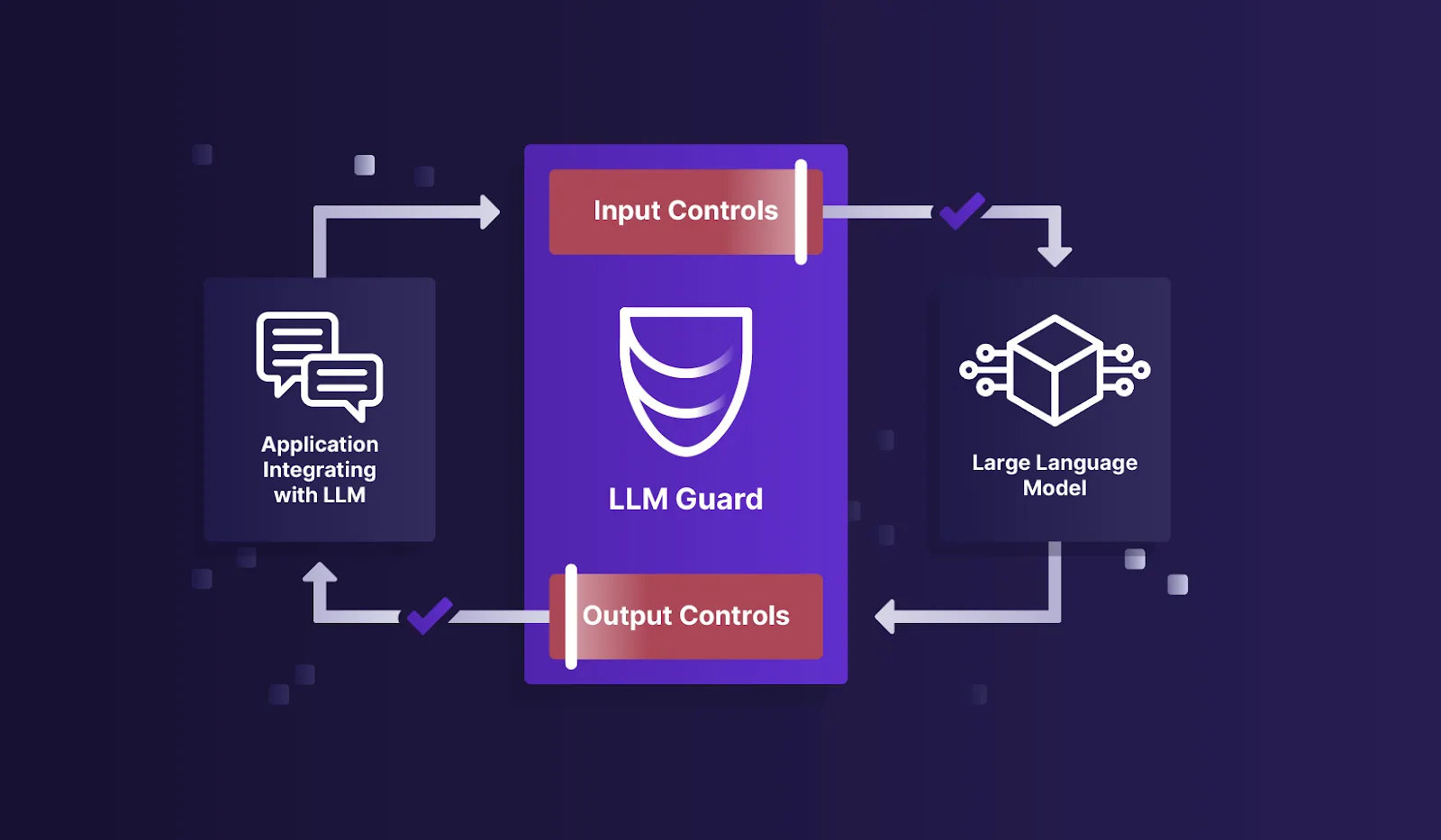
LLM Guard sits between your application and its language model. It runs 15 input scanners on user prompts before they reach the model, and 20 output scanners on the model’s responses before they reach the user.
Each scanner handles a specific risk: prompt injection, PII exposure, toxic language, secrets in code, and more. Scanners are modular.
You pick which ones you need and configure them independently.
The library works with any language model since it processes text, not model internals. It also ships with an API server mode for language-agnostic deployments.
What does LLM Guard protect against?
LLM Guard covers six runtime security risks: prompt injection attacks that hijack model behavior, PII leakage in outputs, toxic and harmful content generation, hardcoded secrets in responses, malicious URLs in model output, and factual inconsistency when responses contradict provided context.
The toolkit runs 15 input scanners on every prompt before it reaches the LLM and 20 output scanners on every response before it returns to the user. Each scanner is independent — activate only the checks your use case needs, with no performance cost from unused scanners.
The PromptInjection scanner uses ML models trained on real injection patterns rather than regex matching, so it catches indirect injection attempts hidden in documents or tool outputs. All processing runs locally — no prompt data, no response data, and no credentials leave your infrastructure. LLM Guard is MIT licensed and works with any LLM provider.
| Capability | Details |
|---|---|
| Input Scanning | 15 scanners that filter user prompts before they reach your LLM. Covers prompt injection, PII anonymization, secrets detection, toxicity, banned topics, invisible text, and more. |
| Output Scanning | 20 scanners that validate model responses. Checks for bias, malicious URLs, factual consistency, sensitive data leaks, toxicity, and relevance to the original query. |
| API Server | Deploy LLM Guard as a standalone HTTP API. Integrates with any language or framework, not just Python. Available via Docker for production deployments. |
LLM Guard Key Features
| Feature | Details |
|---|---|
| Input Scanners | 15 scanners: Anonymize, BanCode, BanCompetitors, BanSubstrings, BanTopics, Code, Gibberish, InvisibleText, Language, PromptInjection, Regex, Secrets, Sentiment, TokenLimit, Toxicity |
| Output Scanners | 20 scanners: BanCompetitors, BanSubstrings, BanTopics, Bias, Code, Deanonymize, JSON, Language, LanguageSame, MaliciousURLs, NoRefusal, ReadingTime, FactualConsistency, Gibberish, Regex, Relevance, Sensitive, Sentiment, Toxicity, URLReachability |
| PII Handling | Anonymize scanner replaces PII in prompts; Deanonymize restores it in outputs when appropriate |
| Prompt Injection | Dedicated scanner using ML models to detect direct and indirect injection attempts |
| Secrets Detection | Identifies API keys, passwords, and credentials in both inputs and outputs |
| Factual Consistency | Output scanner that checks whether responses are consistent with provided context |
| License | MIT — fully open-source |
| Python Support | Requires Python >=3.10, <3.13 |
LLM Guard Input Scanners
LLM Guard ships 15 input scanners that process user prompts before they reach the LLM:
- Anonymize — replaces PII (names, emails, phone numbers, credit card numbers) with placeholders (addresses OWASP LLM02: Sensitive Information Disclosure )
- BanCode — blocks prompts containing code snippets
- BanCompetitors — filters mentions of specified competitor names
- BanSubstrings — blocks prompts containing specific text patterns
- BanTopics — prevents prompts about restricted subjects
- Code — detects code content in prompts
- Gibberish — identifies nonsensical or garbled input
- InvisibleText — detects hidden Unicode characters used in prompt injection
- Language — enforces language restrictions on input
- PromptInjection — detects direct and indirect injection attacks using ML models (addresses OWASP LLM01: Prompt Injection )
- Regex — pattern-based filtering with custom regular expressions
- Secrets — identifies API keys, passwords, and credentials
- Sentiment — analyzes emotional tone of input
- TokenLimit — enforces maximum token count
- Toxicity — filters harmful, offensive, or abusive language
LLM Guard Output Scanners
LLM Guard’s 20 output scanners validate and filter model responses:
- FactualConsistency — checks whether the response is consistent with the provided context
- Bias — detects biased or discriminatory content in responses
- Deanonymize — restores PII that was anonymized in the input stage
- JSON — validates JSON structure and schema compliance
- MaliciousURLs — blocks links to known malicious sites
- NoRefusal — flags when the model refuses to answer without good reason
- Relevance — checks whether the response matches the original query
- URLReachability — verifies that URLs in responses actually resolve
- ReadingTime — estimates the reading time of responses
- LanguageSame — verifies the response is in the same language as the input
Getting Started with LLM Guard
- Install the library — Run
pip install llm-guard. Requires Python 3.10 or higher. For GPU-accelerated inference, install withpip install llm-guard[onnxruntime-gpu]. - Choose your scanners — Import the input and output scanners you need. Each scanner is independent, so you only load what you use.
- Scan inputs and outputs — Use
scan_prompt()to process user input through your chosen input scanners, send the sanitized prompt to your LLM, then usescan_output()to validate the response. - Deploy as API (optional) — For non-Python environments, deploy LLM Guard as a standalone API server. The API server wraps all scanner functionality behind HTTP endpoints.
A minimal end-to-end scan looks like this:
from llm_guard import scan_prompt, scan_output
from llm_guard.input_scanners import Anonymize, PromptInjection, Toxicity
from llm_guard.output_scanners import Deanonymize, Sensitive
from llm_guard.vault import Vault

vault = Vault()
input_scanners = [Anonymize(vault), Toxicity(), PromptInjection()]
output_scanners = [Deanonymize(vault), Sensitive()]

prompt = "Hi, my name is John Doe and my credit card is 4242-4242-4242-4242."
sanitized_prompt, results_valid, results_score = scan_prompt(input_scanners, prompt)

if any(not result for result in results_valid.values()):
    raise ValueError(f"Prompt blocked: {results_valid}")

response = your_llm_call(sanitized_prompt)  # OpenAI, Anthropic, local, anything

sanitized_response, results_valid, results_score = scan_output(
    output_scanners, sanitized_prompt, response
)
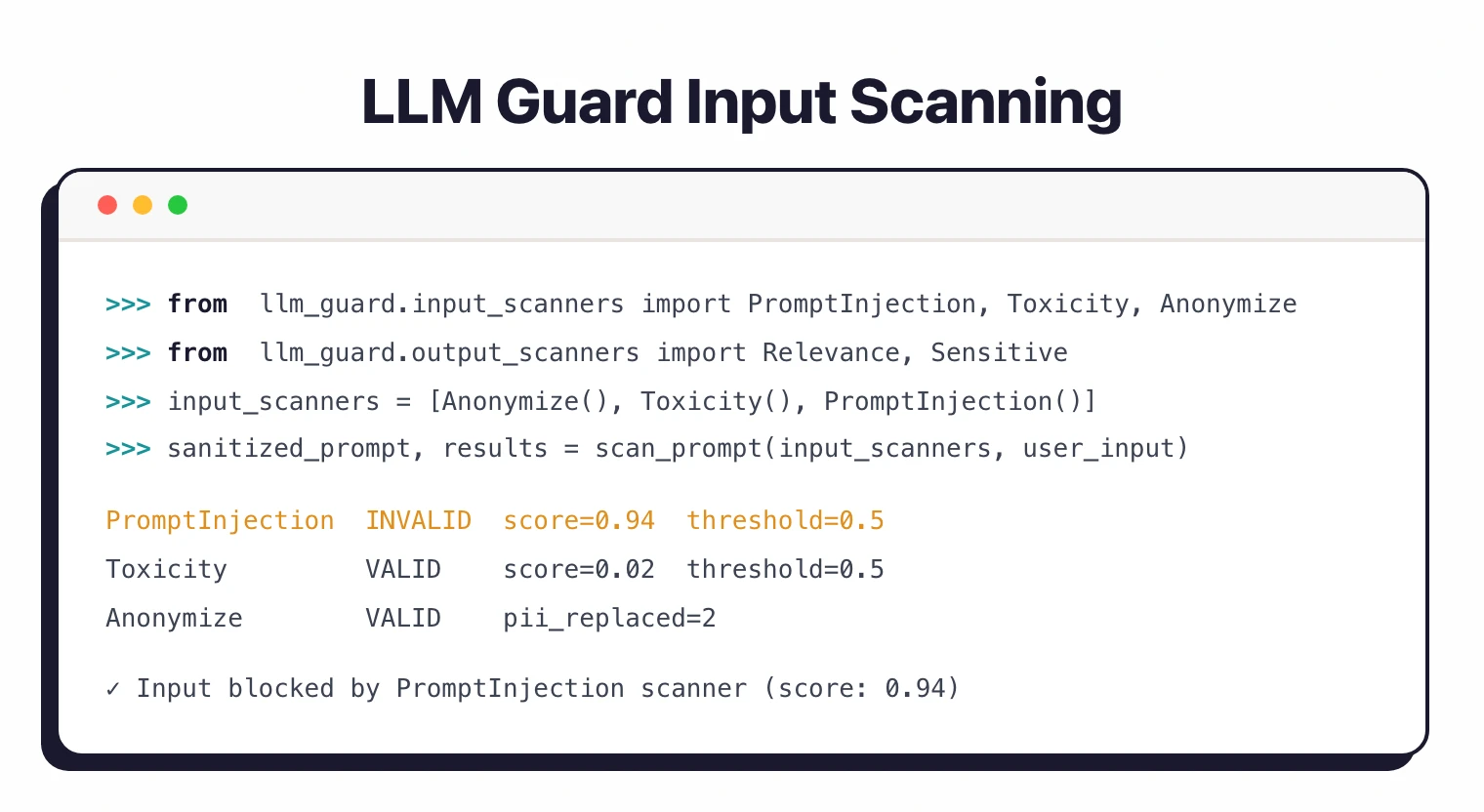
Anonymize replaces the PII with placeholders before the prompt hits the LLM. Deanonymize restores the original values in the response when it is safe to do so. The Vault keeps the mapping between placeholders and real values.
LLM Guard vs other LLM security tools
| LLM Guard | NeMo Guardrails | Lakera Guard | Garak | |
|---|---|---|---|---|
| Purpose | Runtime input/output scanning | Runtime dialog + content rails | Runtime scanning (cloud API) | Offline red-team / adversarial testing |
| Deployment | Self-hosted (pip, Docker) | Self-hosted (pip, Docker) | Managed cloud API | CLI, offline |
| License | MIT (free) | Apache-2.0 (free) | Commercial (free tier) | Apache-2.0 (free) |
| Prompt injection scanner | Yes (ML-based) | Yes (via rail config) | Yes (proprietary model) | N/A (red-team, not runtime) |
| PII / anonymization | Yes (15 input scanners) | Via Colang custom rails | Yes | No |
| Dialog flow control | No | Yes (Colang DSL) | No | No |
| Offline / air-gapped | Yes | Yes | No (cloud API) | Yes |
| Any LLM provider | Yes (text-only) | Yes | Yes | Yes |
| Best for | Self-hosted policy layer | Complex dialog rules | Managed SaaS guardrails | Security testing before launch |
Release note — v0.3.16: The current LLM Guard release (v0.3.16) ships 15 input scanners and 20 output scanners, with expanded PromptInjection model updates and improved performance on Python 3.12. Check the GitHub releases page for the latest version. Protect AI ships multiple minor releases per quarter.
LLM Guard vs Lakera Guard
LLM Guard and Lakera Guard solve the same problem from opposite deployment models. LLM Guard is a self-hosted Python library you run locally with no per-call cost. Lakera Guard is a managed cloud API.
Lakera leads on operational simplicity. You hit an HTTPS endpoint and get a guardrail verdict back. The trade-off is data egress — every prompt leaves your network for evaluation.
Pick LLM Guard when data residency, offline operation, or zero per-request cost matters. Pick Lakera when you want guardrails as a service and prefer paying for managed inference over running your own.
LLM Guard vs NeMo Guardrails
LLM Guard and NeMo Guardrails operate at different layers of the LLM stack. LLM Guard runs scanner functions on prompts and responses — it answers “is this input safe?” or “does this output leak PII?”. NeMo Guardrails runs a dialog flow engine using Colang DSL.
NeMo is structurally heavier. You define conversation rails in a custom language, and the runtime decides whether the model should answer, refuse, or hand off to a tool. LLM Guard is structurally lighter — you import scanners and call them in your existing application code.
Pick LLM Guard when you want surgical input/output filtering you can drop into a Python app. Pick NeMo Guardrails when you need conversational policy enforcement across multi-turn dialogs and have the budget to maintain Colang flows.
LLM Guard vs Garak
LLM Guard and Garak are not direct replacements — they sit at opposite ends of the LLM security workflow. Garak is a red-teaming probe that fires adversarial prompts at a model offline and reports which jailbreaks succeed. LLM Guard is a runtime guardrail that scans live prompts and responses in production.
Garak’s output is a report card on a model’s weaknesses. You run it once per model release, fix what you can, and accept the rest. LLM Guard’s output is a per-request verdict that blocks or sanitizes traffic as it flows.
Most teams run both. Use Garak in CI to vet new models or prompts before deployment; use LLM Guard at runtime to enforce the guardrails Garak identified as necessary. Pick only one if you must — Garak alone leaves production unprotected, LLM Guard alone leaves model selection blind.
When to use LLM Guard
LLM Guard fits teams that want open-source, self-hosted guardrails for LLM applications. Since it runs locally, your data never leaves your infrastructure.
The modular scanner design means you can start with just prompt injection detection and add PII anonymization or toxicity filtering later. Each scanner works independently, so adding one doesn’t affect the others.
The library works with any LLM provider because it scans the text, not the model. Whether you use OpenAI, Anthropic, local models, or a mix, the same scanners apply.
For a broader look at AI and LLM security, read the AI security guide . For a different approach to LLM safety that includes dialog flow control, look at NeMo Guardrails .
For red teaming and adversarial testing rather than runtime protection, consider Garak or PyRIT . Lakera Guard offers similar scanner functionality as a managed cloud API.