
Invicti Shark (IAST)

Invicti Shark (IAST)

NEW
Category: IAST
License: Commercial

Invicti Shark is an IAST sensor that works alongside the Invicti DAST scanner to provide deeper vulnerability detection, asset discovery, and precise code-level remediation information.

What is Invicti Shark?

Shark extends Invicti’s DAST capabilities by placing a sensor inside your application runtime.

While the DAST scanner tests your application from the outside, Shark observes how requests are processed internally, enabling detection of vulnerabilities and assets that external scanning alone would miss.

The team behind Shark has deep expertise in IAST technology, having created one of the first commercial IAST implementations.

This experience shows in Shark’s ability to combine seamlessly with Invicti’s Proof-Based Scanning technology, which automatically verifies that detected vulnerabilities are actually exploitable.

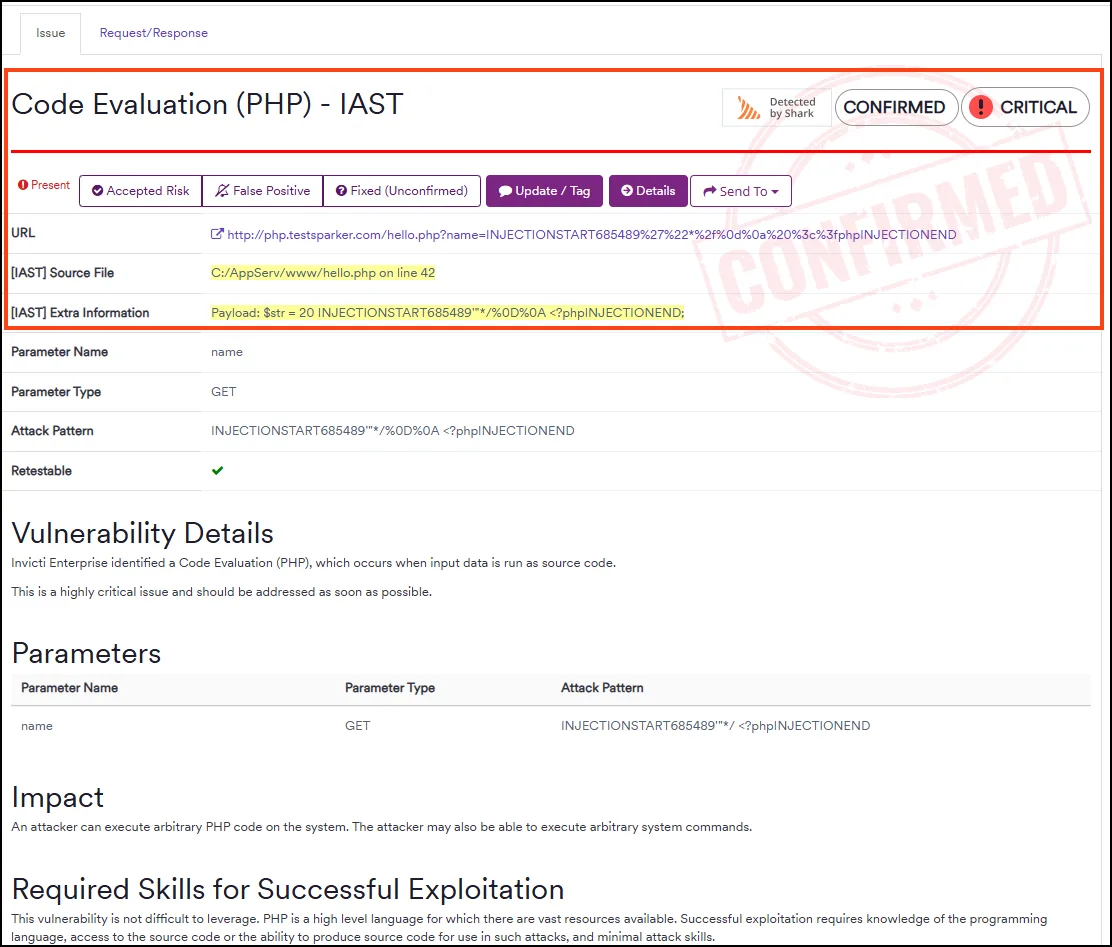
When Shark identifies a vulnerability, it provides the exact file name and line number where the issue exists.

This precision eliminates the detective work developers typically face when remediating scanner findings, directly pointing them to the code that needs attention.

Key Features

Hidden Asset Discovery

Traditional DAST crawlers can only find pages and endpoints that are linked from other pages.

Shark discovers assets that exist in the application but are not externally linked:

  • Admin panels without public navigation
  • API endpoints not documented or linked
  • Backup files and development artifacts
  • Unlinked JavaScript files containing sensitive functionality
  • Hidden form fields and parameters

By observing the application from inside, Shark sees the complete map of available endpoints, dramatically expanding the attack surface that Invicti tests.

Proof-Based Scanning Integration

Invicti’s Proof-Based Scanning automatically confirms vulnerabilities by safely exploiting them and providing evidence.

Shark enhances this by:

  • Confirming that exploitation attempts actually reached vulnerable code
  • Providing stack traces showing the attack path
  • Verifying that input bypassed sanitization as suspected
  • Eliminating false positives through runtime observation

The combination means reported vulnerabilities are both verified as exploitable (through proof) and documented with exact code locations (through Shark).

API Security Flaw Detection

Shark specifically monitors for API security vulnerabilities defined in the OWASP API Security Top 10:

  • BOLA (Broken Object-Level Authorization): Detects when user input directly accesses objects without authorization checks
  • IDOR (Insecure Direct Object Reference): Identifies direct references to internal implementation objects
  • BFLA (Broken Function-Level Authorization): Finds missing authorization on administrative functions

These vulnerabilities require understanding of application context that only runtime observation provides.

SQL Injection Tracing

For SQL injection vulnerabilities, Shark traces the complete path from user input to database query:

HTTP Parameter 'id' → sanitize_input() → build_query() → mysql_query()
                      └── bypassed      └── concatenated  └── executed

The trace shows whether sanitization functions were called, whether they were effective, and how the final query was constructed.

Developers see exactly why the vulnerability exists and what needs to change.

Installation

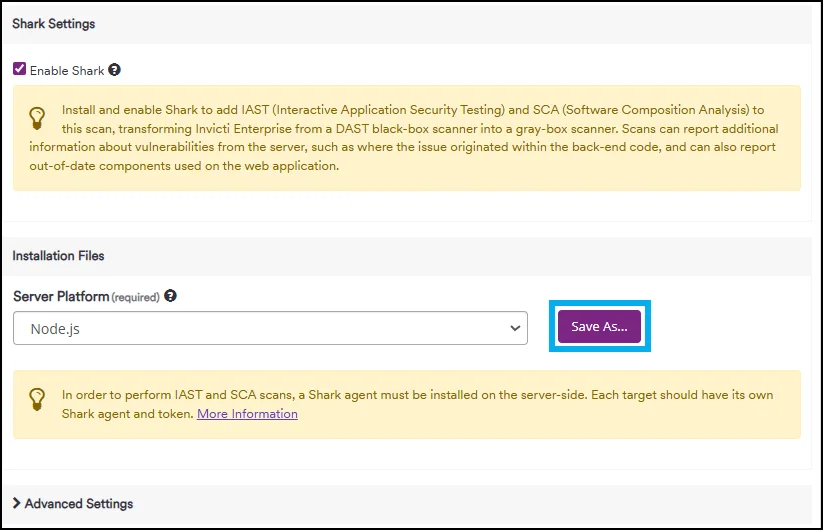
Shark deployment varies by application platform.

The sensor is lightweight and designed for staging environments where integration testing occurs.

PHP Installation

Download the Shark PHP extension from your Invicti account and configure PHP to load it:

# Copy the extension to your PHP extensions directory
cp shark.so /usr/lib/php/20220829/

# Add to php.ini
extension=shark.so
shark.api_key=your-invicti-api-key
shark.enabled=true

Restart your web server:

sudo systemctl restart apache2
# or
sudo systemctl restart php-fpm

Java Installation

Add Shark as a Java agent to your application startup:

java -javaagent:/path/to/shark-agent.jar \
  -Dshark.apiKey=your-invicti-api-key \
  -jar your-application.jar

For Tomcat, add to CATALINA_OPTS in setenv.sh:

export CATALINA_OPTS="$CATALINA_OPTS -javaagent:/opt/shark/shark-agent.jar"

For Spring Boot with Maven:

<plugin>
  <groupId>org.springframework.boot</groupId>
  <artifactId>spring-boot-maven-plugin</artifactId>
  <configuration>
    <jvmArguments>
      -javaagent:${project.basedir}/shark-agent.jar
      -Dshark.apiKey=${env.SHARK_API_KEY}
    </jvmArguments>
  </configuration>
</plugin>

.NET Installation

Install the Shark .NET agent via NuGet or direct download:

# NuGet installation
Install-Package Invicti.Shark

# Or download and add reference
dotnet add reference Shark.dll

Configure in appsettings.json:

{
  "Shark": {
    "ApiKey": "${SHARK_API_KEY}",
    "Enabled": true,
    "ReportingUrl": "https://your-invicti-instance/shark"
  }
}

For IIS applications, install the Shark IIS module through the provided installer.

Integration

Configuring Invicti for Shark Scans

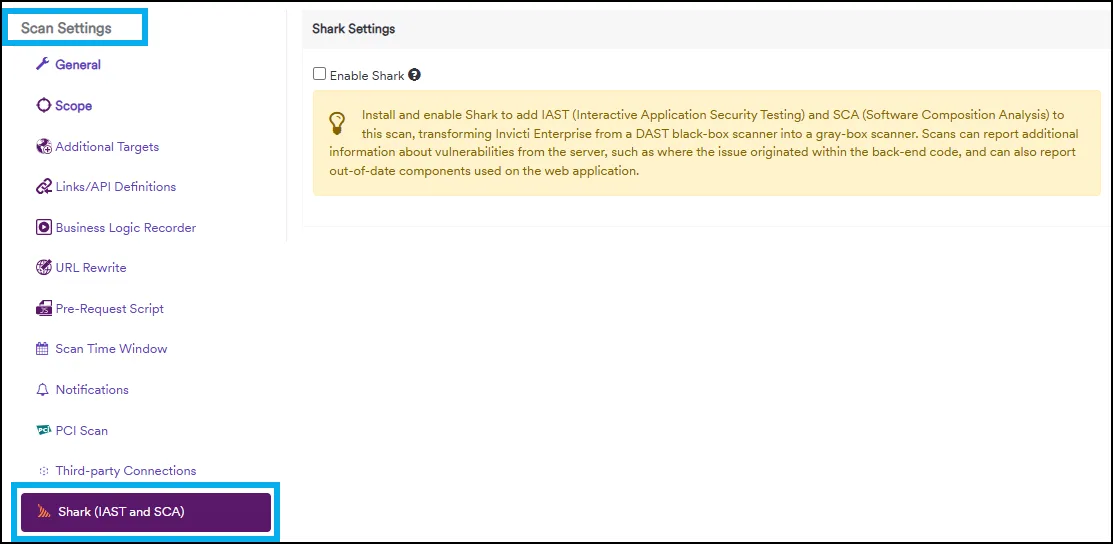
Enable Shark in your Invicti scan profile:

  1. Navigate to Scan Profiles in Invicti
  2. Select your target profile or create a new one
  3. Under Advanced Settings, enable IAST Integration
  4. Enter the Shark sensor URL (your staging application with Shark installed)
  5. Save and run your scan

Invicti automatically communicates with the Shark sensor during scanning, receiving real-time feedback about how requests are processed.

CI/CD Pipeline Integration

Deploy Shark to your staging environment and run scans as part of your pipeline:

# GitHub Actions example
name: Security Scan with Invicti + Shark

on:
  push:
    branches: [main]
  pull_request:

jobs:
  security-scan:
    runs-on: ubuntu-latest
    steps:
      - uses: actions/checkout@v4

      - name: Build and deploy staging with Shark
        run: |
          docker build -f Dockerfile.staging-shark -t app-shark:latest .
          docker-compose -f docker-compose.staging.yml up -d

      - name: Run Invicti scan with IAST
        env:
          INVICTI_API_TOKEN: ${{ secrets.INVICTI_API_TOKEN }}
          INVICTI_URL: ${{ secrets.INVICTI_URL }}
        run: |
          # Trigger scan via Invicti API
          SCAN_ID=$(curl -s -X POST "$INVICTI_URL/api/1.0/scans/new" \
            -H "Authorization: Bearer $INVICTI_API_TOKEN" \
            -H "Content-Type: application/json" \
            -d '{
              "TargetUrl": "http://staging.example.com",
              "ProfileId": "iast-enabled-profile",
              "IastEnabled": true
            }' | jq -r '.Id')

          echo "Scan started: $SCAN_ID"

          # Wait for scan completion
          while true; do
            STATUS=$(curl -s "$INVICTI_URL/api/1.0/scans/$SCAN_ID" \
              -H "Authorization: Bearer $INVICTI_API_TOKEN" | jq -r '.State')
            if [ "$STATUS" = "Complete" ]; then break; fi
            sleep 60
          done

      - name: Check for critical vulnerabilities
        env:
          INVICTI_API_TOKEN: ${{ secrets.INVICTI_API_TOKEN }}
        run: |
          CRITICAL=$(curl -s "$INVICTI_URL/api/1.0/scans/$SCAN_ID/vulnerabilities" \
            -H "Authorization: Bearer $INVICTI_API_TOKEN" \
            | jq '[.[] | select(.Severity == "Critical")] | length')

          if [ "$CRITICAL" -gt 0 ]; then
            echo "Found $CRITICAL critical vulnerabilities"
            exit 1
          fi
# GitLab CI example
stages:
  - build
  - deploy
  - security

deploy-staging:
  stage: deploy
  script:
    - docker-compose -f docker-compose.staging-shark.yml up -d
  environment: staging

invicti-shark-scan:
  stage: security
  script:
    - |
      # Trigger Invicti scan with IAST enabled
      curl -X POST "$INVICTI_URL/api/1.0/scans/new" \
        -H "Authorization: Bearer $INVICTI_API_TOKEN" \
        -d '{"TargetUrl": "'$STAGING_URL'", "IastEnabled": true}'
  needs: [deploy-staging]
  rules:
    - if: $CI_PIPELINE_SOURCE == "merge_request_event"

When to Use Invicti Shark

Ideal for organizations that:

  • Already use Invicti DAST and want enhanced accuracy
  • Need code-level vulnerability location for faster remediation
  • Have staging environments where IAST agents can be deployed
  • Want to discover hidden assets and shadow APIs
  • Require verified exploitability proof for vulnerability reports
  • Test PHP, Java, or .NET web applications

Consider alternatives if:

  • You do not have access to deploy agents in your test environment
  • Your applications use languages not supported by Shark
  • You need standalone IAST without DAST integration
  • You prefer open-source tools over commercial solutions

Shark transforms Invicti from an external scanner into a hybrid DAST/IAST platform that sees applications from both outside and inside.

The combination of Proof-Based Scanning with runtime observation produces vulnerability reports that are both verified and actionable.