
8 Best IAST Tools (2026)
Independent ranking — no vendor pays to appear here. See methodology.
Every active IAST tool compared: Contrast, Datadog, HCL AppScan and more. Agent-based runtime testing with SAST precision and DAST context — ranked by fit.
At a glance
The best IAST tools in 2026: Contrast Assess, Datadog IAST, Black Duck Seeker, Invicti Shark, and HCL AppScan.
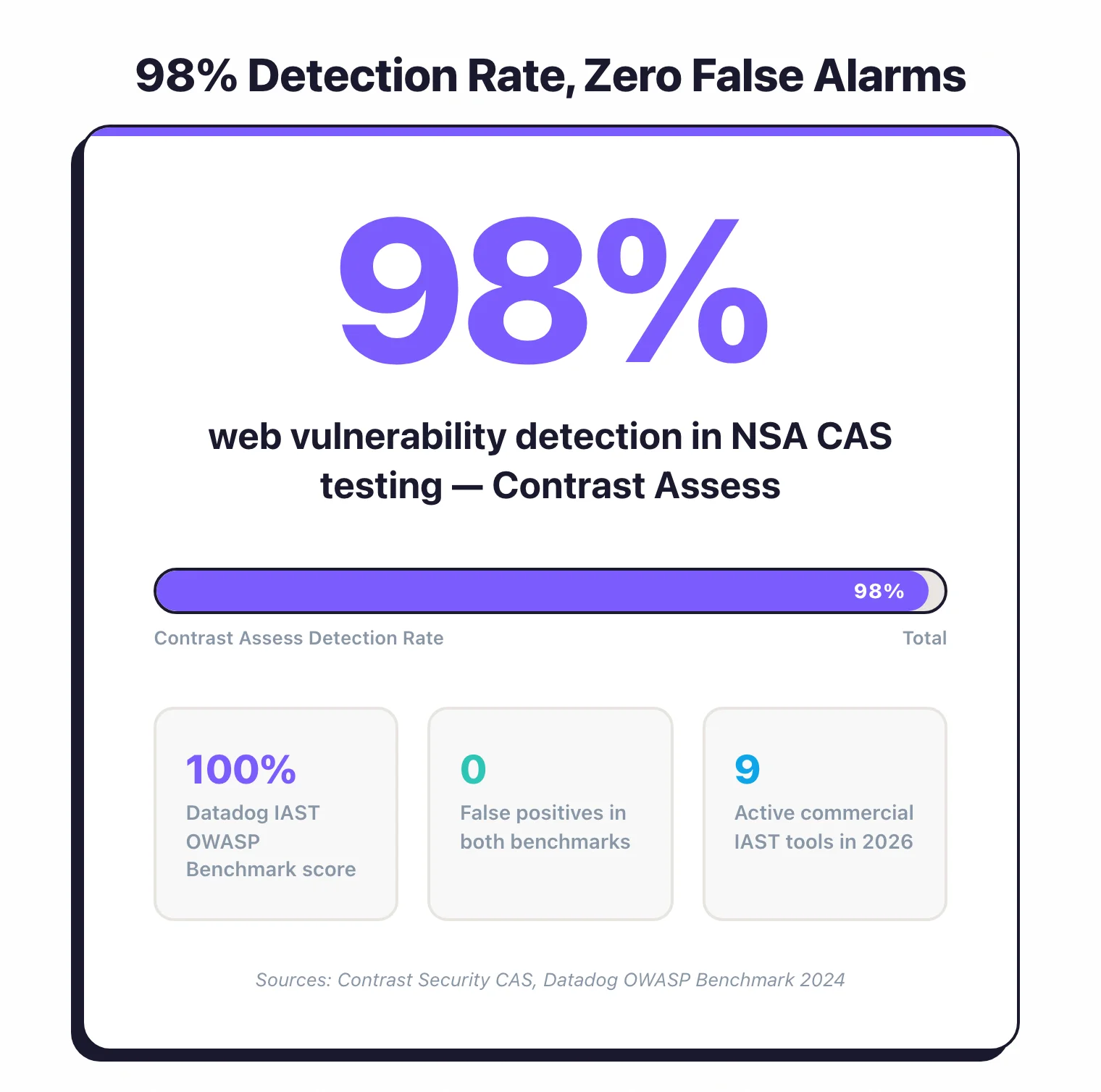
- Best dedicated IAST platform: Contrast Assess — the longest IAST track record and 98% detection in NSA CAS testing
- Best IAST inside an APM stack: Datadog IAST — 100% OWASP Benchmark score, bundled with the observability platform AppSec teams already use
- Best language coverage: Black Duck Seeker (formerly Synopsys Seeker) — 10+ languages, with active verification probes that confirm exploitability
- Best for teams using Invicti DAST: Invicti Shark — pairs with the DAST scanner for DAST + IAST in one workflow
- Best enterprise IAST with compliance reporting: HCL AppScan — IAST + DAST + SAST in one suite with SOC 2 / PCI dashboards
IAST instruments a running application with an agent and observes real request flow, combining SAST code-path precision with DAST runtime context. I evaluated agent-based runtime testing tools across language coverage, CI/CD fit, false-positive rate, and vulnerability detection depth. No vendor paid to appear on this page.
What is IAST?
IAST (Interactive Application Security Testing) is a grey-box testing method within the wider application security discipline that places a software agent inside a running application to monitor code execution in real time during testing.
Unlike SAST , which analyzes source code without running it, or DAST , which tests from outside, IAST combines the code-level precision of SAST with the runtime context of DAST by observing both source code and live application behavior simultaneously.
Quick Pick by Need
- Proven accuracy, Java/.NET/Node.js/Python/Go/PHP coverage? → Contrast Assess (98% NSA CAS detection)
- Already on Datadog APM? → Datadog IAST (single env var, 100% OWASP Benchmark)
- DAST + IAST in one workflow? → Invicti Shark or AcuSensor
- All-in on Checkmarx One? → Checkmarx IAST (cross-tool correlation)
- Widest language coverage + compliance reporting? → Seeker IAST (10+ languages, PCI/HIPAA)
The payoff: you get both worlds. Like SAST , IAST can point to exact file and line numbers.
Like DAST , it tests real application behavior. The combination produces very few false positives because the tool sees exactly which code path handles each request.
Contrast Assess reports 98% web vulnerability detection in NSA Center for Assured Software (CAS) testing with zero false alarms (Contrast Security, CAS benchmark results), while Datadog IAST scored 100% on the OWASP Benchmark with zero false positives (Datadog blog, June 2024; the OWASP Benchmark tests Java only).
The trade-off is deployment complexity. IAST agents need to run inside your application, which means modifying container images for Kubernetes environments and dealing with language-specific quirks.
IAST also depends on test coverage — the agent only sees vulnerabilities in code paths that your tests actually exercise.
Pick your next step
I want IAST vs DAST
In-process agent versus external scanner. Coverage, accuracy, deployment cost, and the case for running both in your pipeline.
→I'm picking between the leaders
Contrast Assess against Seeker IAST. NSA CAS detection rate, language coverage, OWASP Benchmark scores, and where each one fits.
→I'm evaluating Contrast
Contrast alternatives ranked — Datadog IAST, Seeker, Checkmarx, and Invicti Shark. Use this when Contrast pricing or coverage falls short.
→Quick Comparison of the Best IAST Tools in 2026
| Tool | USP | License |
|---|---|---|
| Commercial | ||
| AcuSensor (Acunetix) | IAST agent for Acunetix DAST | Commercial |
| Checkmarx IAST | Unified platform with SAST/SCA/DAST correlation | Commercial |
| Contrast Assess | 98% web vulnerability detection rate in NSA CAS testing, zero false alarms | Commercial |
| Datadog IAST | 100% OWASP Benchmark score, APM integration | Commercial |
| Fortify WebInspect Agent | IAST for OpenText Fortify WebInspect | Commercial |
| HCL AppScan IAST | Patented false positive reduction, auto-correlation | Commercial |
| Invicti Shark NEW | DAST+IAST combined, Proof-Based Scanning | Commercial |
| Seeker IAST | Active verification, broadest language coverage | Commercial |
| Discontinued / Acquired | ||
| Contrast Security RENAMED | Brand page; the IAST product is now tracked as Contrast Assess | Commercial |
| Hdiv Detection ACQUIRED | Acquired by Datadog (2022), integrated into Datadog Code Security | Commercial |
The IAST market has consolidated since 2022, with standalone vendors being absorbed into larger platforms.
Hdiv Security, a Spanish startup that built a zero-false-positive IAST tool for Java and .NET, was acquired by Datadog in May 2022 and folded into Datadog Application Security Management.
Seeker IAST changed owners when Clearlake Capital and Francisco Partners bought the Synopsys Software Integrity Group in late 2024, spinning off Seeker into the newly independent Black Duck Software.
Standalone IAST vendors keep getting absorbed into bigger platforms that bundle security testing with observability or DevSecOps toolchains.
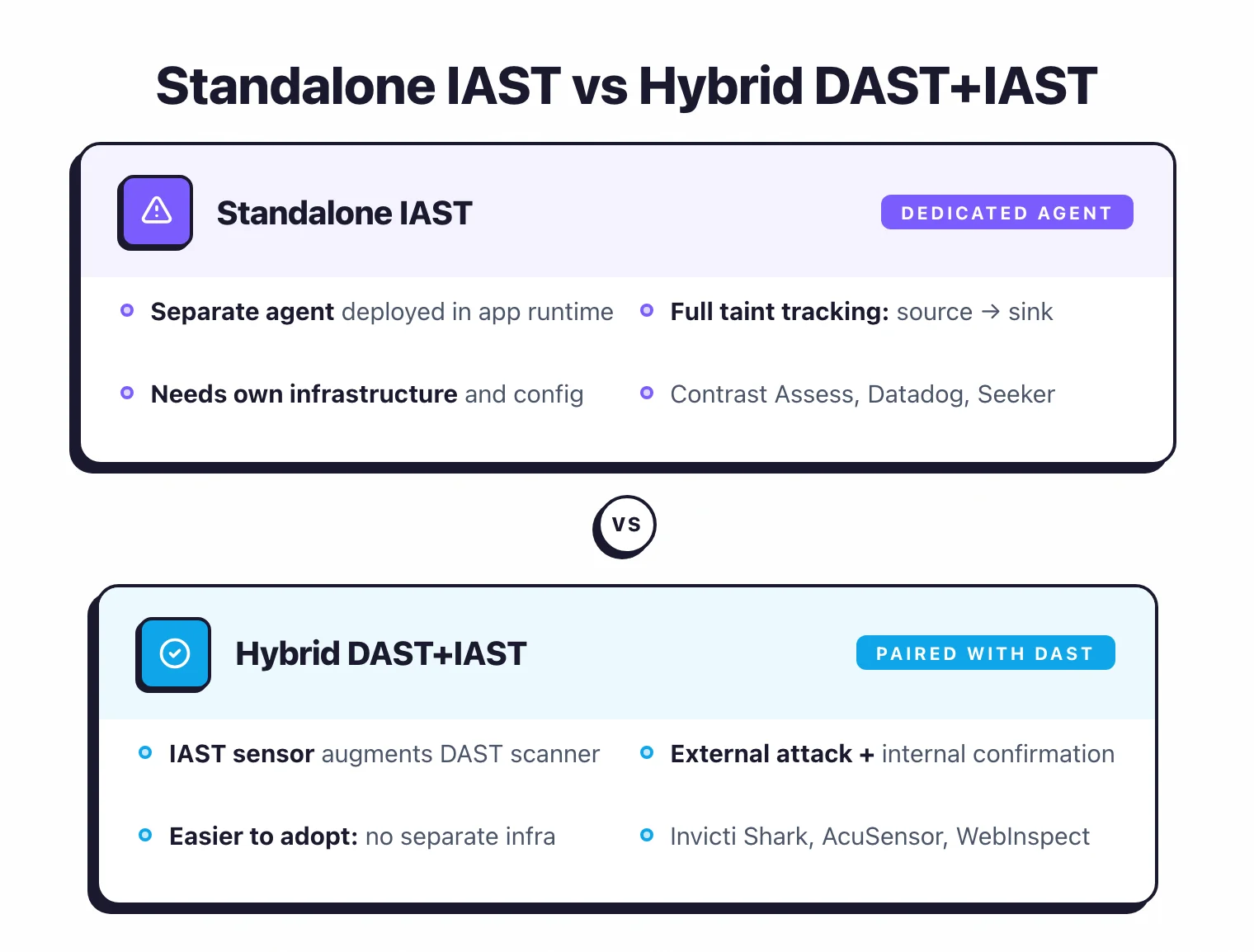
The other trend I find interesting is the hybrid DAST+IAST model. Invicti Shark pairs an internal IAST sensor with the Invicti DAST scanner, so you get external attack simulation and internal code-level confirmation in one scan.
Acunetix AcuSensor and Fortify WebInspect Agent work the same way: IAST agents that augment an existing DAST scanner rather than operate on their own. This hybrid approach is easier to adopt because you skip setting up separate IAST infrastructure.
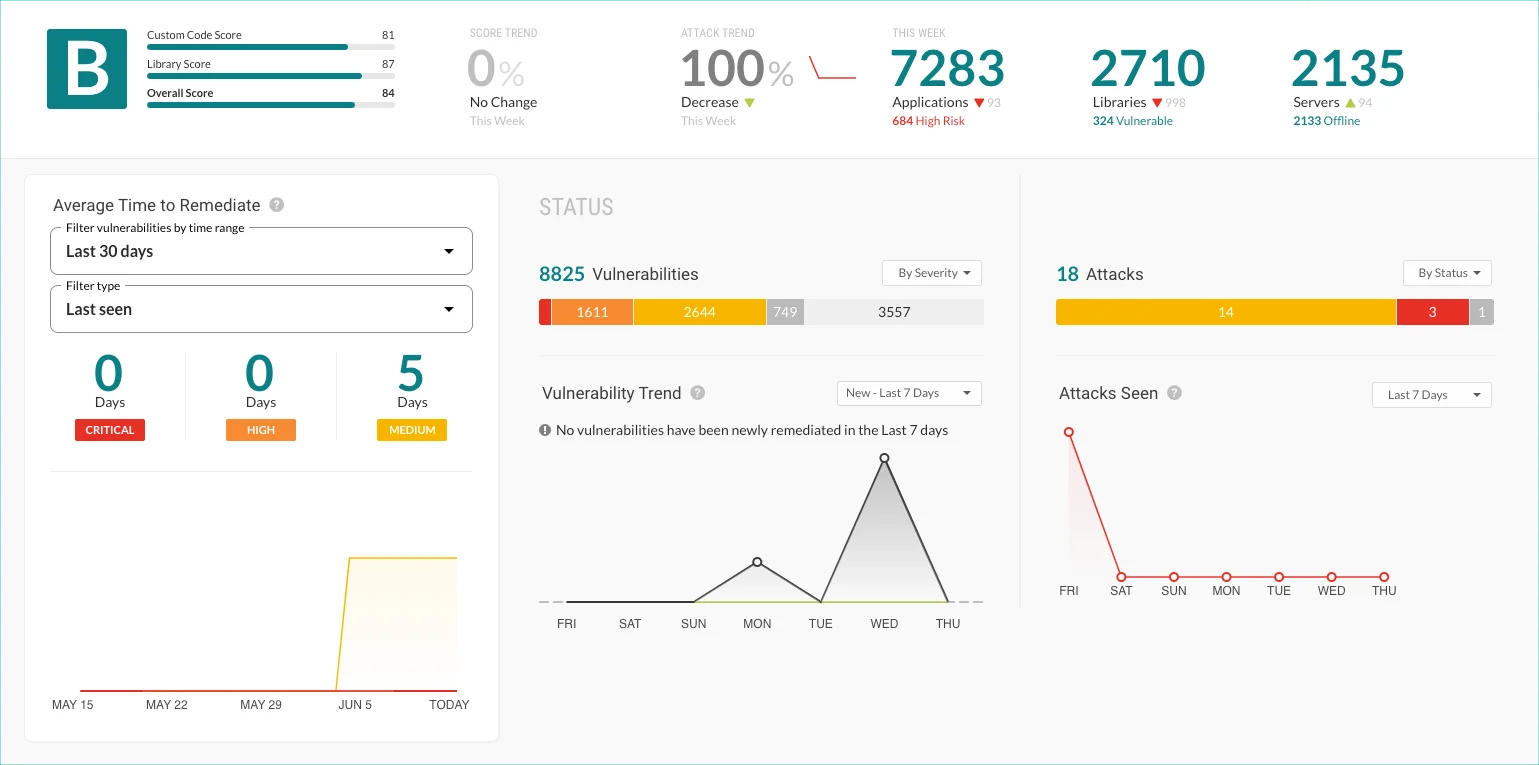
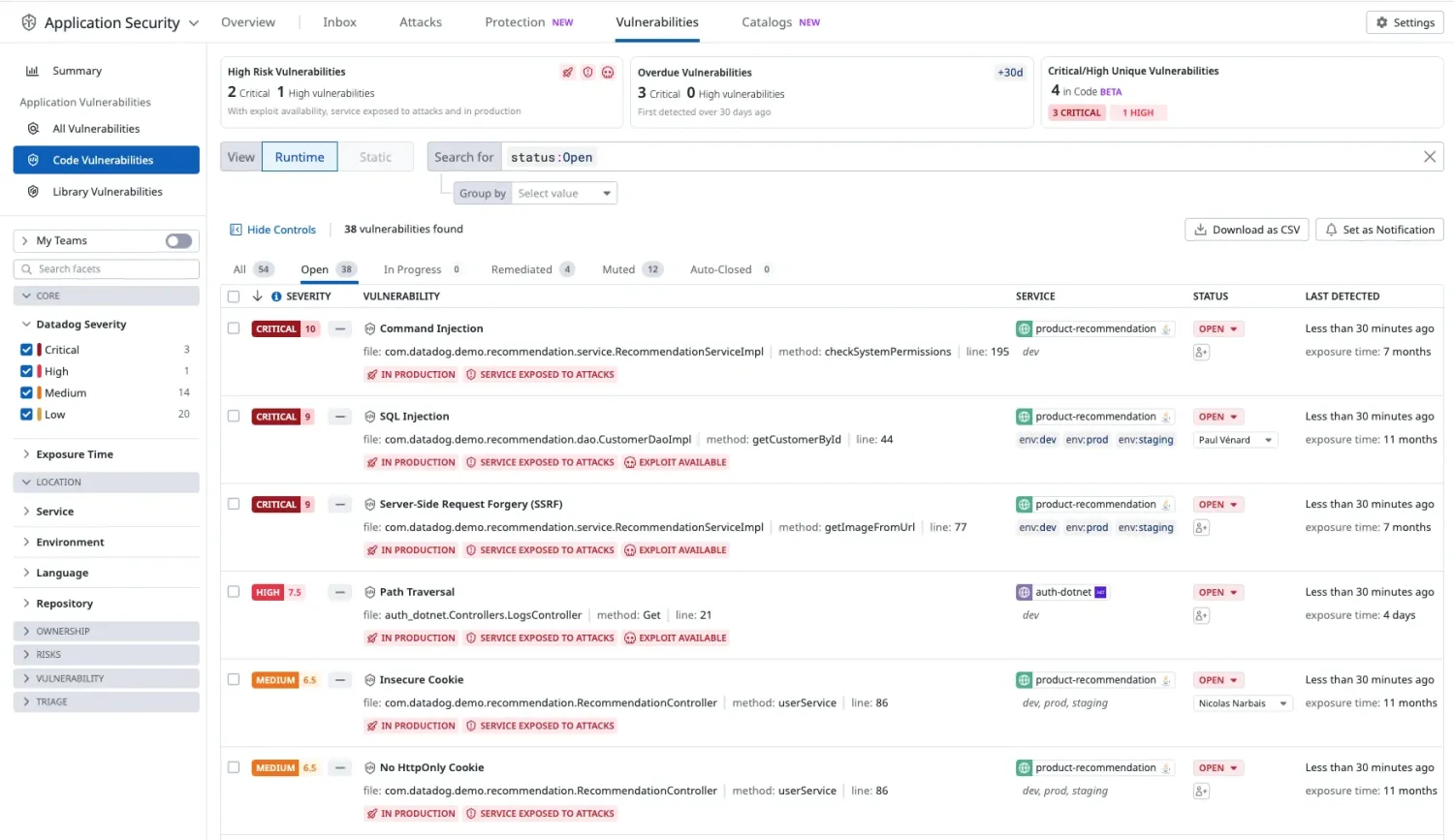
Here is what the two most-referenced IAST tools actually look like in production:
Why is IAST still so much smaller than SAST or DAST?
Deployment friction is the main reason IAST adoption lags behind SAST and DAST . SAST runs in CI pipelines with no runtime dependency.
DAST scans a URL. IAST requires an agent inside the application runtime, which means modifying deployment configs, managing agent versions across services, and dealing with language-specific quirks.
If you run dozens or hundreds of microservices, instrumenting every one with an IAST agent is a serious operational investment.
That friction keeps adoption limited to teams with solid DevOps practices and mature test automation.
Why is IAST Hard to Deploy?
Deployment complexity is the single biggest reason teams give up on IAST. On a traditional VM, installing the agent is a one-time config change and you are done.
In containerized and Kubernetes environments, every Docker image rebuild needs to include the agent, so it becomes a permanent step in your CI/CD pipeline.
And if you run serverless (AWS Lambda, Google Cloud Functions), most IAST tools as of 2026 simply do not work there. Ephemeral function invocations make persistent agent deployment impractical.
Traditional VMs
Add the agent JAR or DLL to your application server startup. For Tomcat, add to CATALINA_OPTS. For IIS, install the .NET profiler. Simple one-time setup.
Containers (Docker/Kubernetes)
Modify your Dockerfile to include the agent, or use init containers. Every image rebuild needs the agent. Adds complexity to your CI/CD pipeline and increases image size.
Serverless (Lambda, Cloud Functions)
Most IAST tools do not support serverless. The ephemeral nature of functions makes agent deployment impractical. Consider SAST and DAST instead.
For containerized deployments, the typical approach is a multi-stage Docker build. The first stage compiles your application as usual.
The second stage copies the agent binary or JAR alongside your application artifact. You then set the right environment variable or startup flag (-javaagent for Java) in your container’s entrypoint.
Some teams use init containers in Kubernetes to inject the agent at pod startup without touching the application image.
Either way, every image rebuild needs the agent baked in, so your CI pipeline has to account for agent version updates.
Performance is worth watching, especially in shared staging environments. I recommend establishing baseline response times for critical endpoints before enabling the agent, then measuring the difference.
If overhead crosses your threshold (10-15% latency increase is a common ceiling), you can tune the agent’s instrumentation scope.
Most tools let you exclude specific packages or URL paths from analysis. HCL AppScan IAST goes a step further with a hot attach/detach feature for Java that lets you enable instrumentation only during specific test windows, then turn it off.
Which programming languages do IAST tools support?
Java and .NET have the deepest IAST agent coverage across all vendors in 2026.
Java is the most mature: every vendor supports it with broad app server compatibility (Tomcat, JBoss, WebSphere, WebLogic, Spring Boot). .NET is the second strongest, covering both .NET Framework and modern .NET 5-9 on IIS and Kestrel.
Node.js support is available from most vendors but with fewer framework-specific optimizations. Python is covered by Contrast Assess, Datadog IAST, and Seeker.
Go support exists in Contrast Assess and Seeker. PHP has broader support than you might expect: Contrast Assess, HCL AppScan, Seeker, Invicti Shark, and Acunetix AcuSensor all cover it.
Ruby, Scala, Kotlin, and Groovy are niche. Seeker IAST leads with 10+ languages, while Datadog IAST and Checkmarx IAST each support 3-4.
When should you skip IAST entirely?
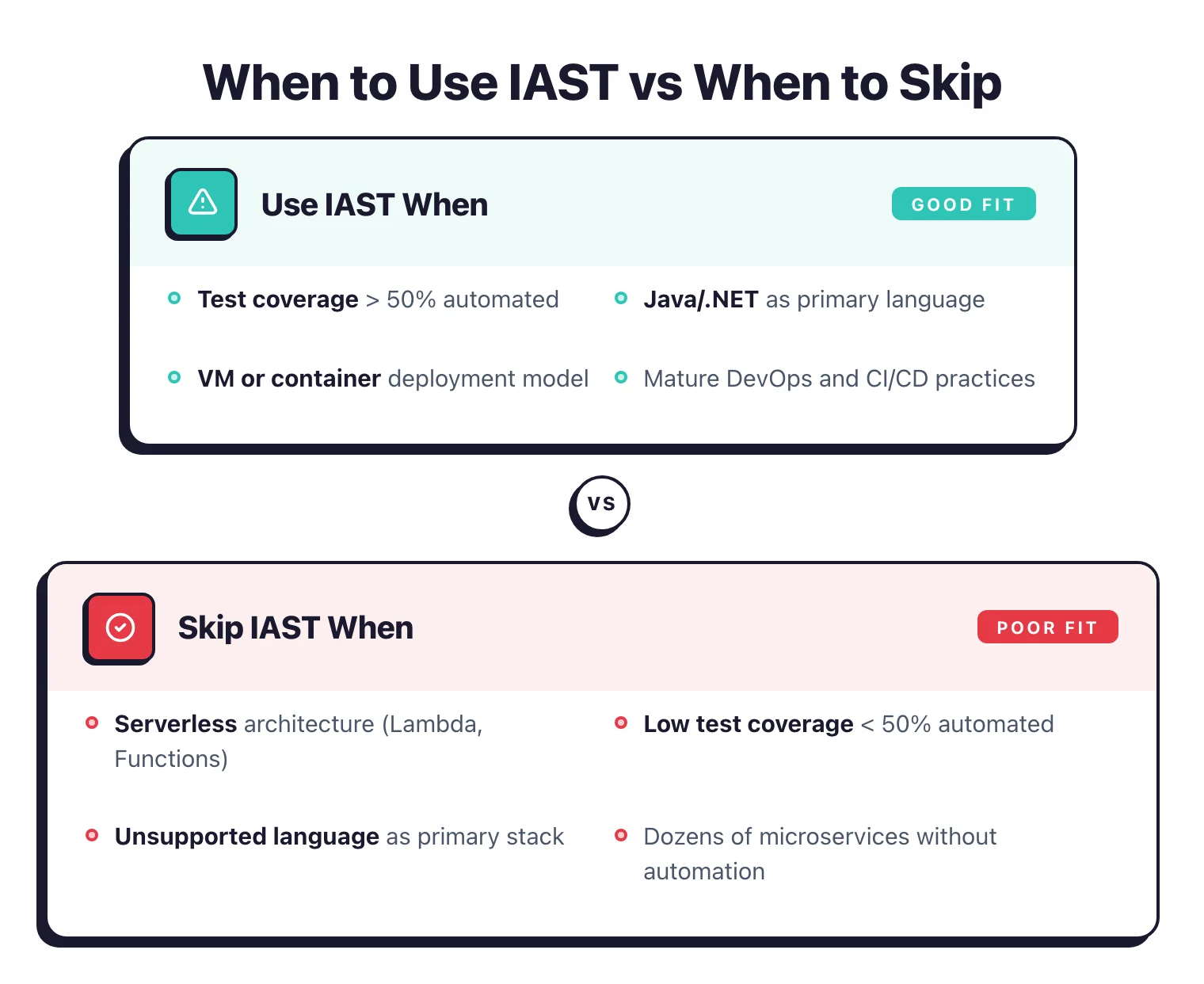
Skip IAST if your application runs on a language no IAST agent supports, if you have dozens of microservices but automated test coverage below 50%, or if your architecture is primarily serverless.
In these cases, the agent will only see a fraction of your code paths, and you will get more value from investing in SAST and expanding test coverage first.
Pair SAST with DAST and revisit IAST once your infrastructure and testing maturity catch up.
How to Choose the Right IAST Tool
Choosing the best IAST tool for your team comes down to four things: language support, fit with your existing AppSec stack, deployment complexity for your infrastructure, and test automation maturity.
With only eight active commercial products in 2026, the shortlist is smaller than most AppSec categories.
The factors worth evaluating:
Language Support
Contrast Assess covers Java, .NET, Node.js, Python, Go, PHP, Kotlin, and Scala (via the Flex Agent; Ruby is no longer listed on Contrast's supported-languages page). Seeker supports Java, .NET, Node.js, Go, Python, Ruby, PHP, and JVM languages. Datadog IAST supports Java, .NET, Node.js, and Python. HCL AppScan covers Java, .NET, Node.js, and PHP. Check if your primary language is covered before committing.
Existing AppSec Stack
If you already use Contrast for RASP, adding Assess is seamless. If you use Black Duck for SCA, Seeker integrates well. Datadog IAST makes sense if you already use Datadog for APM. Checkmarx IAST fits enterprises using Checkmarx One. Invicti Shark pairs with Invicti DAST.
Deployment Complexity
IAST requires agent installation. For traditional VMs, this is easy. For Kubernetes, you need to modify your container images. Evaluate the effort for your environment.
Test Automation Maturity
IAST only sees code paths that tests trigger. If your test coverage is low, you will miss vulnerabilities. Make sure your test suite is comprehensive before investing in IAST.
Here is how I would narrow it down based on your situation:
If you want proven accuracy – Contrast Assess is the IAST market leader, reporting 98% web vulnerability detection in NSA Center for Assured Software (CAS) testing with zero false alarms (Contrast Security, CAS benchmark results).
It covers Java, .NET, Node.js, Python, Go, PHP, Kotlin, and Scala via the Flex Agent (Ruby is no longer listed on Contrast’s supported-languages page), and the same agent technology powers Contrast Protect (RASP) for production.
If you already run Datadog – Datadog IAST
reuses your existing APM tracing libraries, so enabling IAST is a single environment variable (DD_IAST_ENABLED=true). No new agent to deploy.
Pro tip: If you already run Datadog APM, enabling IAST is a single environment variable (DD_IAST_ENABLED=true). No new agent, no new contract, no new dashboard.
It scored 100% on the OWASP Benchmark with zero false positives, the highest score of any IAST tool on that test (Datadog blog, June 2024; the OWASP Benchmark tests Java only).
If you want DAST+IAST in one workflow – Invicti Shark . The IAST sensor pairs directly with the Invicti DAST scanner, adding code-level details and hidden asset discovery without separate IAST infrastructure. Acunetix AcuSensor and Fortify WebInspect Agent take a similar hybrid approach for their respective DAST products.
If you are all-in on Checkmarx One – Checkmarx IAST . Automatic correlation across SAST, DAST, SCA, and IAST findings is the real selling point here, cutting duplicate tickets and giving a unified view of each vulnerability.
If you need the widest language coverage and compliance reporting – Seeker IAST supports 10+ languages including PHP, Ruby, Scala, Kotlin, and Groovy. That makes it the broadest-coverage IAST tool available in 2026.
The active verification approach and built-in sensitive data tracking for PCI DSS, GDPR, and HIPAA make it a solid pick for regulated industries.
What Are IAST Best Practices?
Installing the agent is step one. Actually getting value from IAST takes a bit more thought.
These six practices come from vendor docs and what I have seen work in practice through 2025-2026.
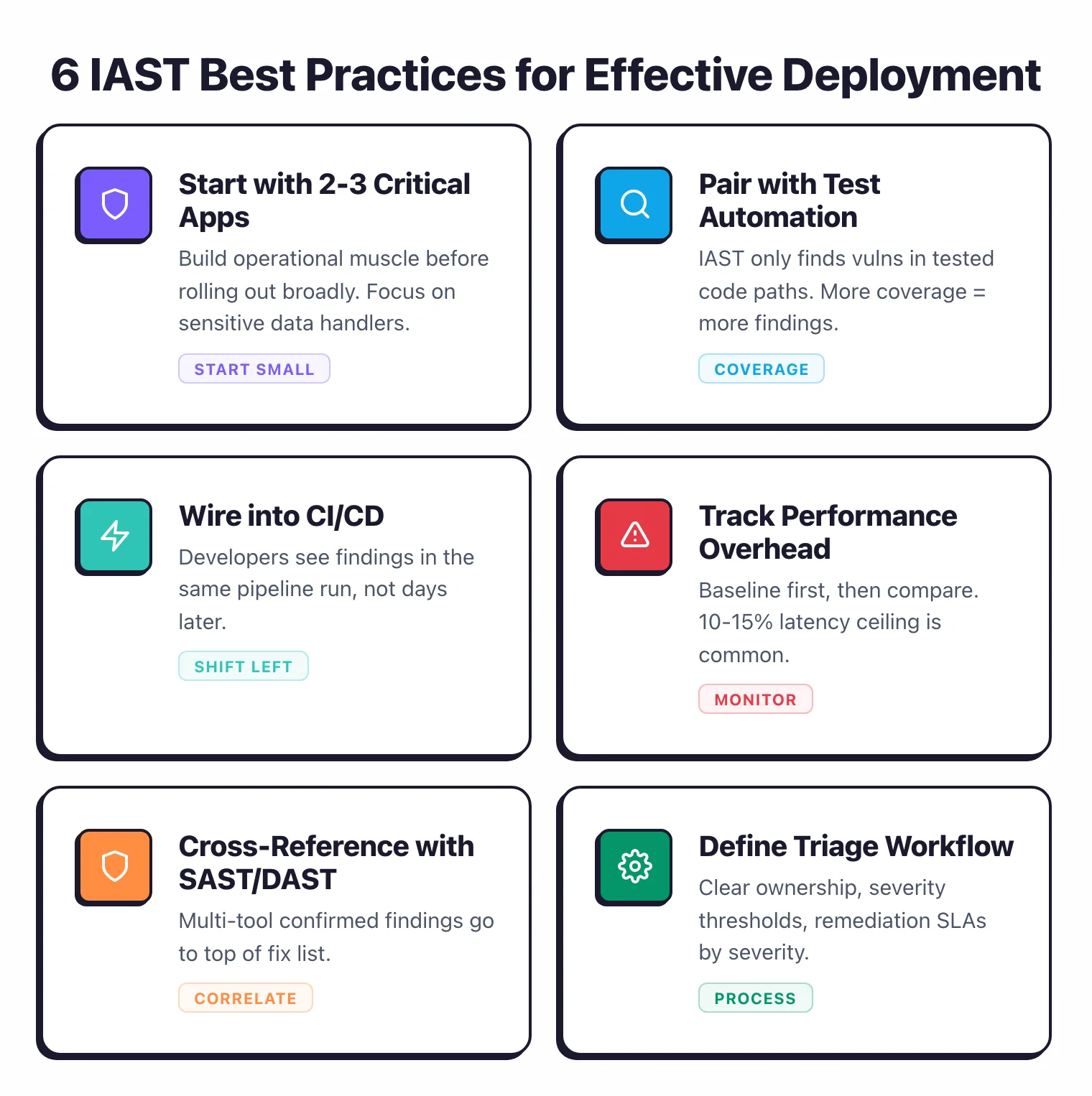
Start with your most critical applications. Do not try to instrument everything at once.
Pick 2-3 applications that handle sensitive data or face the internet, deploy the agent there, and build operational muscle before rolling out further.
Your team learns the deployment workflow and triage process on a manageable scope instead of drowning in alerts from 50 services.
Pair IAST with solid test automation. IAST only catches vulnerabilities in code paths your tests actually hit.
If your test suite covers 30% of the application, IAST analyzes that 30% and nothing more.
This is the single most important factor in IAST effectiveness. Invest in integration tests, API tests, and end-to-end tests that cover authentication flows, input validation, data access patterns, and error handling.
More test coverage means more vulnerabilities found.
Wire IAST into your CI/CD pipeline. Configure the agent to run during your automated test suite in CI.
When a build introduces a new vulnerability, developers see it in the same pipeline run, not days later from a periodic scan.
Most IAST tools ship REST APIs and CI plugins for Jenkins, GitLab CI, GitHub Actions, and Azure DevOps.
Track performance overhead from day one. Get baseline response times for key endpoints before enabling the agent.
After deployment, compare latency and set alerts if overhead crosses your threshold (10-15% is a common ceiling).
If performance takes too much of a hit, narrow the agent’s scope by excluding non-critical packages or static asset paths from instrumentation.
Cross-reference IAST findings with SAST and DAST. A vulnerability confirmed by multiple tools is a high-confidence issue and should go to the top of your fix list.
Findings that only IAST reports are still worth investigating since they often catch runtime-specific bugs that static analysis misses, but cross-tool correlation helps you prioritize.
Checkmarx IAST and HCL AppScan IAST automate this correlation.
Set up a triage workflow. Assign clear ownership for reviewing IAST results, define severity thresholds for blocking CI builds versus creating backlog items, and set remediation SLAs by severity.
Because IAST findings are high-confidence (low false positive rates), a “fix critical findings before release” gate is realistic here in a way it would be too noisy with SAST alone.
What Are the Most Common IAST Pitfalls?
I see the same mistakes come up again and again when teams adopt IAST for the first time. These six are the most common reasons deployments underperform or get abandoned outright.
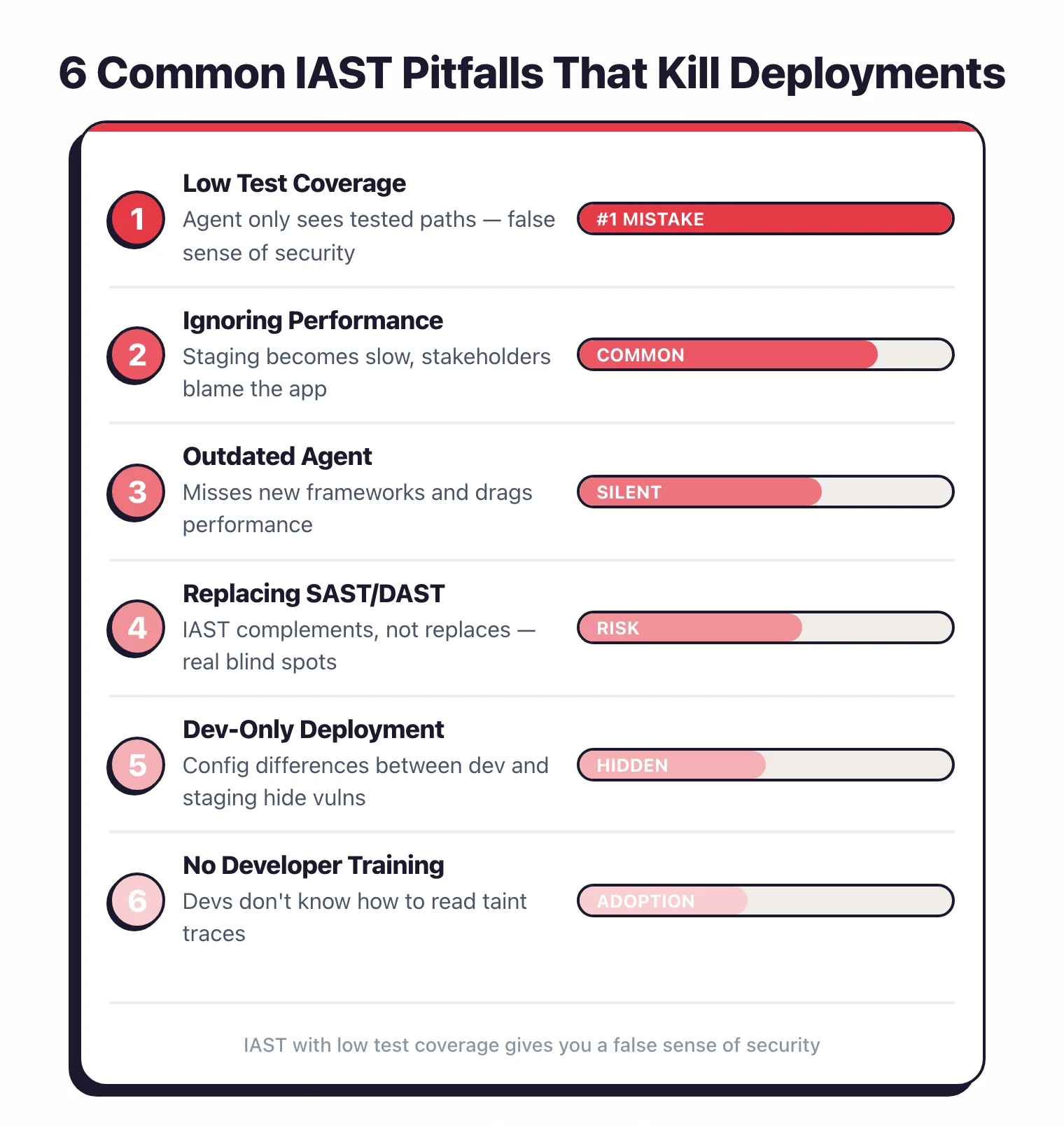
Deploying without enough test coverage. This is mistake number one.
A team installs the IAST agent, runs a handful of manual smoke tests, gets a clean report, and declares the application secure.
But the agent only analyzed the few code paths those tests hit. Everything else went unexamined.
IAST with low test coverage gives you a false sense of security. If your automated test coverage is below 50%, expand your tests before trusting IAST results.
Ignoring performance overhead in staging. Some teams deploy the agent and never check whether it affects response times.
That becomes a problem fast when staging is shared by QA testers, product managers, or integration partners who experience slow responses and blame the application.
Always check latency after enabling IAST, and let stakeholders know an instrumentation agent is running.
Running an outdated agent. Vendors release updates that add support for new frameworks, close detection gaps, and improve performance.
An outdated agent may miss vulnerabilities in newer libraries or drag performance.
Treat agent version updates like any other dependency: include them in your regular maintenance cycle.
Thinking IAST replaces SAST and DAST. IAST does not replace SAST or DAST – it complements them.
IAST has excellent accuracy for data flow vulnerabilities, but it has real blind spots.
It cannot analyze code paths that tests skip. It misses business logic flaws.
It does not scan the full codebase like SAST. And it does not test from an external attacker’s perspective like DAST.
IAST works best alongside SAST and DAST, not instead of them.
Only running IAST on developer laptops. Some teams skip staging entirely.
The problem: dev environments often have different configurations, dependencies, and data than staging or production.
A vulnerability that stays hidden on a developer machine may surface in staging where the application connects to a real database with production-like data.
Run IAST in staging (or a staging-like environment) to catch environment-specific issues.
Not showing developers how to read IAST findings. IAST reports include detailed data flow traces (source, propagation steps, and sink), but developers without security testing experience may not know what they are looking at.
A short onboarding session that walks through reading a taint trace, understanding why a finding was flagged, and applying the fix goes a long way toward faster remediation.
IAST vs SAST vs DAST in 2026
The three main AppSec testing approaches are complementary, not competing. Understanding where each fits helps you build a layered program that catches more vulnerabilities with less noise.
SAST runs on source code without executing it. It is fast to add to CI but produces false positives because it cannot verify whether tainted data actually reaches a dangerous sink at runtime. DAST sends real HTTP requests to a running app and looks for vulnerable responses, giving runtime confirmation but no visibility into internal code paths. IAST sits between them: an agent inside the running app observes real data flows during test execution, combining code-level precision with runtime confirmation.
| SAST | IAST | DAST | |
|---|---|---|---|
| Coverage | Full codebase (static) | Code paths exercised by tests | Attack surface reachable from outside |
| False positive rate | High (no runtime context) | Very low (confirmed at runtime) | Low-medium (real responses) |
| Runtime required | No | Yes (during testing) | Yes (deployed app) |
| Best for | Early code review, CI shift-left | Confirmed data-flow vulns in QA | External attack surface, APIs |
The practical takeaway: SAST catches issues early but needs triage. DAST confirms exploitability from an attacker’s perspective. IAST bridges both by confirming that tainted data actually flows to a dangerous sink, making it the highest-confidence signal of the three.
When to Pick IAST
IAST is the right choice when several conditions align. Here is the decision list I use:
- Runtime verification matters to you. You want proof that tainted data reaches a dangerous sink, not just a static code pattern match. IAST’s near-zero false positive rate means fewer wasted developer hours on false alarms.
- You can deploy an agent in the application. Your app runs on a supported language (Java, .NET, Node.js, Python) in a VM or container, not purely serverless. Agent installation must be feasible in your deployment model.
- You run functional tests in CI/CD. IAST only observes code paths that tests exercise. If you have integration tests, API tests, or end-to-end tests running in your pipeline, IAST can analyze those paths automatically during each build.
- Your team has low false-positive tolerance. Security teams that are overwhelmed by SAST noise get the most immediate value from IAST. The high-confidence findings are easier to prioritize and faster to act on.
- You need compliance evidence. Tools like Seeker IAST produce reports mapped directly to PCI DSS, GDPR, and HIPAA requirements, useful when you need audit-ready documentation of your testing methodology.
If none of these conditions apply, particularly if test coverage is below 30% or the stack is primarily serverless, invest in SAST and DAST first, then revisit IAST once the foundation is stronger.
Top IAST Vendors in 2026
The active IAST market has eight commercial products. Five stand out for adoption and depth of public documentation: Contrast Assess, Datadog IAST, Black Duck Seeker, Invicti Shark, and HCL AppScan.
Contrast Assess is the market-defining IAST tool, from the company co-founded by Jeff Williams, creator of the OWASP Top 10. It uses a patented sensor-based instrumentation approach that tracks data flows from HTTP request entry points through to dangerous sinks (SQL queries, OS commands, file paths). Contrast Assess reported 98% web vulnerability detection in NSA Center for Assured Software testing with zero false alarms.
Datadog IAST scored 100% on the OWASP Benchmark with zero false positives, and it reuses the APM tracing libraries teams already run — enabling it is a single environment variable. Its Java instrumentation depth traces back to Datadog’s May 2022 acquisition of Hdiv Security, a Spanish IAST startup.
Seeker IAST (now part of Black Duck Software after the 2024 Synopsys divestiture) leads on language breadth: Java, .NET, Node.js, Go, Python, PHP, Ruby, Scala, Kotlin, and Groovy. Its active verification feature replays suspicious findings with benign payloads to confirm exploitability before reporting, which further reduces noise. Built-in sensitive data tracking for PCI DSS, GDPR, and HIPAA makes it a strong choice in regulated industries.
Invicti Shark takes the hybrid route: an IAST sensor that pairs with the Invicti DAST scanner and adds code-level detail and hidden asset discovery to each scan. Teams already running Invicti get internal confirmation of findings without deploying separate IAST infrastructure.
HCL AppScan IAST has a patented correlation engine that automatically links each DAST finding to the root cause the IAST agent identifies in source code. The hot attach/detach feature for Java lets you enable instrumentation only during specific test windows without restarting the application. That matters in environments where downtime or restart cycles are expensive.
Methodology
I evaluate IAST tools across five dimensions, drawing on vendor documentation, the OWASP Benchmark Project, community deployment reports, and published case studies. Recommendations reflect documented capabilities plus practitioner-reported behavior — not a private benchmark study.
Runtime overhead is assessed using vendor-published latency figures and community telemetry; the 10% latency ceiling is the threshold most teams report as the limit before pulling the agent. Language and framework coverage is verified against vendor documentation and cross-checked against community reports, since published support matrices sometimes lag actual agent capabilities. CI integration quality covers whether the tool offers a native plugin for GitHub Actions, GitLab CI, and Jenkins, and whether it can gate builds on new high-severity findings without manual configuration. Deployment complexity is rated based on the number of steps required to add the agent to a containerized Java app from scratch, per vendor docs. False positive rate is assessed using the OWASP Benchmark where vendor results are published, plus practitioner reports on production codebases.
No tool earns a recommendation without supporting evidence on all five dimensions. I update this methodology section when criteria change or new evidence surfaces.
2026 Trends: eBPF-based IAST
The biggest architectural shift in IAST for 2026 is the move toward eBPF (extended Berkeley Packet Filter) instrumentation as an alternative to traditional language-level agents. eBPF runs programs in the Linux kernel without modifying application code or requiring language-specific agents. That addresses the two biggest IAST pain points: deployment complexity and language coverage gaps.
Traditional IAST agents hook into language runtimes: JVM bytecode instrumentation for Java, the .NET CLR profiler API, V8 hooks for Node.js. Each requires a language-specific implementation, version compatibility testing, and Dockerfile changes per image. eBPF-based instrumentation operates at the kernel system call level, so one agent can observe data flows across any language running on Linux (Java, Python, Go, Ruby, and others simultaneously) without touching their runtimes.
Datadog has invested heavily in eBPF-based observability through their acquisition of Seekret (2022) and the integration of eBPF tracing into their APM and Code Security products. Contrast Security has discussed eBPF instrumentation in their engineering blog as a path toward broader language support. For teams running polyglot microservices on Kubernetes, eBPF-based IAST would reduce per-service agent overhead. As of early 2026, fully eBPF-based IAST for production-grade taint tracking remains an emerging capability rather than a shipping product across most vendors.
Frequently Asked Questions
What is IAST?
How is IAST different from SAST and DAST?
Does IAST require test automation?
Why is IAST hard to deploy for cloud-native apps?
What is the best IAST tool?
Is there a free IAST tool?
What is the performance overhead of IAST?
Can IAST work with microservices?
Is IAST worth it if I already have SAST and DAST?
Is IAST the same as SAST?
What is the best IAST tool for Java?
How does IAST differ from RASP?
Are there free IAST alternatives?
Does IAST work in microservices architectures?
Related IAST Resources
Explore Other Categories
IAST covers one aspect of application security tools. Browse other categories below.

Written & maintained by
Suphi CankurtEight years on the vendor side of application-security sales — thousands of evaluations and demos. I started AppSec Santa in 2022 to put that insider view to work for buyers. Independent of any vendor, paid by none, and honest about what fits whom.