


Grype is a free, open-source vulnerability scanner for container images and filesystems. Built by Anchore and released under Apache 2.0, it has 12.4k GitHub stars and over 50 million combined downloads across the Anchore open-source suite (Syft, Grype, Grant).
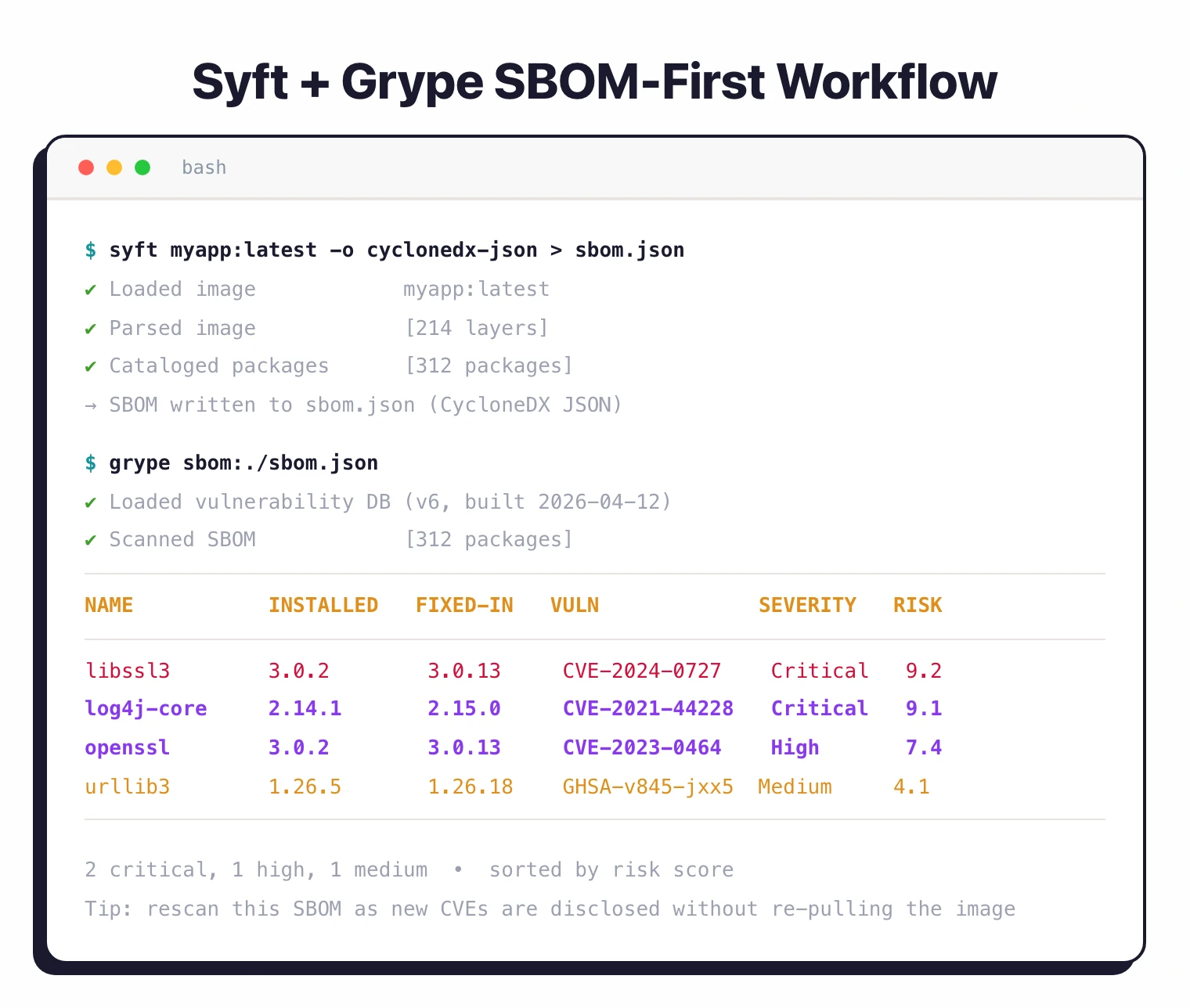
It matches packages against NVD, GitHub Security Advisories, and distribution-specific feeds. You point it at a container image, a directory, or an SBOM file, and it returns a list of known vulnerabilities sorted by risk.
The way I see Grype, it is a low-friction scanner: one Go binary, no daemon, no server, no account.
Grype v0.109.1 fixed a bug where a known CVE was not being detected for a vulnerable JAR file — a critical accuracy fix for teams scanning Java projects in CI.
What is Anchore Grype?
Grype scans container images, filesystems, and SBOMs to find packages with known security vulnerabilities. It covers 20+ language ecosystems (Go, Python, JavaScript, Java, Rust, Ruby, PHP, .NET, and more) plus major Linux distributions (Alpine, Debian, Ubuntu, RHEL, Amazon Linux, Oracle Linux, SUSE, Arch, Gentoo).
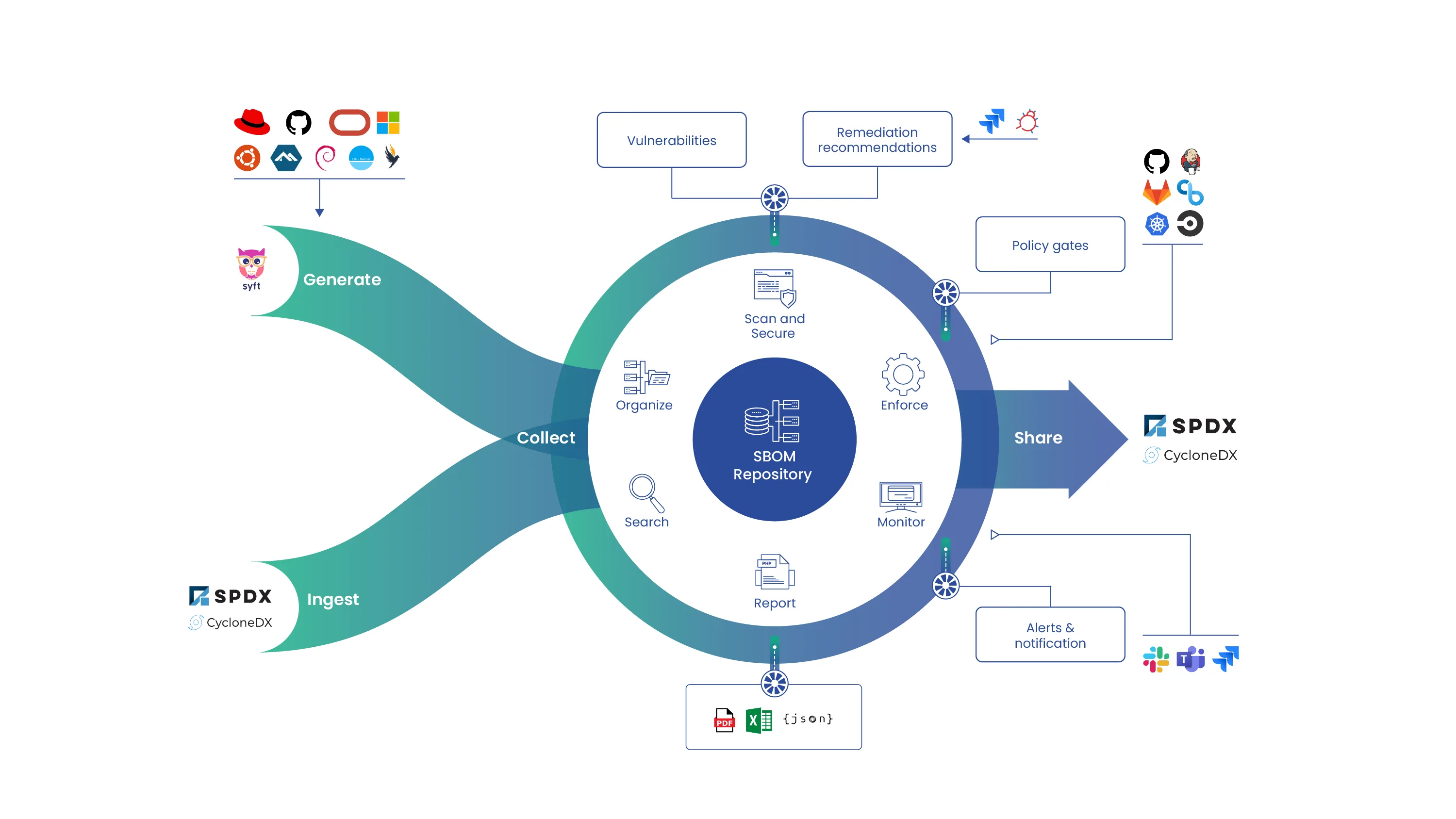
As part of the Anchore open-source ecosystem, Grype pairs with Syft for SBOM generation. Generate an SBOM once with Syft, then rescan it with Grype as vulnerability databases update, without needing the original image.
| Capability | Details |
|---|---|
| Risk-Based Scoring | Combines CVSS severity, EPSS exploit probability, and KEV catalog status into a single 0-10 risk score. Sort results by what actually matters instead of raw severity alone. |
| 20+ Ecosystems | Scans OS packages (APK, DEB, RPM) and language dependencies (npm, pip, Maven, Go, Cargo, Composer, NuGet, and more) against multiple vulnerability databases. |
| SBOM-First Workflow | Accepts CycloneDX, SPDX, and Syft JSON formats. Scan an SBOM file instead of re-analyzing the original image every time the database updates. |
What are Anchore Grype’s key features?
Risk scoring and prioritization
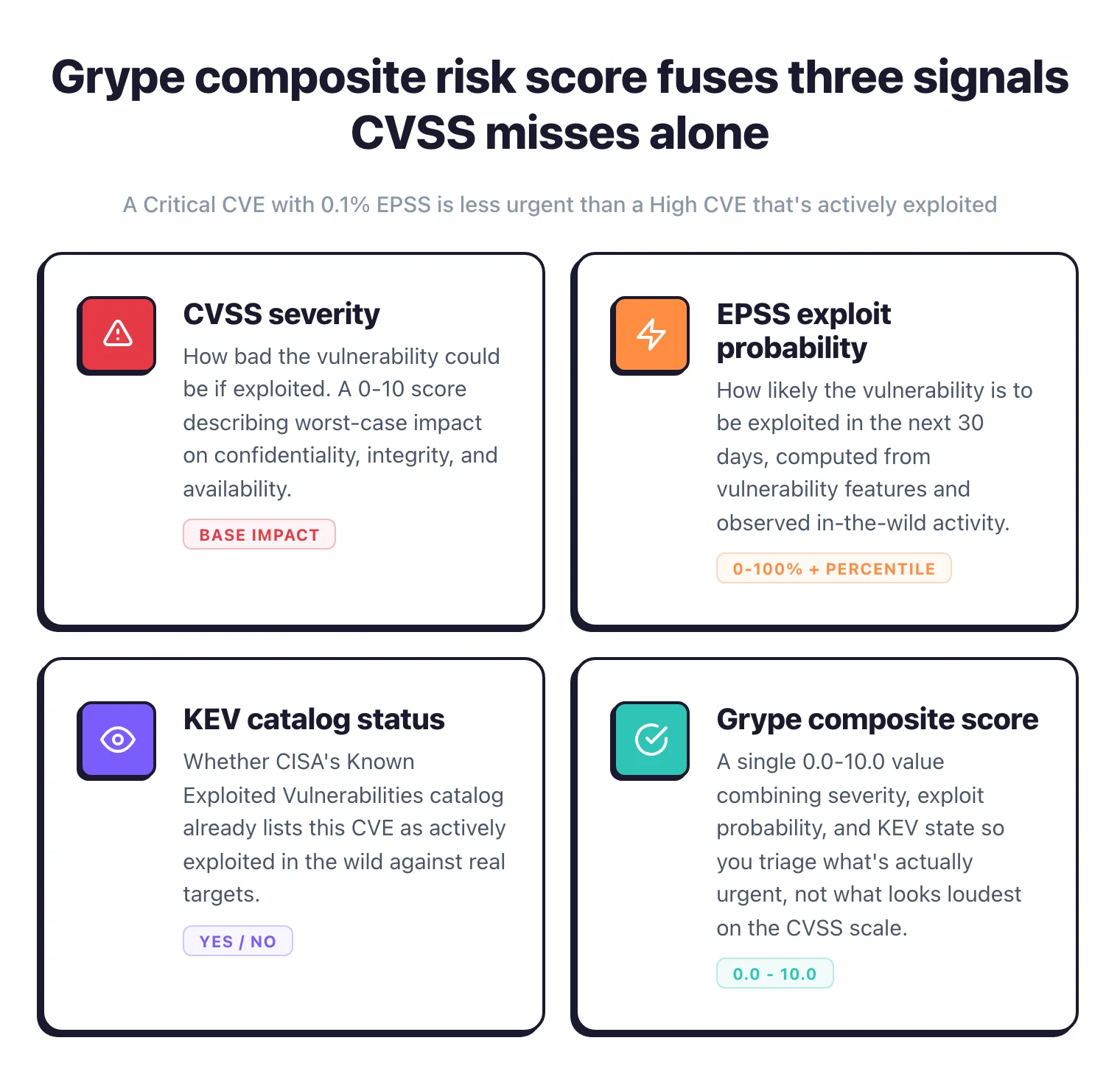
Grype goes beyond raw CVSS scores. Each finding includes an EPSS score (30-day exploitation probability with percentile ranking), KEV catalog status, and a composite risk score from 0.0 to 10.0.
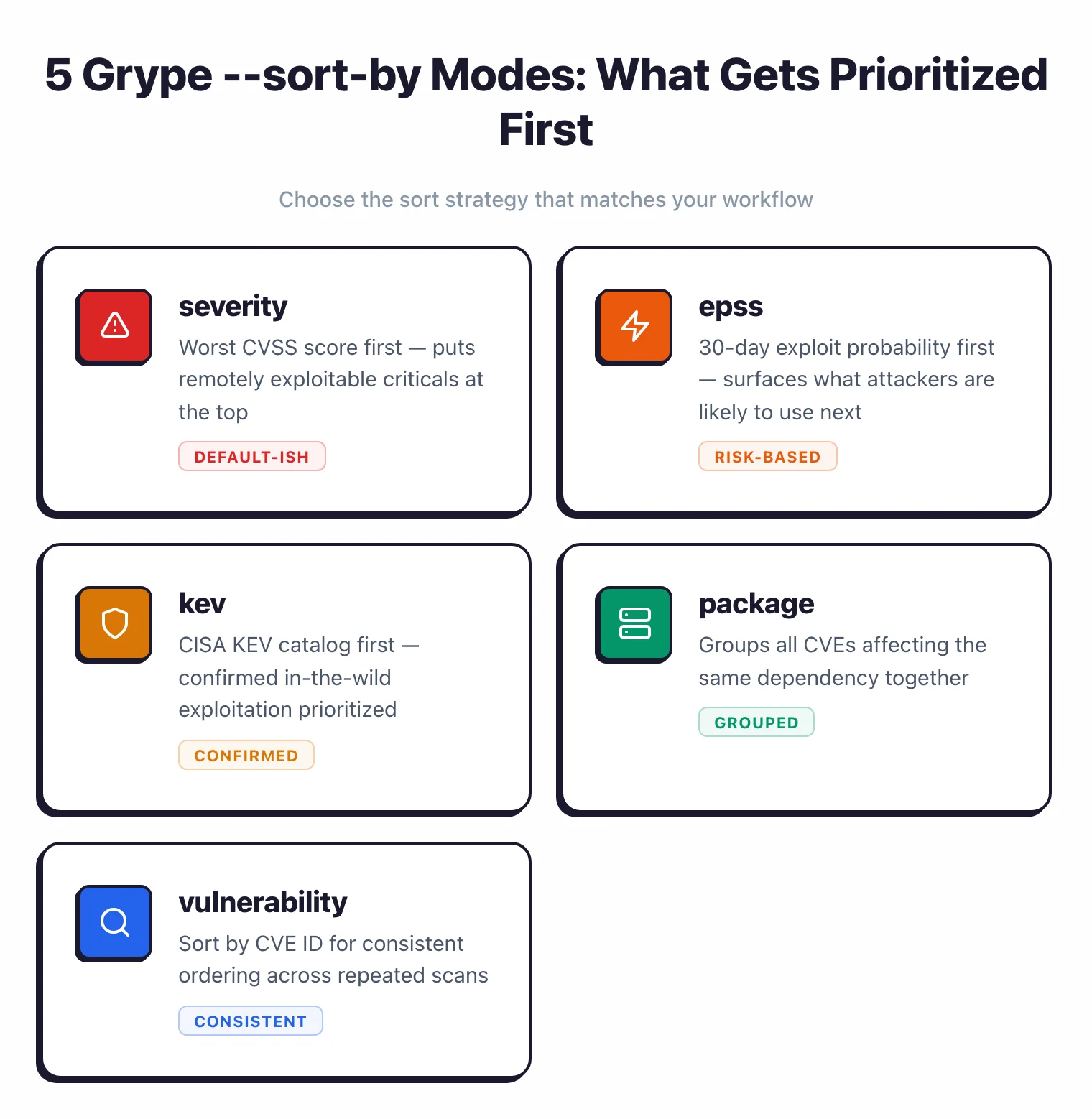
Default sorting puts the most actionable findings first. You can also sort by severity, epss, kev, package, or vulnerability depending on your workflow.
CVSS measures how bad a vulnerability could be. EPSS measures how likely it is to be exploited in the next 30 days.
A critical-severity CVE with a low EPSS score is less urgent than a high-severity CVE that’s actively exploited. Grype’s risk score combines both signals.
Supported ecosystems
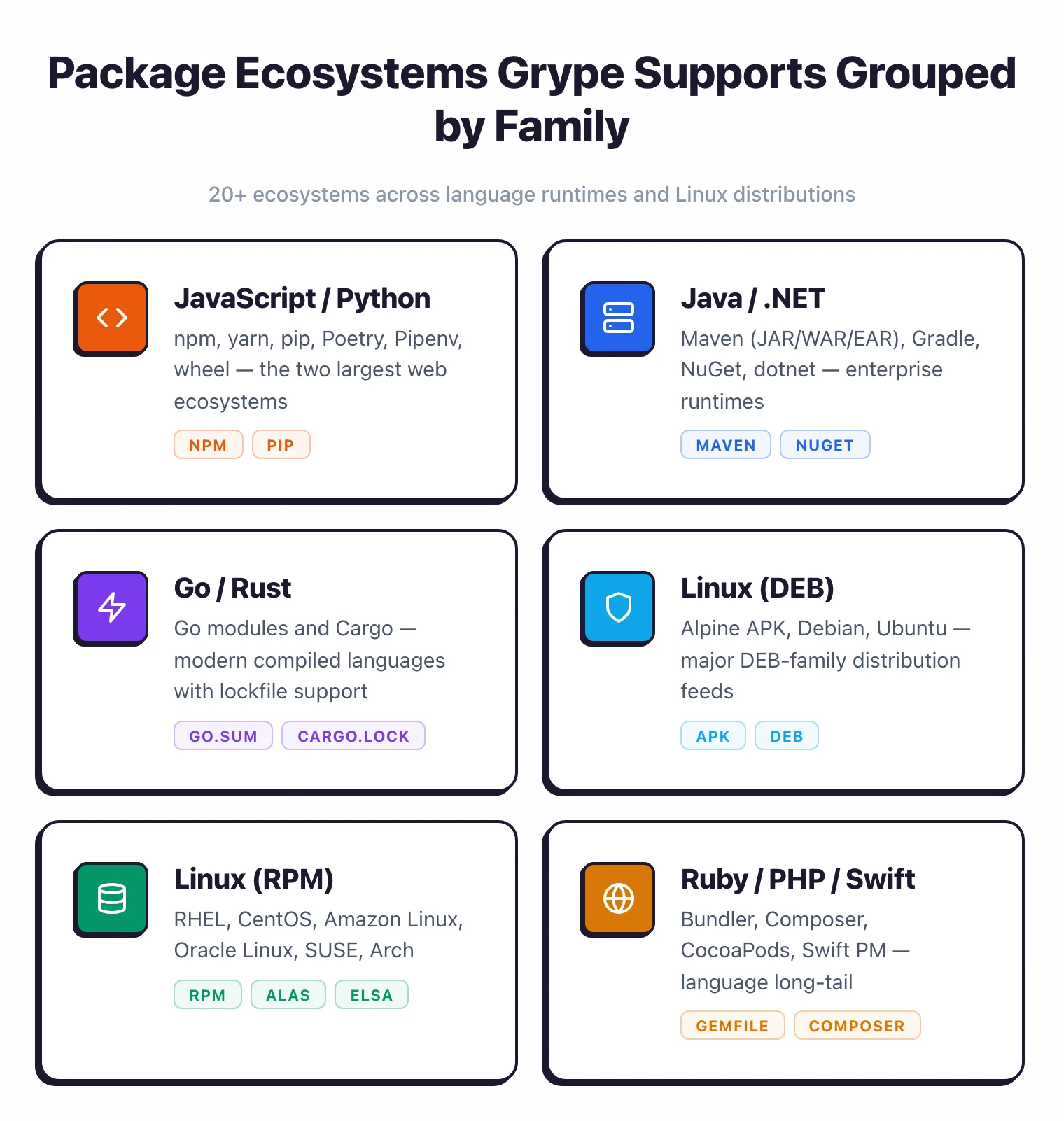
| Ecosystem | Package types |
|---|---|
| JavaScript | npm, yarn |
| Python | pip, Poetry, Pipenv, wheel |
| Java | Maven (JAR, WAR, EAR), Gradle |
| Go | Go modules |
| Rust | Cargo |
| Ruby | Bundler (Gemfile) |
| PHP | Composer |
| .NET | NuGet, dotnet |
| Dart | Pub |
| Haskell | Cabal, Stack |
| Elixir | Mix |
| Erlang | Rebar |
| Swift | CocoaPods, Swift PM |
| R | CRAN |
| Linux (APK) | Alpine |
| Linux (DEB) | Debian, Ubuntu |
| Linux (RPM) | RHEL, CentOS, Fedora, Amazon Linux, Oracle Linux, SUSE, Arch |
Output formats
| Format | Use case |
|---|---|
| Table | Terminal output during development (default) |
| JSON | CI/CD integration, programmatic analysis |
| SARIF | GitHub code scanning, VS Code SARIF Viewer |
| CycloneDX JSON | SBOM-compatible output for Dependency-Track |
| CycloneDX XML | SBOM-compatible output for legacy systems |
| Template | Custom output via Go templates |
Multiple vulnerability sources
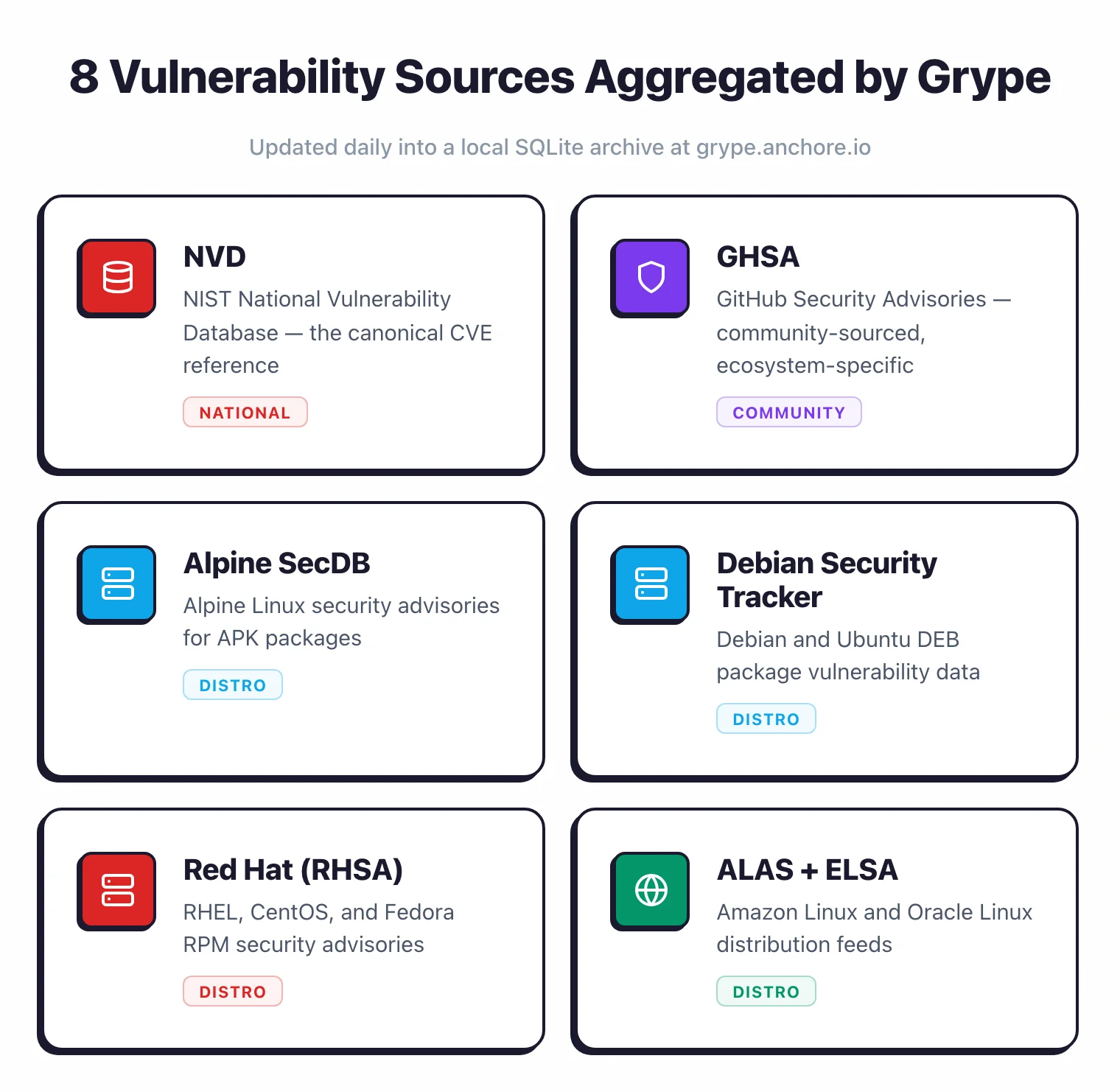
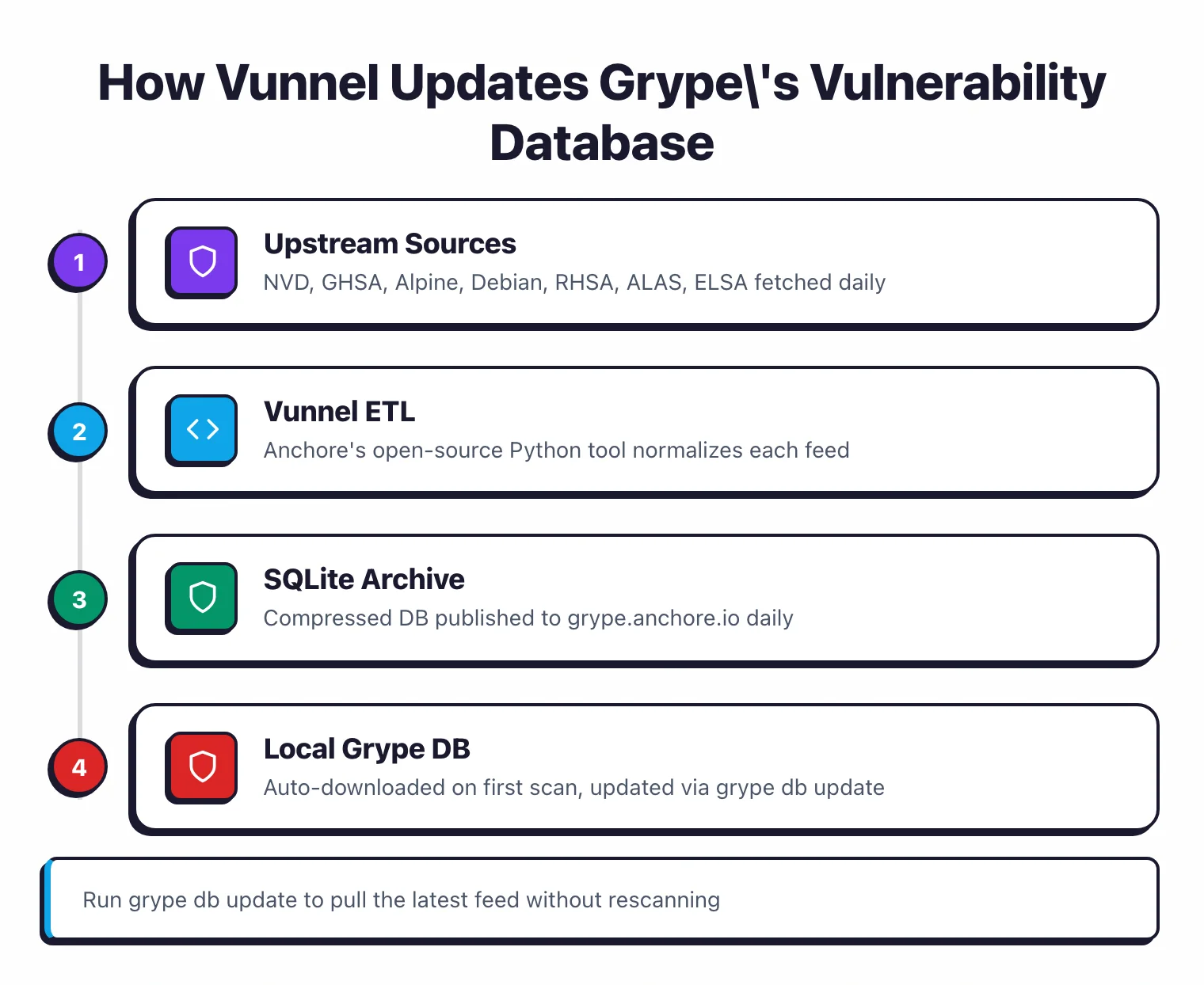
Grype aggregates data from NVD, GitHub Security Advisories, Alpine SecDB, Debian Security Tracker, Red Hat Security Data, Ubuntu/Canonical, Amazon Linux (ALAS), and Oracle Linux (ELSA). The database updates daily via a SQLite archive hosted at grype.anchore.io.
Data processing runs through Vunnel , Anchore’s open-source vulnerability ETL tool.
Container and filesystem scanning
Scan from registries, local Docker/Podman daemons, exported archives (Docker and OCI), OCI directories, or Singularity images. For non-container use cases, grype dir:/path scans a local directory and grype file:/path scans an individual file. The --platform flag handles multi-architecture images.
OpenVEX support
Use VEX (Vulnerability Exploitability eXchange) documents to filter results. If your security team has already assessed a finding and determined it’s not exploitable in your environment, attach a VEX document and Grype will suppress it from future scans.
Installation
- Install the binary – Use curl, Homebrew, or a package manager. The official install script is the fastest path:
curl -sSfL https://get.anchore.io/grype | sudo sh -s -- -b /usr/local/bin - Verify installation – Run
grype versionto confirm. The database downloads automatically on first scan. - Scan something – Point it at an image:
grype alpine:latest. Results appear in seconds, sorted by risk score. - Add to CI – Use
anchore/scan-action@v7in GitHub Actions or run the CLI directly in any pipeline.
# Homebrew (macOS/Linux)
brew install grype

# Curl script (Linux/macOS)
curl -sSfL https://get.anchore.io/grype | sudo sh -s -- -b /usr/local/bin

# Windows (winget)
winget install Anchore.Grype

# Docker
docker pull anchore/grype:latest
Usage
# Scan container image from registry
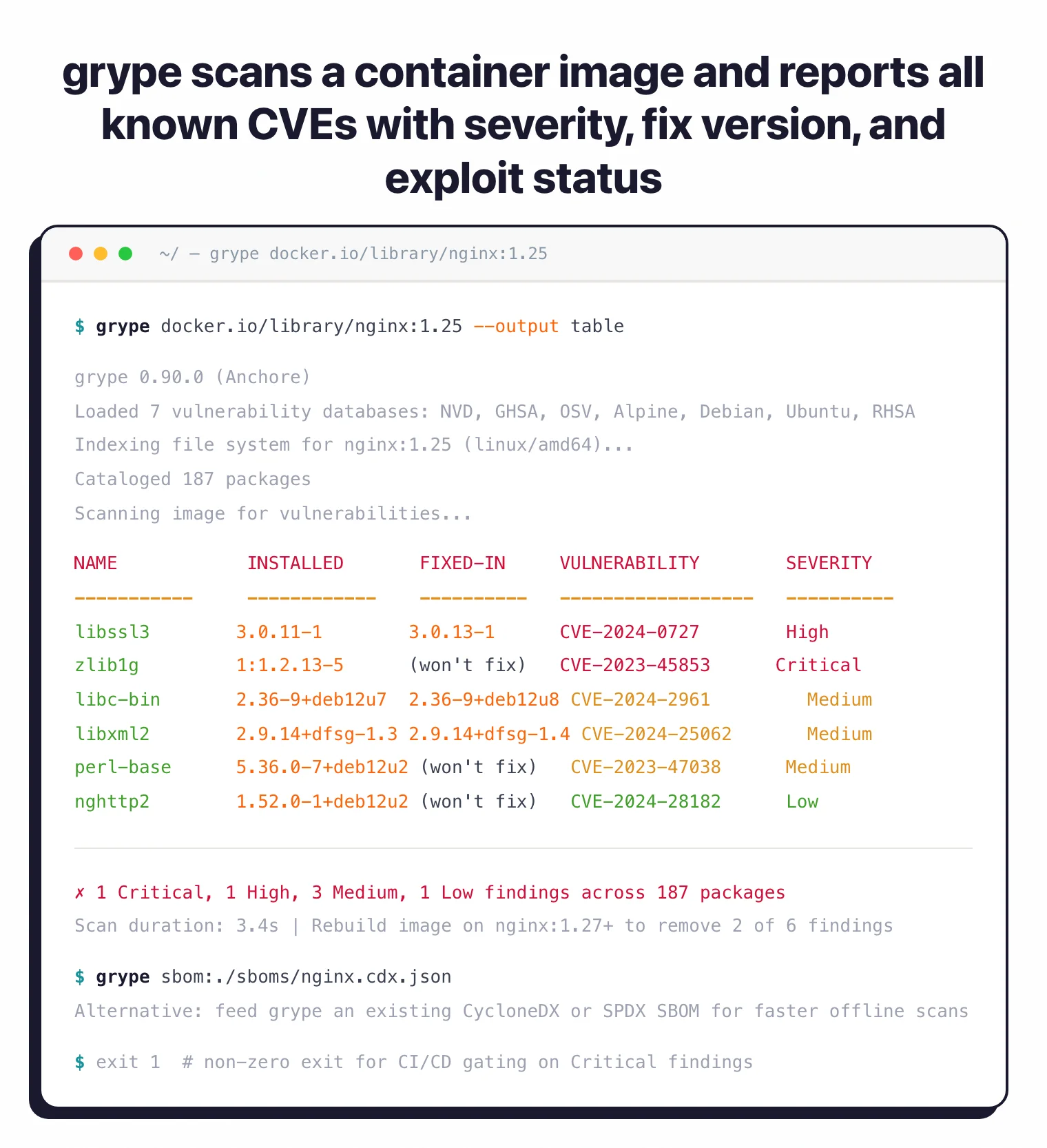
grype alpine:latest

# Scan local Docker image
grype docker:myapp:v1.0

# Scan image archive
grype docker-archive:./image.tar

# Scan filesystem directory
grype dir:/path/to/project

# Scan SBOM file
grype sbom:./sbom.json

# Pipe Syft output directly
syft alpine:latest -o cyclonedx-json | grype

# Fail on high or critical
grype alpine:latest --fail-on high

# Output SARIF for GitHub Security
grype alpine:latest -o sarif > results.sarif

# Sort by EPSS score
grype alpine:latest --sort-by epss

# Show only fixable vulnerabilities
grype alpine:latest --only-fixed

# Search the database directly
grype db search --vuln CVE-2024-1234
grype db search --pkg openssl

# Explain a specific finding
grype explain --id CVE-2024-1234
CI/CD integration
GitHub Actions
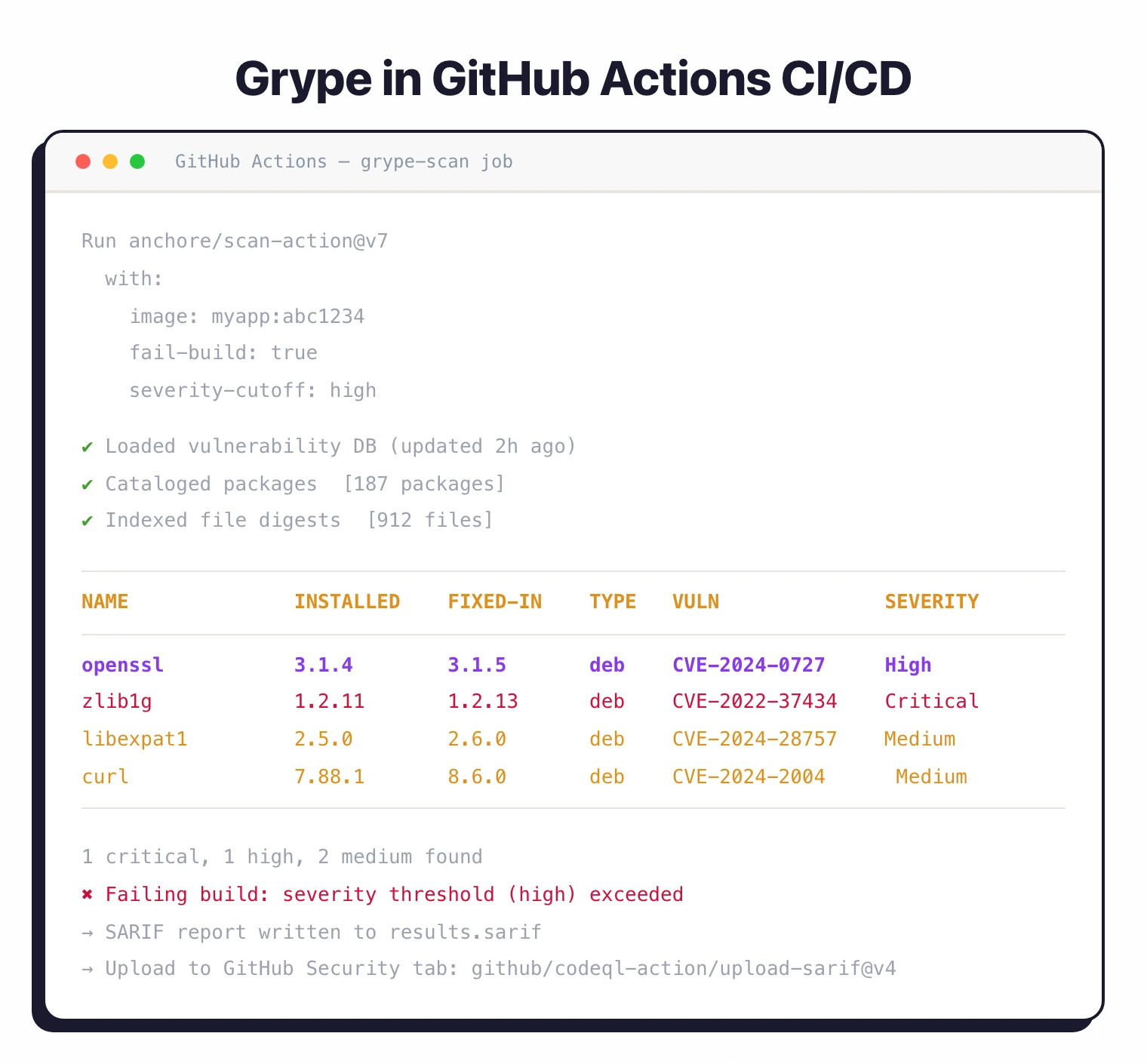
The official action is anchore/scan-action@v7
. It wraps Grype and outputs SARIF for GitHub’s Security tab.
name: Container Vulnerability Scan
on: [push, pull_request]

jobs:
  grype-scan:
    runs-on: ubuntu-latest
    steps:
      - uses: actions/checkout@v4

      - name: Build container image
        run: docker build -t myapp:${{ github.sha }} .

      - name: Scan image with Grype
        uses: anchore/scan-action@v7
        id: scan
        with:
          image: myapp:${{ github.sha }}
          fail-build: true
          severity-cutoff: high

      - name: Upload SARIF
        uses: github/codeql-action/upload-sarif@v4
        with:
          sarif_file: ${{ steps.scan.outputs.sarif }}
GitLab CI
grype-scan:
  image: anchore/grype:latest
  stage: security
  variables:
    GRYPE_DB_AUTO_UPDATE: "true"
  script:
    - grype docker:${CI_REGISTRY_IMAGE}:${CI_COMMIT_SHA}
      --fail-on high
      -o sarif > gl-container-scanning-report.sarif
  artifacts:
    reports:
      container_scanning: gl-container-scanning-report.sarif
Jenkins Pipeline
pipeline {
    agent any
    stages {
        stage('Build Image') {
            steps {
                sh 'docker build -t myapp:${BUILD_NUMBER} .'
            }
        }
        stage('Vulnerability Scan') {
            steps {
                sh '''
                    grype docker:myapp:${BUILD_NUMBER} \
                        --fail-on critical \
                        -o json > grype-results.json
                '''
            }
        }
    }
    post {
        always {
            archiveArtifacts artifacts: 'grype-results.json'
        }
    }
}
Configuration
Create a .grype.yaml configuration file:
# Fail on vulnerabilities of this severity or higher
fail-on-severity: high

# Ignore specific vulnerabilities
ignore:
  - vulnerability: CVE-2021-12345
    package:
      name: openssl
      version: 1.1.1k
  - vulnerability: GHSA-xxxx-yyyy-zzzz

# Database settings
db:
  cache-dir: ~/.cache/grype/db
  update-url: https://toolbox-data.anchore.io/grype/databases/listing.json
  max-allowed-built-age: 120h
  auto-update: true

# Default output format
output: table

# Default sort strategy
sort-by: risk
When to use Grype
Grype works best as a fast, focused vulnerability scanner in CI/CD pipelines. It does one job and does it well.
Strengths:
- Single binary, no server or account needed
- Risk scoring combines CVSS, EPSS, and KEV data for better prioritization
- SBOM-first workflow with Syft avoids redundant image analysis
- 20+ language ecosystems plus all major Linux distributions
- Database updates daily from multiple upstream sources
Limitations:
- CLI only, no web dashboard (use Anchore Enterprise for that)
- No license compliance scanning (pair with FOSSA or Black Duck if you need it)
- No auto-fix PRs (Grype detects, it doesn’t remediate)
How it compares:
| vs. | Key difference |
|---|---|
| Trivy | Trivy bundles SBOM generation, vuln scanning, IaC checks, and secrets detection. Grype focuses on vulnerability matching with better risk scoring. |
| Snyk Container | Commercial platform with fix PRs, dashboards, and policy management. Grype is free and self-contained. |
| Docker Scout | Built into Docker Desktop with supply chain attestations. Grype is registry-agnostic and runs anywhere. |
For more on how Grype fits into a broader security program, see What is SCA? and our SCA in CI/CD guide .