


Fluid Attacks combines DAST, SAST, SCA, and penetration testing in a single platform. Automated scanners find the bugs.
Their team of ethical hackers confirms the critical ones are real.
This two-layer approach — machine scanning plus human verification — is the main selling point. False positive rates stay very low because a person has actually validated exploitability before the finding reaches your dashboard.
The company is based in Colombia, became a CVE Numbering Authority in 2021, and their CLI tool is CASA tier 2 approved for Google Play compliance.
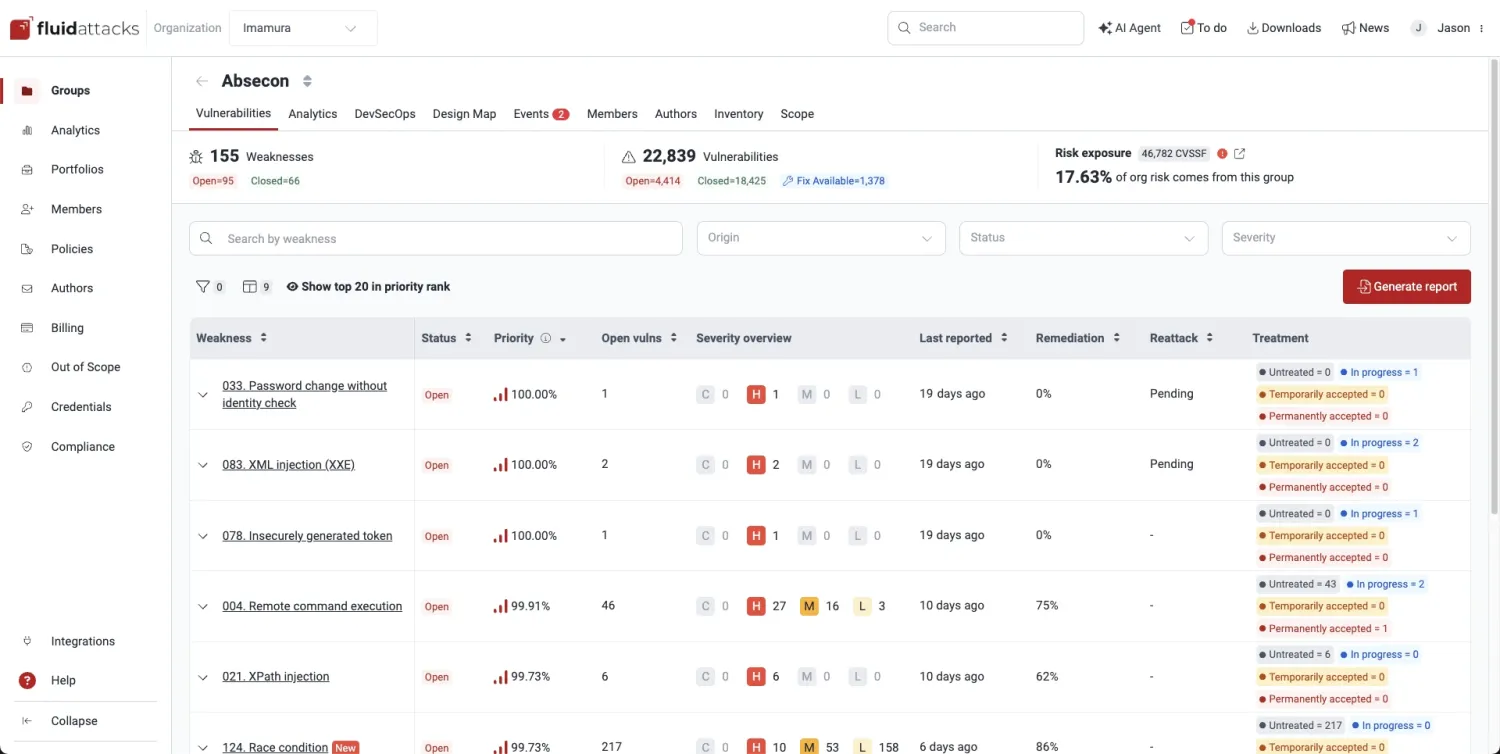
Key features at a glance
| Feature | Detail |
|---|---|
| Testing Methods | DAST, SAST, SCA, PTaaS, secure code review |
| SAST Languages | Java, Python, JS, TS, Go, Ruby, PHP, C#, C/C++, Kotlin, Swift, Scala |
| False Positive Approach | Deterministic detection + human expert verification |
| CVE Authority | CNA status since 2021 — can assign CVE identifiers |
| CASA Compliance | Tier 2 approved for Google Play requirements |
| AI Fix Suggestions | Language and framework-aware remediation guidance |
| API | GraphQL-based API for programmatic access |
| IDE Plugins | VS Code, IntelliJ, Cursor |
| Connectivity | Cloud (HTTPS/SSH), Egress (static IP), Connector (Cloudflare ZTNA) |
| Severity Scoring | CVSSF (proprietary metric beyond standard CVSS) |
What is Fluid Attacks?
Most DAST tools are fully automated — you point them at a target, they scan, they report. Fluid Attacks takes a different approach by adding human verification on top of automated scanning.
The automated layer runs DAST against running applications, SAST against source code in 13 languages, and SCA against your dependency tree. Findings from all three scanners land in one dashboard with deduplication built in.
The human layer is where it gets interesting. Fluid Attacks’ team of certified ethical hackers reviews critical findings, confirms exploitability, and weeds out false positives.
They also run continuous penetration testing alongside the automated scans.
| Capability | Details |
|---|---|
| Automated + Human | Automated scanners (DAST, SAST, SCA) run continuously. Ethical hackers verify critical findings and perform manual testing that automated tools can’t replicate. |
| Low False Positives | Deterministic detection patterns trigger only on confirmed vulnerabilities. Human verification adds a second filter. When a finding hits your dashboard, it’s almost certainly real. |
| AI Fix Suggestions | For each finding, the platform generates fix recommendations specific to your programming language and framework. Not generic advice — actual code-level guidance. |
| CASA Tier 2 | The free CLI tool is approved by the App Defense Alliance for Google Play CASA compliance validation. Useful for mobile teams needing to pass Play Store security requirements. |
Multi-methodology testing
All scan types run through one platform. DAST probes running applications with targeted attack patterns.
SAST reviews source code in 13 languages. SCA checks open-source dependencies for known vulnerabilities and license issues.
The OWASP Testing Guide recommends combining multiple testing methodologies because each catches different vulnerability classes — DAST finds runtime issues, SAST catches code-level flaws, and SCA surfaces vulnerable dependencies.
Results from all three appear in a single dashboard. Duplicate findings across methodologies get merged automatically, so you don’t waste time triaging the same bug reported by two different scanners.
Connectivity options
Fluid Attacks supports three ways to reach your applications:
- Cloud: HTTPS/SSH encrypted connections with OAuth, SSH, or HTTPS authentication
- Egress: Cloudflare-based static IP whitelisting for firewall rules
- Connector: Zero Trust Network Access via Cloudflare Tunnel for private network testing
The Connector option is worth noting — it lets Fluid Attacks scan internal applications without opening inbound firewall ports.
How to use Fluid Attacks
- Create a project — Sign up and configure your first application in the Fluid Attacks platform. Choose your connectivity method (cloud, egress, or connector).
- Connect your repos — Link source code repositories for SAST and SCA. Configure Git access via SSH or HTTPS.
- Set up DAST targets — Add target URLs for dynamic scanning. Configure authentication if testing protected areas.
- Review findings — Check the unified dashboard for results across all scan types. Critical findings include human verification status and AI fix suggestions.
CI/CD integration
Fluid Attacks integrates with GitLab, Azure DevOps, and other CI/CD platforms. The pipeline can break builds when findings exceed your severity threshold.
# Using the Fluid Attacks Docker image
docker run --rm -v $(pwd):/code fluidattacks/cli:latest \
  skims scan /code/config.yaml
Fluid Attacks primarily works through their platform for continuous scanning and human verification. The CLI tool (skims) takes a YAML configuration file that defines scan targets and rules.
For CI/CD integration, connect your repositories directly through the Fluid Attacks platform, which handles build-breaking policies and finding deduplication across scan types.
What does Fluid Attacks integrate with?
These integrations are how I plug Fluid Attacks into a broader DevSecOps workflow — alongside other options in the DAST tools landscape like Invicti when you want pure automation, or Burp Suite when manual testing leads.
 GitLab
 Azure DevOps
 Jira Cloud
 VS Code
 IntelliJ
When to use Fluid Attacks
Fluid Attacks makes sense when you want automated scanning verified by actual humans. The combination eliminates most false positives, but it costs more than pure-automation tools and the human review adds time to the triage cycle.
Good fit when you need:
- Multi-methodology testing (DAST + SAST + SCA) in one place
- Human expert verification of critical findings
- Very low false positive rates
- Continuous penetration testing alongside automated scanning
- CASA tier 2 compliance for Google Play
- CVE-level vulnerability research support
Teams that prioritize speed over accuracy, or those on a tight budget, may prefer fully automated DAST tools like StackHawk or ZAP .
For a comparison of testing approaches, see the guide on SAST vs DAST vs IAST . Fluid Attacks is for organizations willing to pay more for higher confidence in findings.
Teams focused purely on API security might also consider Escape , which specializes in business logic and BOLA detection.
How much does Fluid Attacks cost?
Fluid Attacks does not publish list prices on fluidattacks.com. Paid subscriptions are quoted by sales after a scoping conversation, and the human-verification component means pricing also factors in scope volume — a key cost driver beyond the automated scanners alone.
What drives cost is the number of applications under continuous testing, the testing methodologies enabled (DAST, SAST, SCA, plus optional manual pentest hours), and the depth of human review you select. The free CASA tier 2 CLI tool is the no-cost entry point for Google Play compliance validation.
I treat Fluid Attacks as an upper-mid-market platform — it sits in the price band you’d expect for a managed-service component layered on top of automated scanning. If you need a published-price option in the DAST tools landscape , StackHawk or open-source ZAP are easier to defend in procurement.
What are alternatives to Fluid Attacks?
If Fluid Attacks’ human-verification model or pricing posture does not fit, these are the alternatives I’d weigh in the DAST tools landscape :
- Burp Suite Professional — Per-user annual license — verify pricing on portswigger.net before budgeting. The pentester standard for manual workflows; pair it with automated DAST rather than expecting full continuous coverage.
- Invicti — Enterprise DAST with proof-based scanning and ASPM-style rollups. Better fit when you need broad regulated-industry compliance reporting and don’t need a managed human-review layer.
- Acunetix — Sister product under Invicti Group, positioned for SMB and mid-market buyers. Same proof-based scanning core with lower entry friction. Stronger pure-DAST choice when human verification is not a requirement.
- ZAP — The free OWASP scanner. Broader vulnerability coverage and authenticated scan support, no usage cap. Best when budget is the binding constraint and you can absorb manual triage internally.
- Veracode DAST — Enterprise platform that bundles DAST, SAST, and SCA on a unified dashboard. Worth evaluating when your buyer profile is enterprise software security with FedRAMP or similar compliance pressures.