


Datadog Application Security (now branded App and API Protection) provides runtime application protection integrated with Datadog’s observability platform. It uses the same tracing libraries as Datadog APM to embed RASP capabilities directly into application code across 7 languages.
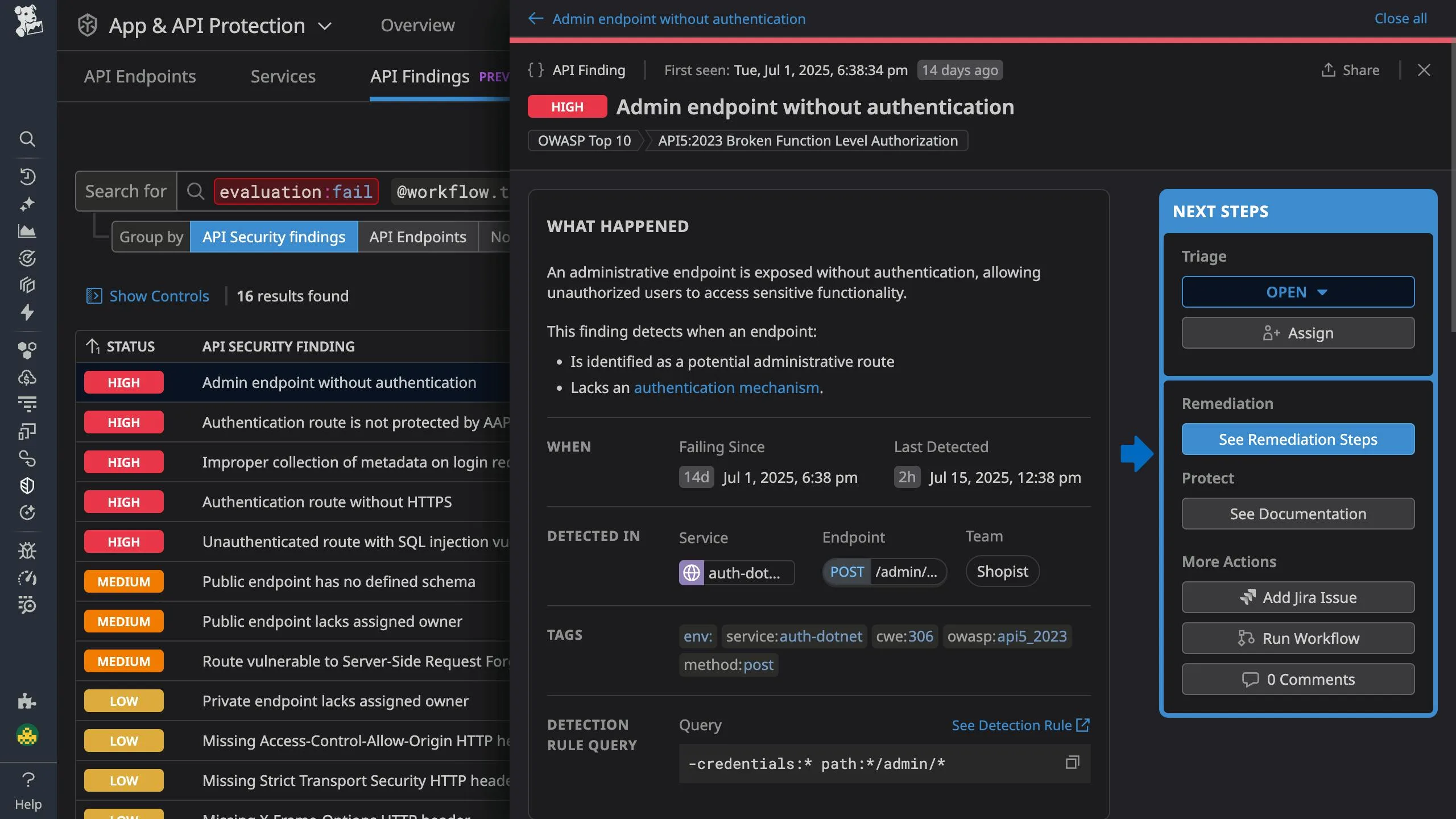
What is Datadog Application Security?
Datadog ASM embeds security protection into applications using the same tracing libraries that power Datadog APM. If you already run Datadog APM, enabling ASM typically requires only a configuration flag change — no separate agent or network appliance.
The RASP capabilities come from Datadog’s 2021 acquisition of Sqreen . The technology operates inside the application runtime, with visibility into how requests flow through code. It blocks attacks before they reach vulnerable code paths.
When an attack is detected, security teams see the attack signature alongside the full distributed trace, the services affected, the user responsible, and the code paths involved.
| Capability | Details |
|---|---|
| In-App WAF | Operates inside the application runtime rather than at the network perimeter. Sees requests after TLS termination and understands application context like user sessions. |
| APM Integration | Links every security event to a distributed trace. Follow a malicious request from ingress through every microservice it touched. |
| API Discovery | Continuously discovers all API endpoints including undocumented and shadow APIs. Detects OWASP API Top 10 risks. |
What are Datadog Application Security’s key features?
| Feature | Details |
|---|---|
| Languages | Java, .NET, Node.js, Python, Go, Ruby, PHP |
| Deployment | In-app (tracer-based) or perimeter (edge WAF/CDN) |
| Detection | OWASP Top 10: SQLi, XSS, command injection, SSRF, path traversal |
| Blocking | Real-time blocking of requests, users, or IPs at edge or in-app |
| API security | Shadow API discovery, OWASP API Top 10 detection |
| Business logic | Account Takeover and Credential Stuffing detection |
| Observability | Security events linked to distributed traces, logs, and APM metrics |
| Enablement | DD_APPSEC_ENABLED=true flag on existing APM tracing libraries |
In-app WAF
The in-app WAF operates inside your application rather than at the network perimeter.
This positioning provides several advantages:
- Sees requests after TLS termination without additional decryption
- Understands application context like user sessions and business logic
- Blocks attacks that network WAFs miss due to encoding or evasion techniques
- Works in environments where network-based WAFs are impractical (microservices, serverless)
Detection rules cover the OWASP Top 10 including SQL injection, XSS, command injection, path traversal, and SSRF.
Custom rules can be created to address application-specific threats.
Distributed tracing integration
When an attack is detected, Datadog ASM links the security event to the corresponding distributed trace.
This integration shows:
- The complete request path through your microservices
- Latency impact of the malicious request
- Database queries and external API calls triggered
- The specific code functions that processed the malicious input
Security teams investigating an incident can follow the request from ingress through every service it touched, understanding exactly what the attacker accessed.
Threat intelligence and user tracking
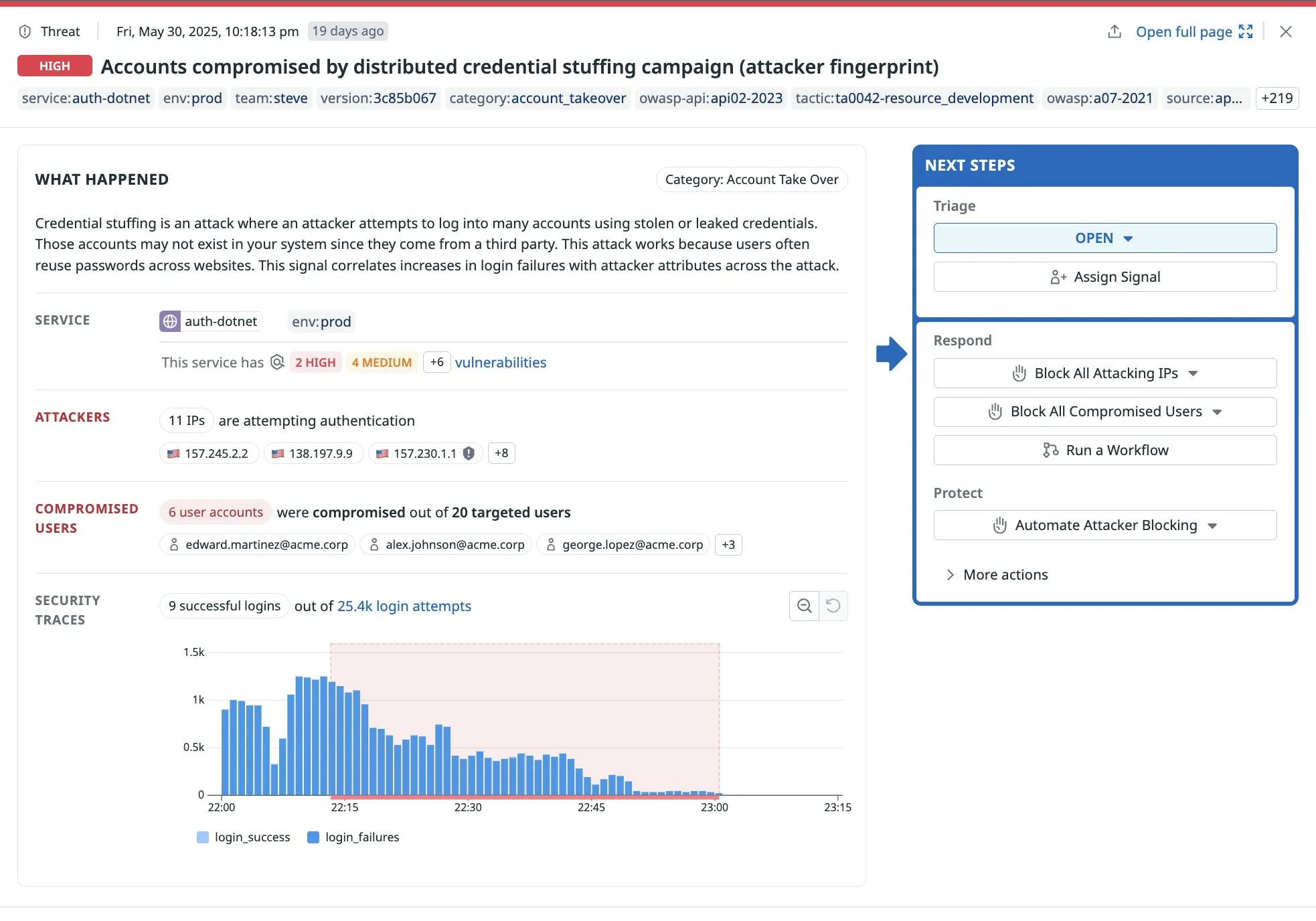
Datadog ASM correlates attacks with threat intelligence feeds to identify known malicious actors.
User tracking associates security events with authenticated users, enabling:
- Identification of accounts engaged in suspicious behavior
- Detection of credential stuffing using known breached credentials
- Account lockout recommendations based on attack patterns
- Attribution of attacks to specific users for forensic purposes
DD_APPSEC_ENABLED=true. The same tracing library handles both performance monitoring and security protection.Code-level vulnerability detection
Datadog ASM identifies vulnerabilities in your code based on how requests are processed at runtime. When the tracer observes dangerous patterns — unsanitized user input reaching database queries, for example — it flags the specific code location.
This approach catches vulnerabilities that static analysis misses because it observes actual execution paths rather than theorizing about code flow.
How do I get started with Datadog Application Security?
- Install the tracer — Add the Datadog tracing library for your language (Java, Node.js, Python, Go, Ruby, PHP, or .NET). If you already use Datadog APM, the tracer is already installed.
- Enable ASM — Set
DD_APPSEC_ENABLED=trueas an environment variable or system property. For Java, pass-Ddd.appsec.enabled=trueto the JVM. - Deploy — Restart your application. ASM starts detecting and blocking attacks using the same tracing library that collects APM data.
- Review findings — Security events appear in the Datadog Security dashboard with linked distributed traces, user attribution, and code-level context.
Installation examples
Java
# Download the Datadog Java agent
curl -L https://dtdg.co/latest-java-tracer -o dd-java-agent.jar

# Run your application with ASM enabled
java -javaagent:dd-java-agent.jar \
  -Ddd.appsec.enabled=true \
  -Ddd.service=my-service \
  -Ddd.env=production \
  -jar your-application.jar
For application servers like Tomcat, add to CATALINA_OPTS:
export CATALINA_OPTS="$CATALINA_OPTS -javaagent:/opt/datadog/dd-java-agent.jar -Ddd.appsec.enabled=true"
Node.js Installation
npm install dd-trace
Initialize the tracer with ASM enabled:
// Must be the first line of your application
const tracer = require("dd-trace").init({
  appsec: { enabled: true },
  service: "my-service",
  env: "production",
});

// Your application code follows
const express = require("express");
const app = express();
Python Installation
pip install ddtrace
Run your application with the Datadog tracer:
DD_APPSEC_ENABLED=true DD_SERVICE=my-service ddtrace-run python app.py
For Django or Flask:
DD_APPSEC_ENABLED=true ddtrace-run gunicorn myapp.wsgi:application
Kubernetes Deployment
Use the Datadog Admission Controller to automatically inject the tracer:
apiVersion: apps/v1
kind: Deployment
metadata:
  name: my-app
  labels:
    admission.datadoghq.com/enabled: "true"
  annotations:
    admission.datadoghq.com/java-lib.version: latest
spec:
  template:
    metadata:
      labels:
        admission.datadoghq.com/enabled: "true"
      annotations:
        admission.datadoghq.com/java-lib.version: latest
    spec:
      containers:
        - name: my-app
          env:
            - name: DD_APPSEC_ENABLED
              value: "true"
            - name: DD_SERVICE
              value: my-service
What does Datadog Application Security integrate with?
 APM
Infrastructure
Log Management
SIEM
APM
Infrastructure
Log Management
SIEMWhen to use Datadog ASM
Datadog ASM makes sense if you already use Datadog for APM. The same tracing library handles both — no additional agent to deploy or manage.
Security events link directly to traces, logs, and infrastructure data, which cuts incident investigation time.
The in-app WAF works well in microservices architectures where network WAFs struggle to see past load balancers and service meshes. For teams that want standalone RASP without the Datadog platform, Contrast Protect or Dynatrace Application Security are alternatives.