
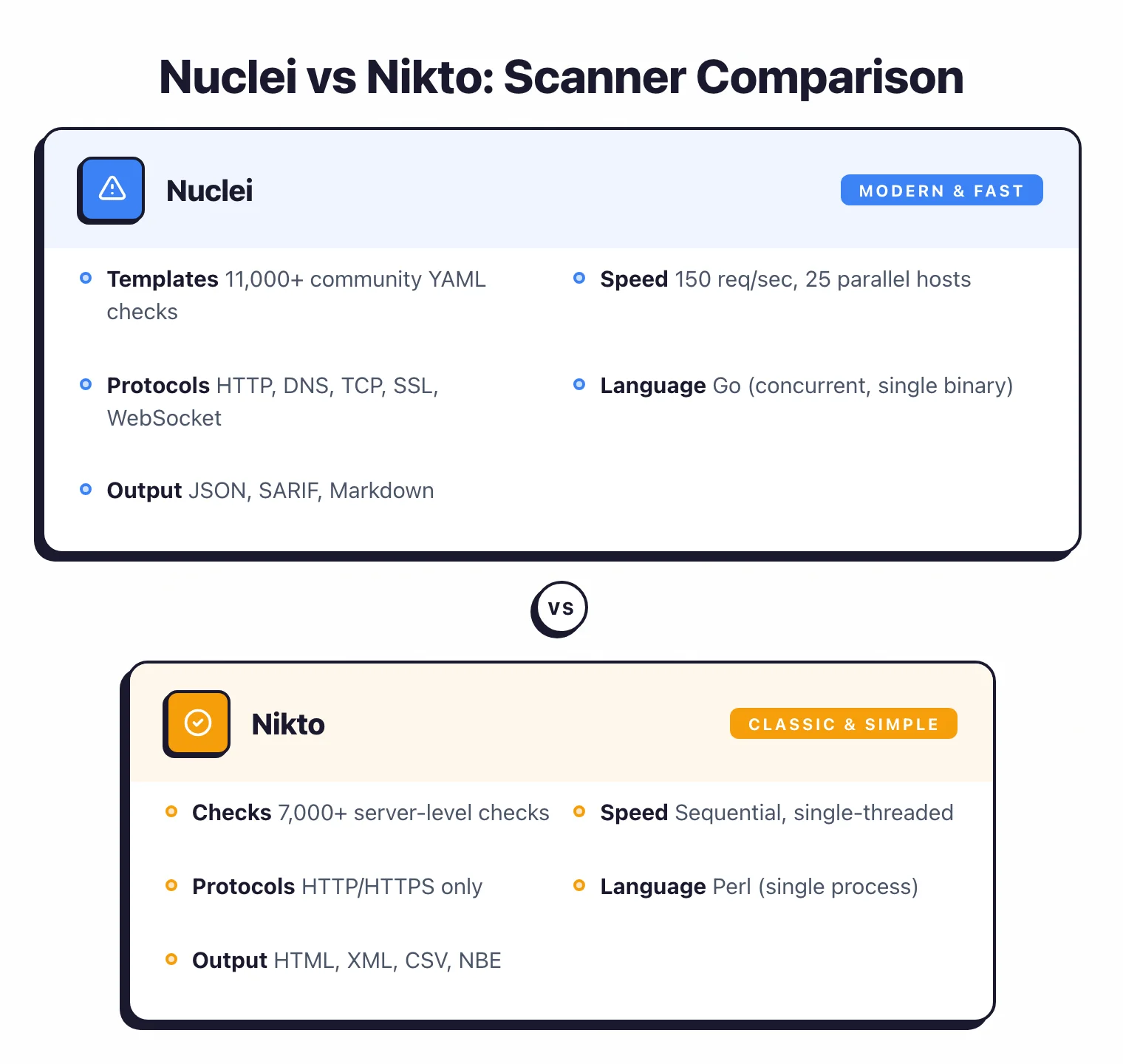
- Nuclei (27,100+ GitHub stars, MIT) scans at 150 req/sec across 25 parallel hosts; Nikto (10,100+ stars, GPL-2.0) is single-threaded Perl that processes requests sequentially.
- Nuclei supports 8 protocols (HTTP, DNS, TCP, SSL, Websocket, Headless, File, Whois); Nikto is limited to HTTP/HTTPS only.
- Nuclei has 12,000+ community templates with new CVE templates appearing within hours of disclosure; Nikto has 7,000+ server checks but its last stable release was v2.6.0.
- Nuclei outputs SARIF for GitHub/GitLab code scanning integration; Nikto outputs HTML, XML, CSV, and NBE but does not support SARIF.
- Nikto offers 8 built-in WAF evasion modes that Nuclei lacks, making it useful for testing through web application firewalls.
Which Is Better: Nuclei or Nikto?#
Nuclei is the more capable and modern tool. Its template-driven approach covers CVEs, misconfigurations, exposures, and default credentials across multiple protocols.
With 27,100+ GitHub stars and an active community pushing new templates within hours of CVE disclosure, it’s the scanner most security teams reach for first.
Nikto still has a place as a quick, no-configuration server reconnaissance tool — fire it at a web server and get a readable report of misconfigurations in minutes.
But for anything beyond basic server checks, Nuclei does more, does it faster, and does it across more protocols.
What Are the Key Differences?#
| Feature | Nuclei | Nikto |
|---|---|---|
| License | MIT | GPL-2.0 |
| GitHub Stars | 27,100+ | 10,100+ |
| Language | Go | Perl |
| Checks/Templates | 12,000+ community templates | 7,000+ server checks |
| Protocols | HTTP, DNS, TCP, SSL, Websocket, Headless, File, Whois | HTTP, HTTPS |
| Scan Speed | 150 req/sec default, concurrent | Sequential, single-threaded |
| Custom Checks | YAML template DSL | Perl plugin architecture |
| AI Features | AI-powered template generation | None |
| SARIF Output | Yes | No |
| Output Formats | JSON, JSONL, SARIF, Markdown, Text | HTML, XML, JSON, CSV, NBE, Text |
| Rate Limiting | Configurable (req/sec, concurrency) | No built-in rate limiting |
| Authentication | Headers, cookies, custom workflows | HTTP Basic, cookies |
| Evasion Techniques | None built-in | 8 WAF evasion modes |
| Docker Image | projectdiscovery/nuclei | sullo/nikto |
| Pre-installed in Kali | Yes | Yes |
| Last Stable Release | Actively updated (2025+) | v2.6.0 |
Nuclei vs Nikto: How Do They Compare?#
Scanning Approach#
Nuclei and Nikto work in quite different ways, even though both are free and open source.
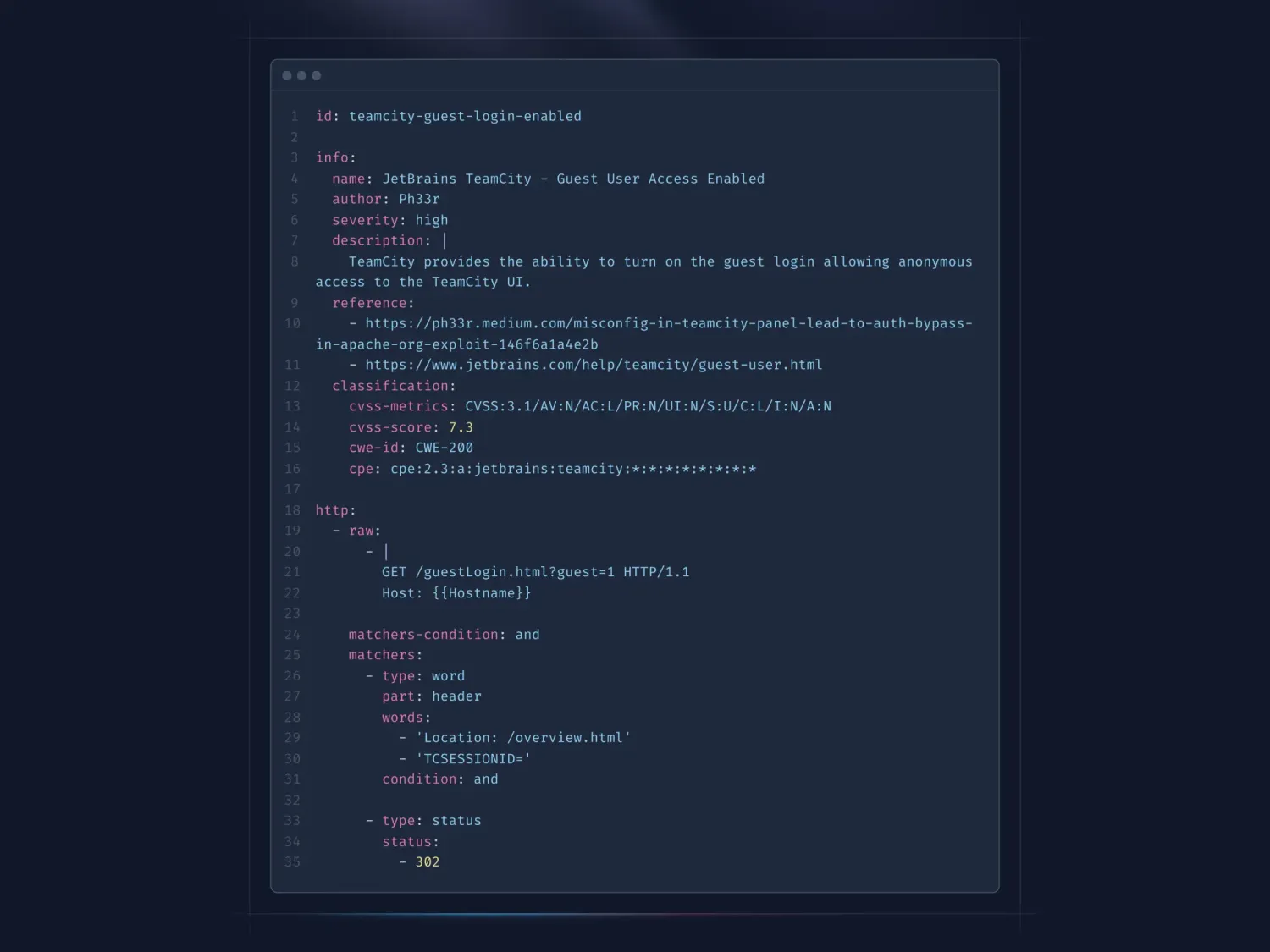
Nuclei is template-driven. Each YAML template defines exactly what request to send and what response pattern constitutes a finding.
You pick templates by tag (CVE, misconfiguration, exposure, default-login) and Nuclei fires them at your targets. Because each template specifies exact match conditions, false positives drop to near zero.
The community maintains 12,000+ templates covering known CVEs with version-specific checks, server misconfigurations, exposed admin panels, default credentials, SSL/TLS issues, and DNS problems. New CVE templates routinely appear within hours of public disclosure.
Nikto takes a database-driven approach. Its 7,000+ checks test for dangerous files left by installers, backup files, outdated server software, insecure HTTP methods, weak SSL configurations, and vulnerable CGI scripts.
You point it at a target and it runs through its check database sequentially. There’s no template authoring involved — it’s more of a “run and read the report” tool.
The practical difference: Nuclei gives you precision and control over what gets tested and how. Nikto gives you breadth of server checks with no configuration required.
Performance#
This is where the gap becomes obvious. Nuclei is written in Go with built-in concurrency.
The default configuration sends 150 requests per second, scanning 25 hosts in parallel with 25 templates running concurrently. Request clustering groups similar requests to reduce total traffic.
For large-scale scanning — hundreds or thousands of targets — Nuclei finishes in a fraction of the time Nikto would take.
Nikto is Perl, single-threaded, and processes requests sequentially. Against a single target, the difference is measurable but tolerable — a few minutes either way.
Against a list of targets, Nuclei’s concurrency advantage compounds quickly. There’s no built-in rate limiting in Nikto either; it sends requests as fast as the single thread allows, which ironically is still slower than Nuclei’s rate-limited default.
For CI/CD pipelines where scan time directly affects build duration, Nuclei’s speed is a meaningful advantage.
Protocol Coverage#
Nuclei scans across HTTP, DNS, TCP, SSL/TLS, File, Whois, Websocket, and headless browser protocols.
This means a single tool can check web application endpoints, DNS configurations, network services, SSL certificate issues, and even render JavaScript-heavy pages through headless Chrome.
Templates specify which protocol to use, so a single scan run can mix checks across different layers.
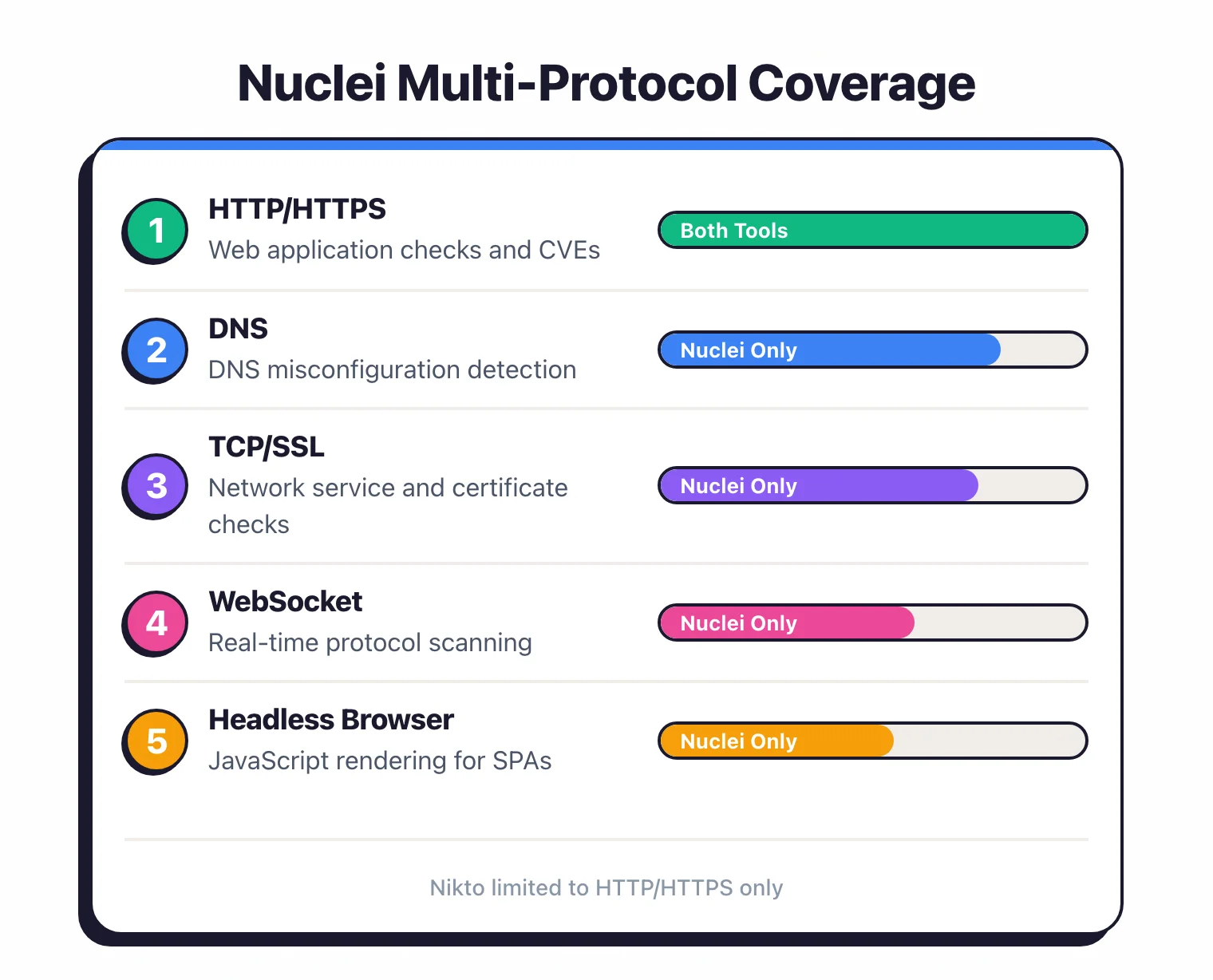
Nikto only speaks HTTP and HTTPS. It’s a web server scanner, not a multi-protocol tool.
No DNS checks, no TCP service scanning, no headless browser rendering. For pure web server reconnaissance, that’s fine.
For broader infrastructure scanning, you need additional tools alongside Nikto.
Extensibility#
Both tools are extensible, but through very different mechanisms.
Writing a Nuclei template takes a few minutes. The YAML DSL is straightforward: define the protocol, request path, method, headers, body, and matchers.
Matchers support word matching, regex, status codes, and conditional logic. Nuclei also supports AI-powered template generation — describe what you want to check in natural language and it generates the YAML.
The barrier to creating custom checks is low enough that security teams regularly write organization-specific templates.
Nikto uses a Perl plugin architecture with 7 hook phases (init, start, recon, scan, prefetch, postfetch, report). Writing a custom Nikto plugin requires Perl knowledge and understanding of the hook system.
The community contributes check database updates, but the pace of new contributions has slowed compared to Nuclei’s template ecosystem.
For teams that want to encode internal security standards as automated checks, Nuclei’s template system is more accessible.
Community and Maintenance#
Nuclei is actively developed. The ProjectDiscovery team ships frequent releases, 220+ contributors have committed code, and the template repository gets daily updates.
The paid ProjectDiscovery Cloud platform provides additional funding for development. The ecosystem includes complementary tools like httpx, subfinder, and katana that work together for reconnaissance workflows.
Nikto’s development pace has slowed. The last stable release was v2.6.0.
Chris Sullo maintains the project, and it still receives check database updates, but the cadence of new features and releases is lower.
Nikto has 60+ contributors and 1,400+ forks, which reflects its long history rather than current activity levels.
Both tools ship pre-installed on Kali Linux and other security-focused distributions.
Target scope and substitution#
Nikto and Nuclei are not 1:1 substitutes — their target scope differs at the design level. Nikto is a web-server scanner first: it tests the server tier for outdated software, default files left by installers, dangerous HTTP methods, and CGI script weaknesses.
Nuclei is multi-protocol and template-driven: it tests for known CVEs, misconfigurations, exposed admin panels, default credentials, DNS issues, and SSL/TLS problems across HTTP, DNS, TCP, SSL, WebSocket, headless, file, and whois protocols.
There is overlap in known-CVE detection on web servers, but Nuclei’s template ecosystem extends well beyond what Nikto’s check database covers. For pure server-tier reconnaissance, Nikto is faster to run zero-config; for breadth across modern infrastructure, Nuclei is the right substrate.
Is Nikto still maintained in 2026?#
Yes, but the cadence is much slower than Nuclei. The Nikto project on github.com/sullo/nikto continues to receive check database updates and occasional code changes from Chris Sullo and a small group of contributors, but the last tagged stable release is v2.6.0.
Compared to Nuclei — which ships frequent releases, has 220+ contributors, and sees daily template updates from the community — Nikto’s velocity is closer to “actively maintained as a stable tool” than “actively developed”.
For most teams in 2026, Nuclei is the better default for new work because the template library covers Nikto’s classic server checks plus modern CVEs, multi-protocol scanning, SARIF output for GitHub Code Scanning, and AI-assisted template generation.
Nikto still has a place when you want a zero-configuration “point at the URL and read the report” scanner for one-off web-server reconnaissance, when WAF evasion modes (8 built-in) help testing through an IPS/WAF, or when an existing pipeline already consumes Nikto’s older output formats.
If you are starting from scratch in 2026, install Nuclei first and add Nikto only when its specific zero-config server-checks workflow is genuinely useful.
When Should You Choose Nuclei?#
Choose Nuclei if:
- You need to scan large numbers of targets quickly with concurrent scanning
- Multi-protocol coverage (HTTP, DNS, TCP, SSL, Websocket) matters for your use case
- You want to write custom checks using an accessible YAML template DSL
- SARIF output for GitHub or GitLab code scanning integration is required
- You need near-zero false positives through precise template matching
- Staying current with newly disclosed CVEs through community templates is a priority
When Should You Choose Nikto?#
Choose Nikto if:
- You want a quick, zero-configuration server reconnaissance pass before deeper testing
- WAF evasion techniques (8 built-in modes) are useful for your testing scenario
- You prefer a simple “point and shoot” scanner without template management
- Your workflow already includes Nikto and the output formats (HTML, XML, NBE) feed into existing processes
- You’re running a one-off server hardening check and don’t need ongoing scanning infrastructure
Both tools are free and work well together. Many security professionals run Nuclei for the bulk of their scanning and keep Nikto around for quick server-level checks when they don’t need Nuclei’s full template library.
For broader application-level testing beyond what either tool covers, pair them with a crawling DAST scanner like ZAP .
For more DAST tools , see AppSec Santa’s full category comparison.
Frequently Asked Questions
Is Nuclei better than Nikto?
Can Nuclei replace Nikto?
Which tool is faster?
Are Nuclei and Nikto free?
Should I use Nuclei or Nikto for CI/CD?

Written & maintained by
Suphi CankurtEight years on the vendor side of application-security sales — thousands of evaluations and demos. I started AppSec Santa in 2022 to put that insider view to work for buyers. Independent of any vendor, paid by none, and honest about what fits whom.