


CAST Highlight is a SaaS software intelligence platform for portfolio-level SCA and application analysis, spanning cloud readiness, technical debt, and open-source risk. It scans hundreds of applications across 50+ technologies within days, combining local code inspection with short business-context surveys.
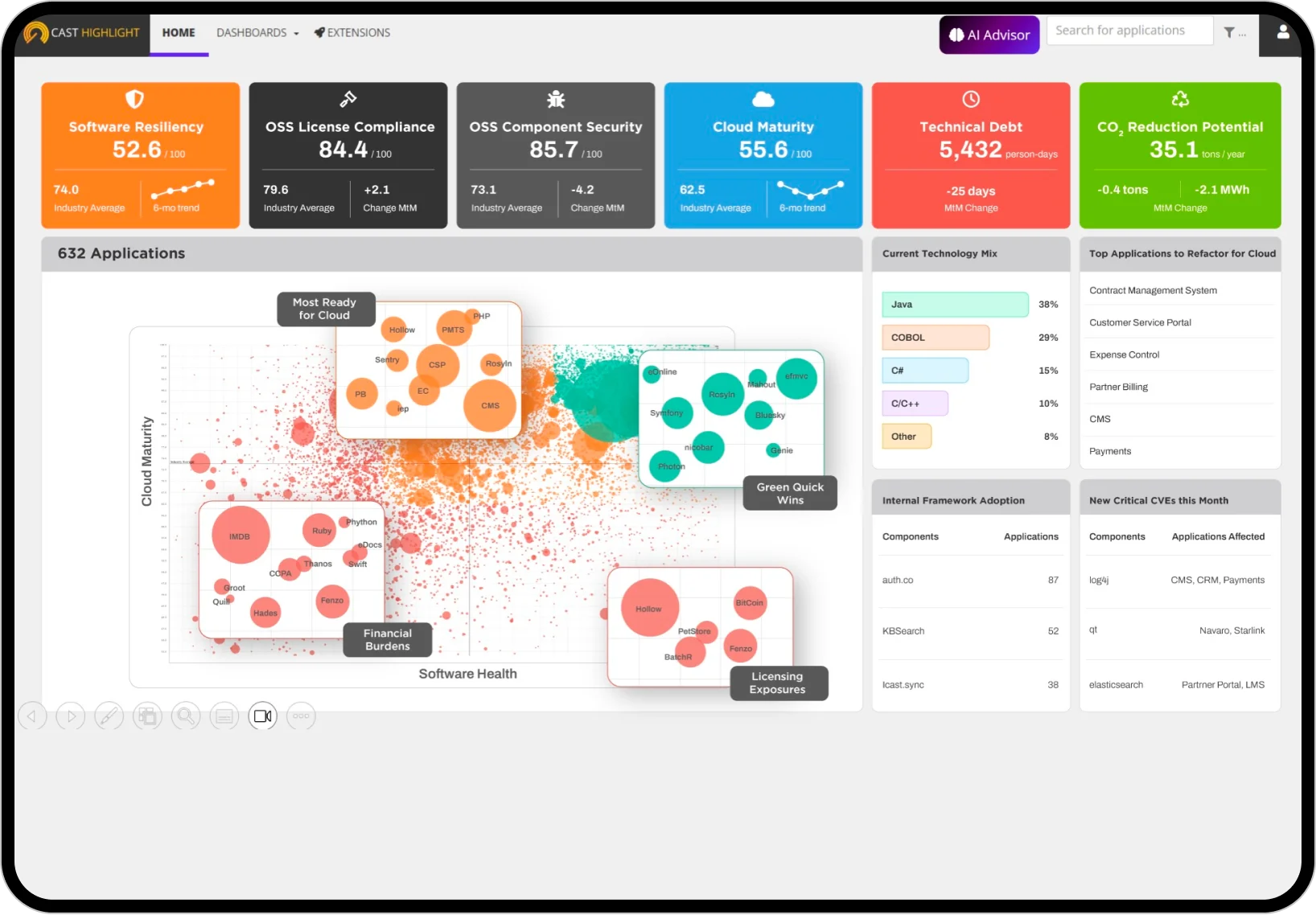
Unlike pure SCA tools that focus on vulnerability detection, CAST Highlight assesses applications across multiple dimensions: cloud readiness, software composition risks, technical debt, and business value alignment.
I would reach for CAST Highlight for portfolio-level decisions where cloud readiness, technical debt, open-source risk, and business context all matter.
What is CAST Highlight?
CAST Highlight scans source code to inventory open-source components, map vulnerabilities, identify cloud blockers, and measure technical debt. It pairs this with business-context questionnaires to add the qualitative signal that technical metrics alone miss.
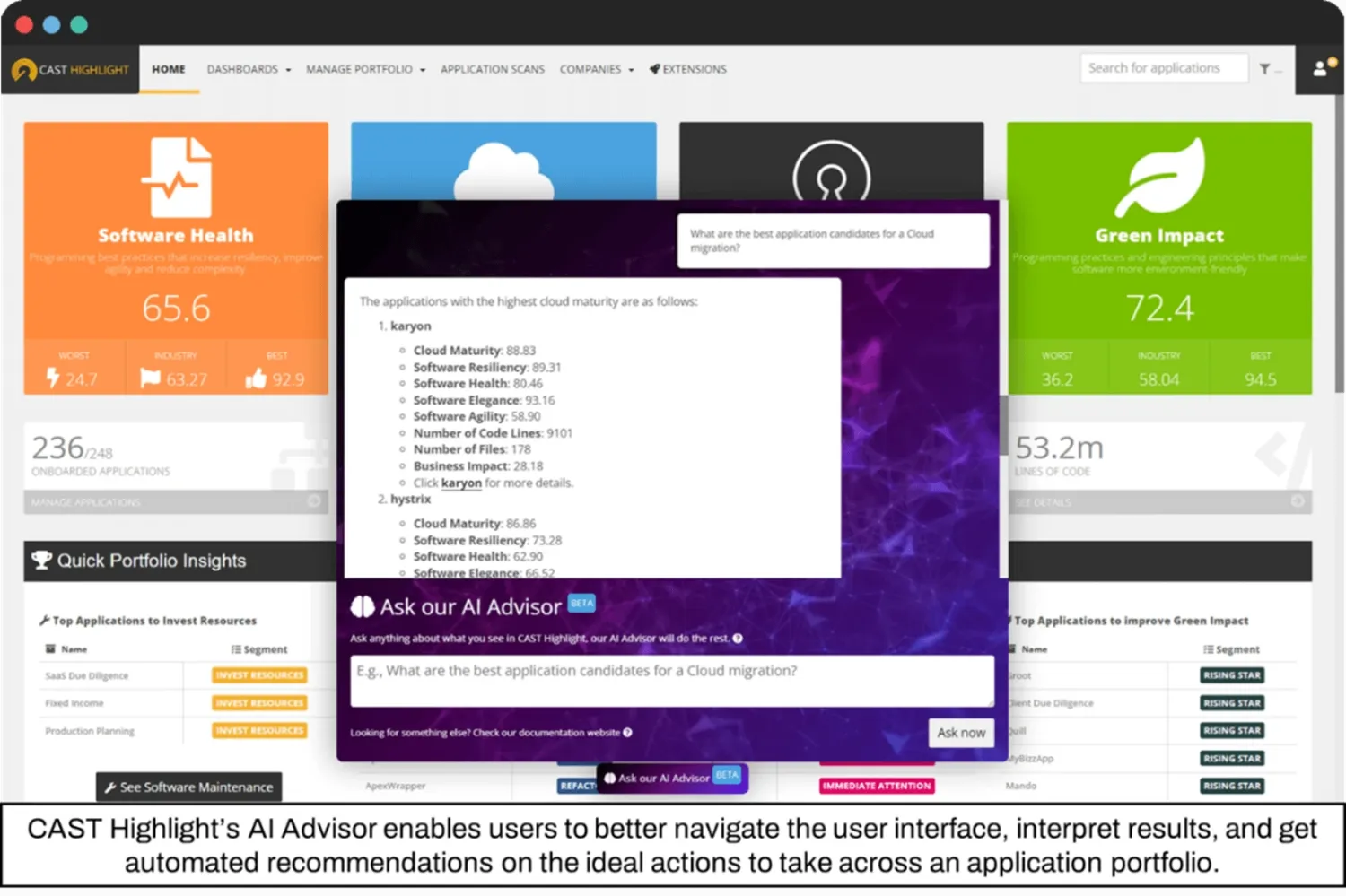
The 2026 release adds an AI Acceleration module. It flags applications suited to AI augmentation, recommends best-fit AI and LLM services, and scores Agentic Readiness against 40+ code criteria.
| Dimension | What CAST Highlight reports |
|---|---|
| Portfolio-scale analysis | Consistent scoring, executive dashboards, and trend tracking across hundreds of applications in days |
| Cloud maturity | Cloud blockers, containerization readiness, effort estimates, and platform recommendations for AWS, Azure, GCP, Oracle, and IBM |
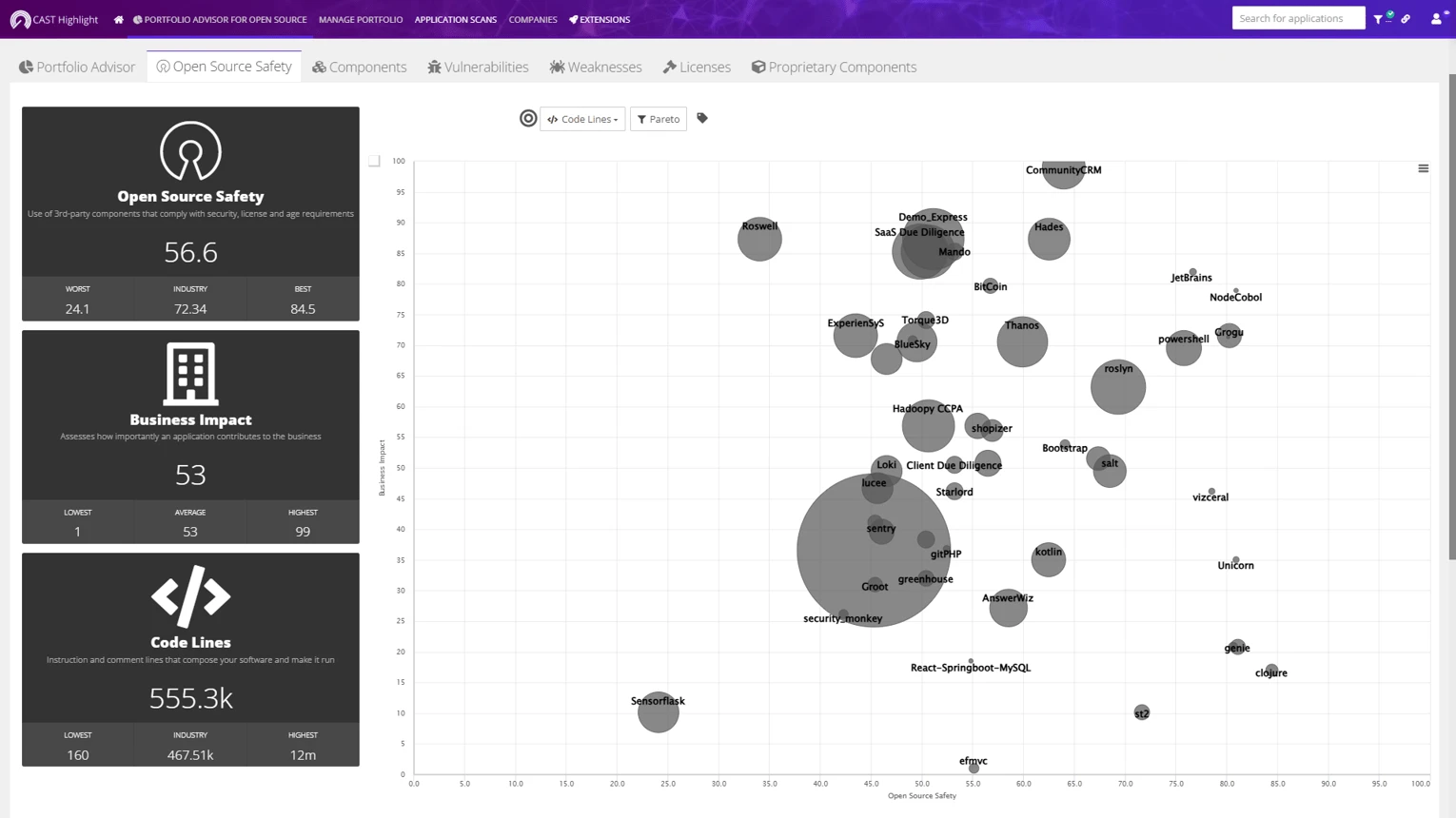
| Software composition | OSS inventory, CVE and known-exploit mapping, license exposures, obsolescence, and transitive dependencies |
| AI acceleration | AI-augmentation opportunities, best-fit LLM services, and Agentic Readiness against 40+ criteria |
What are CAST Highlight’s key features?
Supported technologies
| Category | Technologies |
|---|---|
| Enterprise | Java, C#, COBOL, ABAP, PL/SQL, RPG |
| Web | JavaScript, TypeScript, PHP, Ruby, Python |
| Systems | C, C++, Go, Rust |
| Mobile | Swift, Kotlin, Objective-C |
| Data | SQL, R, MATLAB |
| Other | Scala, Perl, Shell, PowerShell |
| Total | 50+ technologies with automatic detection |
SBOM generation
CAST Highlight generates and imports SBOMs in the two dominant machine-readable standards, then lets you export component data for stakeholder reporting.
| Format | Output type |
|---|---|
| CycloneDX | Standard machine-readable SBOM |
| SPDX | ISO/IEC 5962 standard SBOM format |
| Document exports | Component data for stakeholder-facing reports |
OSS detection behind these exports draws on a knowledge base of 100M+ open-source components.
Portfolio-scale analysis
Scan hundreds of applications in days. Automatic technology detection across 50+ technologies applies one consistent scoring methodology.
Executive dashboards show comparative analysis and trend tracking over time.
Software composition analysis
Component inventory with version tracking, CVE vulnerability mapping, license compliance identification, risk scoring, obsolescence detection, and SBOM generation in standard formats.
Cloud readiness assessment
Identifies cloud blockers (stateful components, filesystem dependencies), provides platform-specific recommendations (AWS, Azure, GCP), scores containerization readiness, and estimates refactoring effort.
Technical debt analysis
Measures code complexity, maintainability scoring, dead code detection, architectural anti-pattern identification, and remediation effort estimation.
Dependency scanning and supported languages
CAST Highlight runs dependency scanning as part of its SCA Insights module. The Code Reader parses package manifests and source across 25+ languages and frameworks — Java, C#, JavaScript, TypeScript, Python, PHP, Ruby, Go, C/C++, Swift, Kotlin, Scala, plus enterprise stacks like COBOL, ABAP, PL/SQL, and RPG. Each scan classifies components, maps vulnerabilities, and records license information for every direct dependency in the manifest.
Scan depth vs CAST Imaging
CAST Highlight’s strength is portfolio-scale throughput — hundreds of applications in days — not deep architectural introspection. Teams that need call-graph-level analysis of a single application typically run CAST Imaging alongside Highlight; Highlight is the portfolio lens, Imaging is the code-understanding microscope.
Transitive dependencies and malicious package detection
CAST Highlight surfaces transitive dependencies through the Code Reader’s OSS Dependency Map. Direct components in the manifest are expanded into their downstream libraries, and each transitive node inherits its own CVE and license metadata. Transitive depth is controlled by scan configuration — the default scan has to be explicitly tuned to include the full transitive graph.
On malicious-package detection, CAST Highlight is honest about its lane: it is built for portfolio-level intelligence and open-source risk posture rather than real-time supply-chain attack detection. Typosquat and maintainer-compromise flags are not the product’s focus. Teams that need active supply-chain-attack catchup typically pair CAST Highlight with a runtime-focused SCA such as Socket or Snyk Open Source for npm-and-PyPI malicious-package coverage.
Scanning and automation
CAST Highlight scans code with the Java-based HighlightAutomation agent. It runs locally against your source, then uploads results — not source code — to the SaaS portal, which is what keeps the analysis compatible with air-gapped review processes.
The same agent runs headless, so a scan can be wired into a CI/CD job or scheduled batch. CAST documents the command-line workflow in its automated code scan guide , and a public REST API exposes application and component data for reporting integrations.
For developers, VS Code and browser extensions surface cloud-maturity and open-source insights closer to where code is written, rather than only in the central portal.
Getting started
Setup is portal-first. You create a company workspace, define applications, then run the agent against each codebase and complete the short business-context survey that feeds the qualitative scores.
The decision most teams get wrong is scope: an “application” is a named unit in the portal, and each portfolio needs its own subscription. Size the portfolio tier before onboarding, since pricing and the dashboard rollups both key off that boundary.
When to use CAST Highlight
CAST Highlight is the right choice for organizations managing large application portfolios that need strategic decision support alongside SCA capabilities.
Strengths:
- Portfolio-level visibility across hundreds of applications
- Cloud readiness assessment with migration planning
- 50+ technology support including COBOL and ABAP
- SBOM generation and import in CycloneDX and SPDX
- AI Acceleration and Agentic Readiness scoring (2026 release)
Limitations:
- Not designed for real-time CI/CD build blocking
- SCA capabilities lighter than dedicated tools
- Better for strategic analysis than daily vulnerability management
- Commercial only
Further reading: What is SCA? | What is SBOM?
How much does CAST Highlight cost?
CAST Highlight is a SaaS subscription, licensed by application-portfolio size and edition rather than per-user. The castsoftware.com/highlight/pricing page lists four editions — Complete, Cloud Insights, SCA Insights, and Green Insights — scaled across portfolio-size tiers (up to 25, 100, 250, 500, and 1,000 applications).
For a single application, CAST publishes a figure: $6.8K / €6.3K per named application per year, without the concierge services. Larger portfolios are quoted through sales. Annual renewal is automatic with a 60-day cancellation notice.
The edition names map to what the scan covers. Complete bundles Core, AI Acceleration Insights, Cloud Insights, SCA Insights, Green Insights, the SBOM Manager extension, and the AI Advisor; the narrower editions peel those modules off to fit one portfolio question (cloud migration, OSS risk only, resource efficiency). There is no permanent free tier — CAST offers a 14-day risk-free trial instead.
Re-check the pricing page before budgeting — CAST adjusts edition bundles between releases.
What are alternatives to CAST Highlight?
CAST Highlight sits in a thin competitive slice — portfolio-level analysis plus lightweight SCA. The closest alternatives each replace a subset of what it covers.
Snyk Open Source
Snyk Open Source is the developer-grade CI/CD SCA that most teams pair with CAST Highlight rather than compare head-to-head. Snyk wins when the primary need is day-to-day vulnerability remediation inside pipelines; CAST Highlight wins when the need is a portfolio-wide view across dozens of applications and stakeholder-ready SBOM exports.
Black Duck
Black Duck is the classic enterprise SCA with deeper license-compliance tooling and broader binary-analysis support. Black Duck fits when legal and compliance depth is the core requirement; CAST Highlight fits when cloud-readiness and technical-debt framing sit alongside the SCA layer.
Mend SCA
Mend SCA pairs SCA with Renovate-powered dependency-update automation. Mend is the right pick when the need is continuous remediation PRs across a polyglot portfolio; CAST Highlight doesn’t ship update automation and instead frames findings as portfolio-risk rollups for planning.
Sonatype Lifecycle
Sonatype Lifecycle is a policy-heavy SCA centered on artifact-repository enforcement (Nexus Repository). Sonatype is the right pick when the control point is the artifact pipeline; CAST Highlight is a different layer — strategic portfolio analysis rather than build-time policy gating.
For broader context, see the SCA tools overview and open-source SCA tools .
CAST Highlight FAQ
What best describes CAST Highlight?
CAST Highlight is a SaaS software intelligence platform for portfolio-level analysis — cloud readiness, technical debt, open-source risk, and SBOM export across hundreds of applications in days. It is not a developer-pipeline SCA scanner; it is the portfolio lens that executives, architects, and procurement use on top of pipeline-level tools.
What languages does the Code Reader support?
The Code Reader parses 25+ languages and frameworks, including Java, C#, JavaScript, TypeScript, Python, PHP, Ruby, Go, C/C++, Swift, Kotlin, Scala, COBOL, ABAP, PL/SQL, and RPG. The supported-technologies table on this page lists the groupings CAST Highlight uses internally.
Can CAST Highlight replace a traditional SCA tool like Snyk?
No — and the vendor doesn’t position it that way. CAST Highlight’s SCA Insights module covers inventory, CVE mapping, license signals, and SBOM export at the portfolio level. Teams that need day-to-day, developer-facing vulnerability management typically keep Snyk Open Source or a similar pipeline tool and use CAST Highlight for cross-portfolio risk rollups.
Is CAST Highlight SaaS or on-prem?
CAST Highlight is SaaS. The Code Reader / HighlightAutomation CLI runs locally to analyze source, but scan results upload to CAST’s SaaS platform for dashboards, portfolio rollups, and SBOM export. There is no advertised on-prem deployment of the analysis platform itself.
How long does a portfolio scan take?
Vendor marketing frames it as “hundreds of applications in days.” Actual wall time depends on portfolio size, codebase sizes, and how much transitive depth you enable in scan configuration; single-application scans typically finish within minutes once the Code Reader is tuned.