


Burp Suite is a widely used toolkit for web application security testing, popular among penetration testers and security researchers.
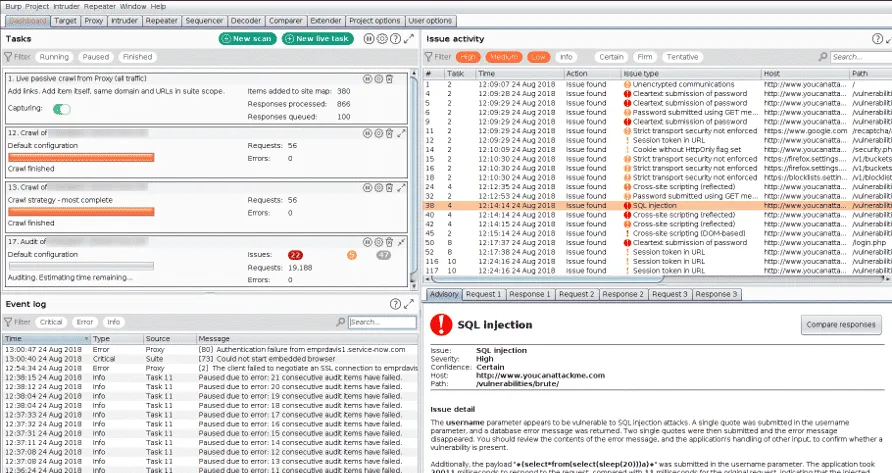
Developed by PortSwigger, pre-installed in Kali Linux, and backed by over two decades of web security research.
PortSwigger’s free Web Security Academy — which the vendor says is used by millions of learners — is built on the same vulnerability research that powers Burp Suite’s detection engine.
Three editions: Community (free), Professional ($499/year), and Burp Suite DAST (formerly Enterprise) for automated CI/CD scanning.
What are Burp Suite’s key features?
| Feature | Details |
|---|---|
| Editions | Community (free), Professional ($499/yr), DAST (enterprise) |
| Proxy | Intercepting proxy for HTTP/HTTPS/WebSocket |
| Scanner | Active and passive vulnerability scanning (Pro/DAST) |
| Extensions | Hundreds of BApps in the BApp Store |
| Attack tools | Intruder (Sniper, Battering Ram, Pitchfork, Cluster Bomb) |
| AI | Burp AI for scan analysis and attack suggestions |
| CI/CD | Docker-based scanning for DAST edition |
| Vuln coverage | XSS, SQLi, CSRF, XXE, SSRF, directory traversal, and more |
I run authenticated dynamic scans against logged-in user sessions, with form-based, OAuth, scripted, or header-based auth profiles handling the multi-step login. Burp does API security testing (black-box) against REST, GraphQL, SOAP, and WebSocket endpoints, with Repeater handy for one-off endpoint poking and the scanner for active probing across the discovered surface.
| Capability | Details |
|---|---|
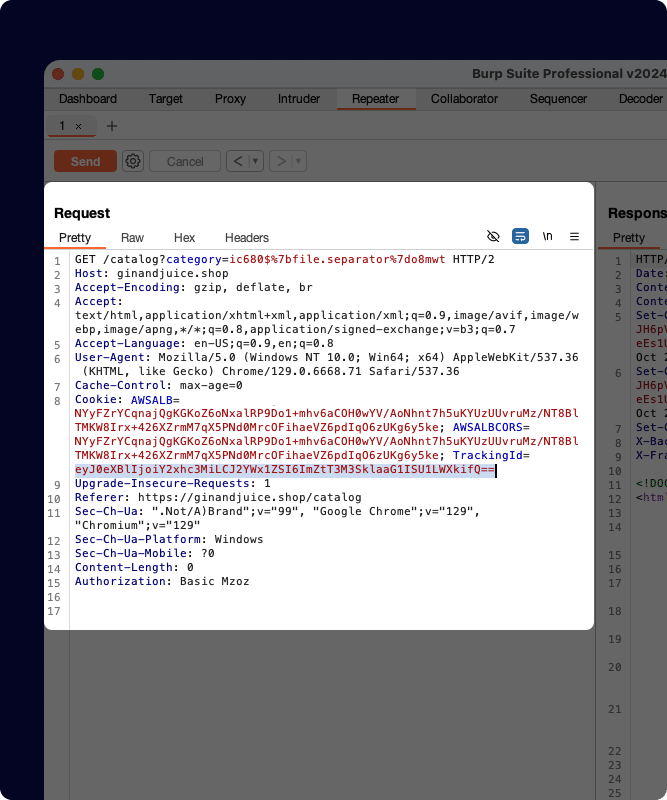
| Intercepting Proxy | The core of Burp Suite. Sits between your browser and the target, capturing every HTTP/HTTPS request and response. Inspect, modify, and replay traffic in real-time. Handles TLS interception, WebSocket messages, and match-and-replace rules. |
| Scanner (Pro/DAST) | Automated vulnerability detection with active probing and passive analysis. Covers OWASP Top 10 and beyond. Configurable scan profiles let you tune speed vs. thoroughness. The DAST edition runs from a Docker container for CI/CD integration. |
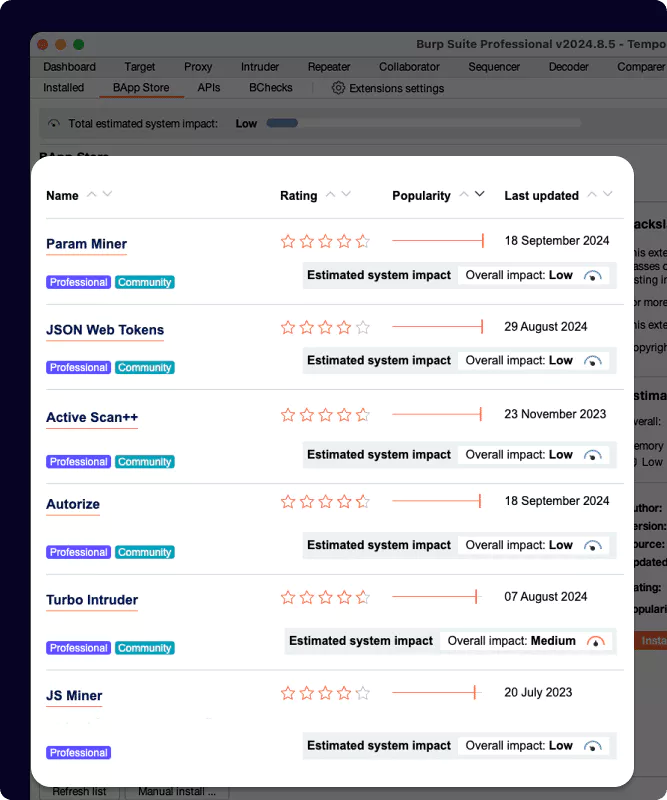
| BApp Store | Hundreds of community and PortSwigger extensions. Active Scan++ for deeper scanning, Autorize for access control testing, JWT Editor for token manipulation, Logger++ for traffic analysis. Write your own in Java or Python. |
Pick your next step
See alternatives
Side-by-side review of every Burp Suite competitor I've tested, from free scanners to enterprise DAST.
→Free open-source pick
OWASP ZAP is the closest free alternative — full proxy, scanner, and scripting without the $499/yr Pro license.
→DAST primer
If you're new to dynamic testing, this guide explains where Burp fits in the broader DAST workflow.
→What manual testing tools does Burp Suite include?
The manual testing tools are what separate Burp from automated-only DAST scanners:
- Repeater — Send individual requests and iterate. Modify parameters, headers, and payloads to probe application behavior one request at a time.
- Intruder — Automated attack tool for fuzzing and brute-forcing. Four attack types: Sniper (single position), Battering Ram (same payload everywhere), Pitchfork (parallel payloads), Cluster Bomb (all combinations).
- Comparer — Diff two responses to spot subtle differences in application behavior.
- Decoder — Encode and decode data in various formats (Base64, URL, hex, HTML).
- Sequencer — Analyze the quality of randomness in tokens and session IDs.
What are the differences between Burp Suite editions?
Community Edition — Free. Manual testing tools with throttled scanning.
Good for learning and basic assessments. No automated scanner.
Professional — $499/year. Full automated scanner, unthrottled Intruder, all manual tools, BApp Store access, Burp AI. The go-to for individual pentesters and security researchers.
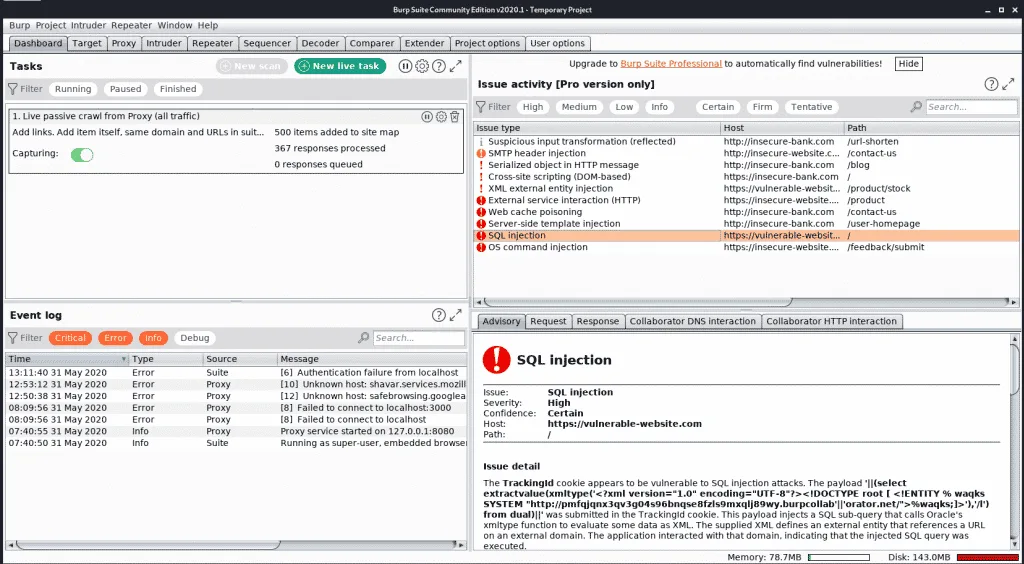
Burp Suite DAST — Formerly Enterprise Edition, renamed April 2025. Designed for teams and CI/CD.
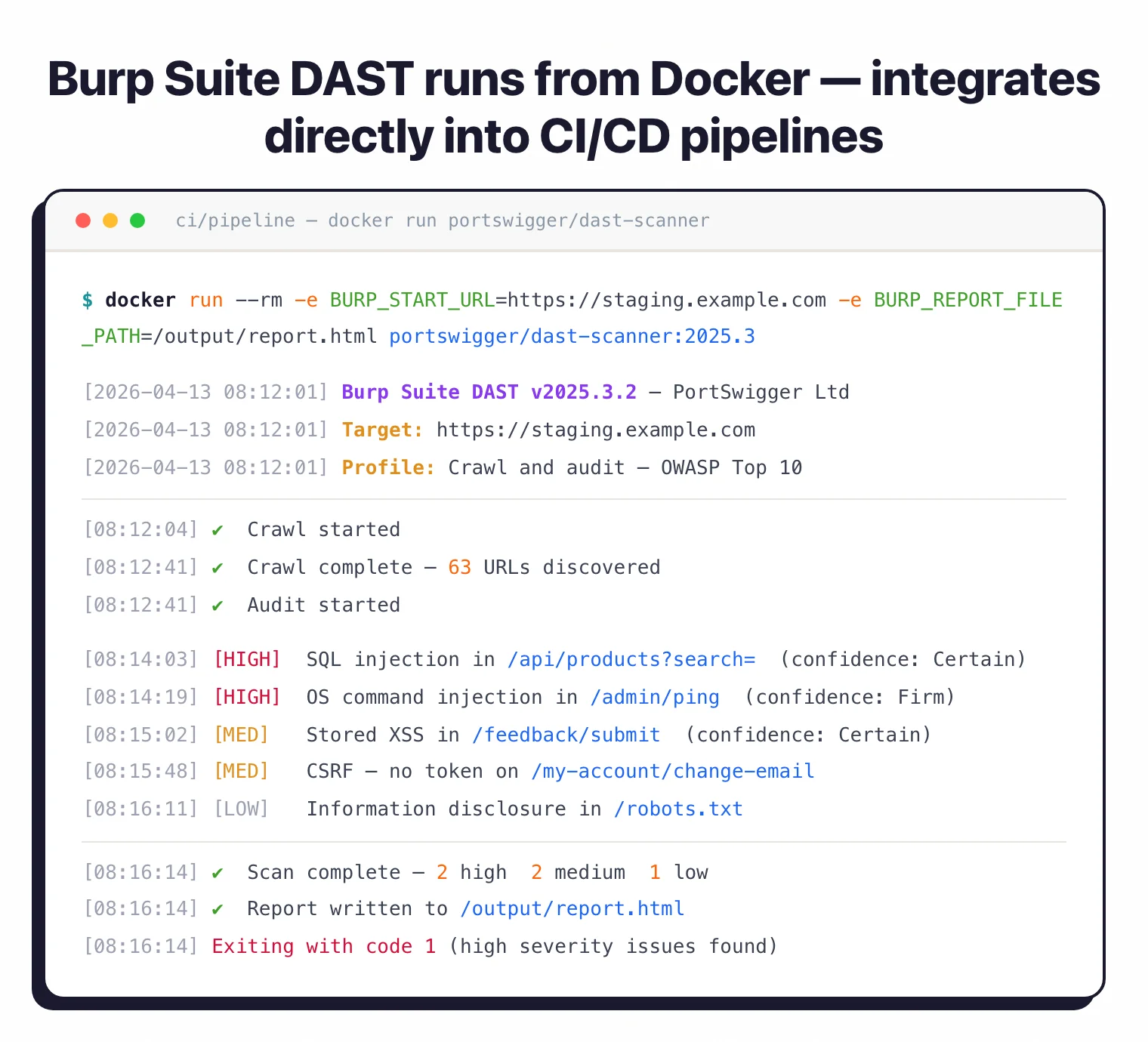
Runs from Docker containers. Supports Jenkins, GitHub Actions, GitLab CI, Azure DevOps, and TeamCity. Cloud-hosted or self-hosted options.
What does Burp Suite integrate with?
 Jenkins
 GitHub Actions
 GitLab CI
 Azure DevOps
 TeamCity
GitLab
TeamCity
GitLab Jira
Jira Trello
 Slack
Slack Splunk
The DAST edition supports custom extensions, BChecks, and BApps in CI-driven scans.
How do I get started with Burp Suite?
- Download and install — Get Community or Professional from portswigger.net. Runs on Windows, macOS, and Linux. Pre-installed in Kali Linux.
- Configure your browser — Burp listens on 127.0.0.1:8080 by default. Set your browser to use this proxy, or use Burp’s built-in Chromium browser with the CA certificate pre-installed.
- Browse and capture — Navigate your target application. Burp captures all traffic in the HTTP history. Use scope settings to filter out irrelevant domains.
- Test and scan — Send interesting requests to Repeater for manual testing or Intruder for automated attacks. Run active scans (Pro/DAST) against specific endpoints or the entire target.
- Report — Export findings as HTML, XML, or push to issue trackers. The DAST edition generates JUnit and Burp XML for CI/CD integration.
How to use Burp Suite
After install, my typical workflow is: launch Burp’s built-in Chromium browser (CA cert pre-installed), browse the target to populate the proxy history, then send interesting requests to Repeater for one-off poking or to Intruder for fuzzing. Active scans run against specific endpoints or the entire site map.
I trigger scans from the desktop UI for manual work and from the DAST edition’s Docker container for CI/CD pipelines. A typical pipeline call mounts a config file, points at a target URL, and exits non-zero on a severity threshold so the build fails on high-severity findings.
Triage happens in the Issues panel. Each finding ships with severity, evidence, and remediation guidance, and selected issues push to Jira, GitLab, or Splunk via the integration layer. The BApp Store is the standard answer when a workflow needs JWT manipulation, access-control testing, or content discovery beyond what ships in the box.
What are Burp Suite’s limitations?
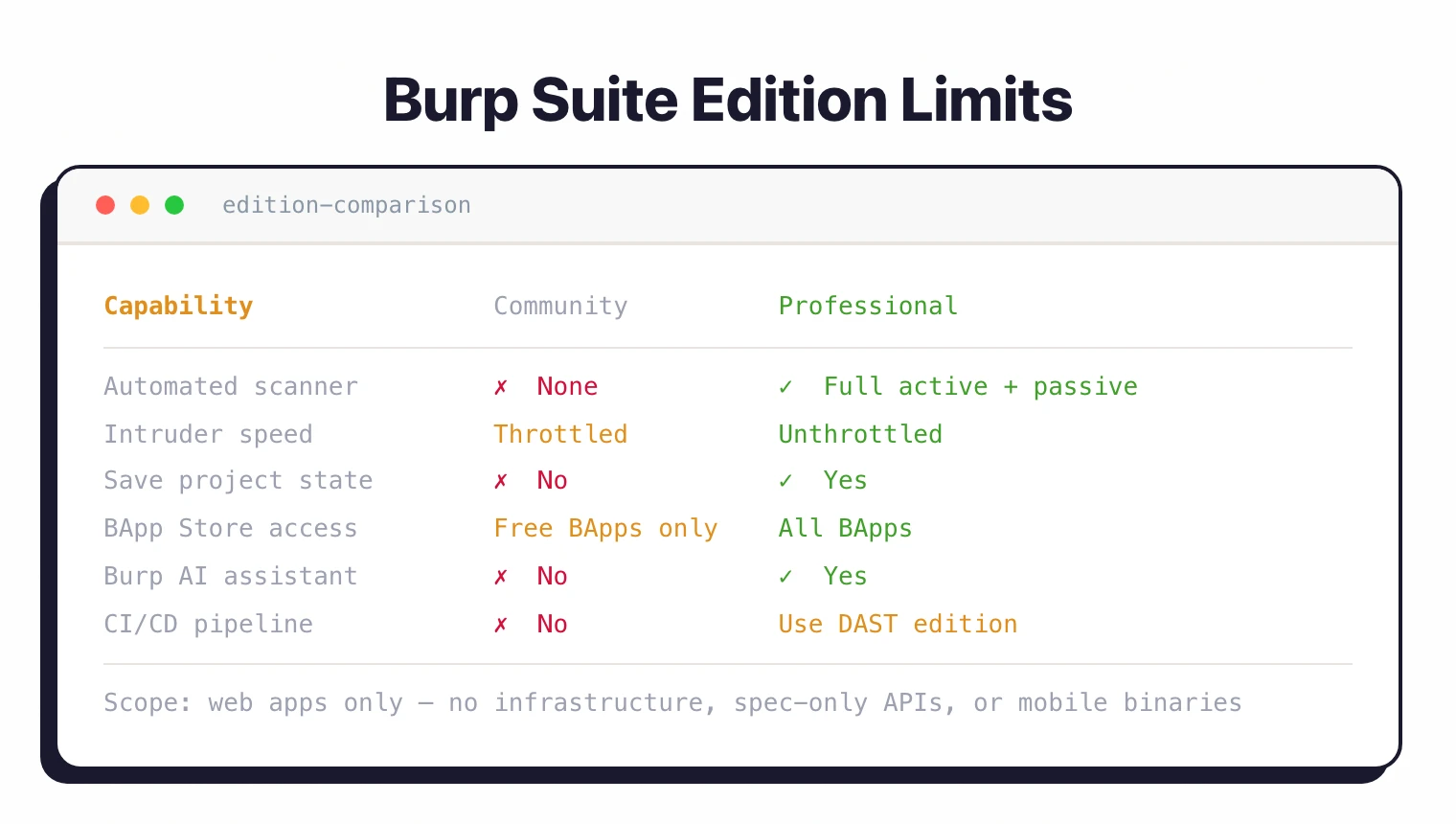
The Community Edition is severely limited for real-world work. Scan speeds are throttled, and you cannot save projects.
If you are serious about web security testing, you need at least Professional.
Burp Suite is focused on web applications. It does not scan infrastructure, APIs defined only by specifications (without a running server), or mobile application binaries.
For developer-friendly automated DAST without manual testing, consider Bright Security or StackHawk .
For autonomous fuzzing powered by DARPA CGC technology, see Mayhem . For open-source alternatives, see ZAP .
For a full rundown of options, see the Burp Suite alternatives guide.
Burp Suite is a DAST tool — see what is DAST for background on dynamic testing. It does not replace SAST , though it pairs well with static tools for full coverage.
How much does Burp Suite cost?
Three editions, two with public pricing.
Community Edition is free. Manual testing tools with throttled scanning, no automated scanner, and no project save. Useful for learning and small ad-hoc assessments.
Burp Suite Professional is $499 per user, per year, billed annually on portswigger.net/buy. Includes the full automated scanner, unthrottled Intruder, all manual tools, BApp Store access, and Burp AI.
Burp Suite DAST (formerly Enterprise Edition) is the CI/CD scanner with team management, scheduled scans, and Docker-based deployment. PortSwigger does not publish a public list price for DAST — pricing is on request via the sales team. Cloud-hosted and self-hosted options are both available.
What determines cost: edition (Pro is per-user, DAST is per-scan-target plus seats), license duration (annual vs multi-year), and add-ons such as Burp AI tokens for the DAST edition.
Burp Suite vs OWASP ZAP
Burp Suite Pro is $499/year with a polished UI and a wider spread of detected vulnerability types than ZAP’s default configuration. OWASP ZAP is fully free under Apache 2.0 with a YAML automation framework and GitHub Actions integration.
Pick Burp when manual testing flexibility is the priority. The BApp Store extensions and Repeater workflow are hard to match elsewhere. Pick ZAP when budget is the constraint or when CI/CD-driven scans matter more than manual proxy work.
ZAP’s automation framework lets you script scans in YAML without licensing concerns. Burp’s DAST edition has comparable CI/CD coverage but with separate licensing.
For full benchmark numbers and license comparison, see Burp Suite vs ZAP .
Burp Suite vs Nuclei
Nuclei takes a template-first approach with ProjectDiscovery’s 11,000+ community YAML templates that run in seconds. Burp Suite’s scanner uses PortSwigger’s research-backed detection engine across the OWASP Top 10 and beyond.
Nuclei wins on speed and CVE coverage. Point it at a target and it tests every known vulnerability template in under a minute. Burp wins on depth and false-positive control, especially for authenticated scans and complex multi-step flows.
I run Nuclei first for fast surface-level coverage, then Burp Pro for the harder authenticated and business-logic testing. The two tools sit at different layers of a DAST stack.
For Docker setup, template authoring, and authenticated scan comparisons, see Nuclei vs Burp Suite .
Burp Suite vs Invicti
Invicti is the enterprise pick with proof-based scanning, multi-team RBAC, and ASPM via the Kondukto acquisition. Burp Suite is built around manual testing. The Pro edition is a desktop toolkit, and the DAST edition adds CI/CD scanning.
Invicti’s proof-based scanning auto-verifies vulnerabilities by safely exploiting them, which Invicti says cuts false positives sharply on managed AppSec programs. Burp’s strength is depth in the hands of an experienced tester, not autonomous verification.
Pick Invicti when scanning depth, RBAC, and proof-of-exploit matter more than manual-testing flexibility. Pick Burp when human-driven testing and the BApp ecosystem are the primary requirements.
For pricing and feature breakdowns, see Invicti vs Burp Suite .
What are alternatives to Burp Suite?
If Burp Suite does not fit, four alternatives cover most exit paths.
ZAP is the closest free peer — full intercepting proxy, automated scanner, and YAML automation framework at zero cost. Pick it when budget is the constraint and your team has the security expertise to tune the configuration.
Invicti is the enterprise pick — proof-based scanning, multi-team RBAC, and ASPM via the Kondukto acquisition. Pick it when scanning depth and proof-of-exploit matter more than manual-testing flexibility.
Nuclei takes a template-based approach with ProjectDiscovery’s 11,000+ community templates. Pick it for fast, precise checks across CVEs, misconfigurations, and exposed panels.
StackHawk wraps ZAP for CI/CD with developer-friendly YAML configuration. Pick it when developer-owned pipeline scans matter more than manual proxy work.
Dastardly is PortSwigger’s free CI/CD scanner that uses the Burp Scanner engine in a Docker container with a 10-minute scan cap. Pick it when you want Burp-engine results in pipelines without the DAST edition’s licensing.