


Bright Security (formerly NeuraLegion) is a developer-first dynamic application security testing (DAST) platform that integrates into CI/CD pipelines and delivers findings with less than 3% false positives.
Unlike traditional DAST tools aimed at security teams, Bright is designed for developers who need scan results inside their pull requests, not in a quarterly report.

Coverage spans OWASP Top 10, API Top 10, and LLM Top 10 vulnerabilities — making it one of the few DAST tools with explicit support for AI-specific risks like prompt injection and insecure output handling.
According to the Verizon DBIR , web application attacks remain one of the top breach vectors, making CI/CD-integrated DAST scanning increasingly important.
Bright holds ISO 27701, ISO 27001, SOC 2, and Cyber Essentials certifications.
What are Bright Security’s key features?
| Feature | Details |
|---|---|
| False positive rate | Less than 3% |
| Vulnerability coverage | OWASP Top 10, API Top 10, LLM Top 10 |
| Deployment | SaaS, Docker, CLI, Kubernetes |
| API scanning | OpenAPI/Swagger, GraphQL, HAR file replay |
| Remediation | AI-powered fix generation and validation |
| CI/CD support | GitHub Actions, GitLab CI, Jenkins, Azure DevOps |
| IDE support | VS Code, IntelliJ |
| Certifications | ISO 27701, ISO 27001, SOC 2, Cyber Essentials |
I run authenticated dynamic scans against logged-in user sessions, with header-based, form-based, OAuth, or scripted auth profiles handling the multi-step login. The scanner does API security testing (black-box) against REST and GraphQL endpoints by ingesting OpenAPI/Swagger specs or HAR file replays. SQL injection / XSS probing fires payload mutation across discovered parameters, and the AI validation loop confirms each finding before it lands in the dashboard.
| Capability | Details |
|---|---|
| Developer-First Design | Built for developers from day one. CLI tools, Docker scanners, IDE integrations, and Git-aware scanning that understands branches and pull requests. Findings include code-level remediation guidance. |
| AI Vulnerability Validation | Every finding gets validated automatically by the AI engine. Context-aware payload generation and automated exploit confirmation keep false positives under 3%. |
| Bright STAR | Next-gen platform combining DAST, IAST, and API security. Adds automated remediation with AI-generated fixes and a validation loop that confirms fixes actually work. |
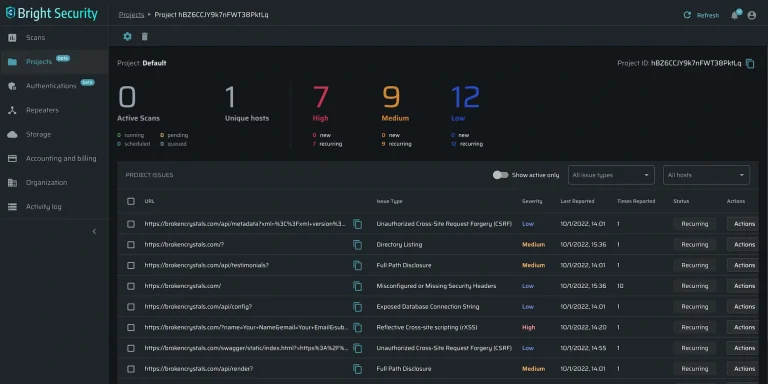
Scanning Modes
Bright supports multiple ways to define your scan target:
- Crawler — Point it at a URL and let it discover pages and endpoints automatically
- HAR file replay — Import recorded HTTP traffic and replay it with attack payloads
- OpenAPI/Swagger — Import your API specification for structured API testing
- GraphQL — Introspect and test GraphQL schemas
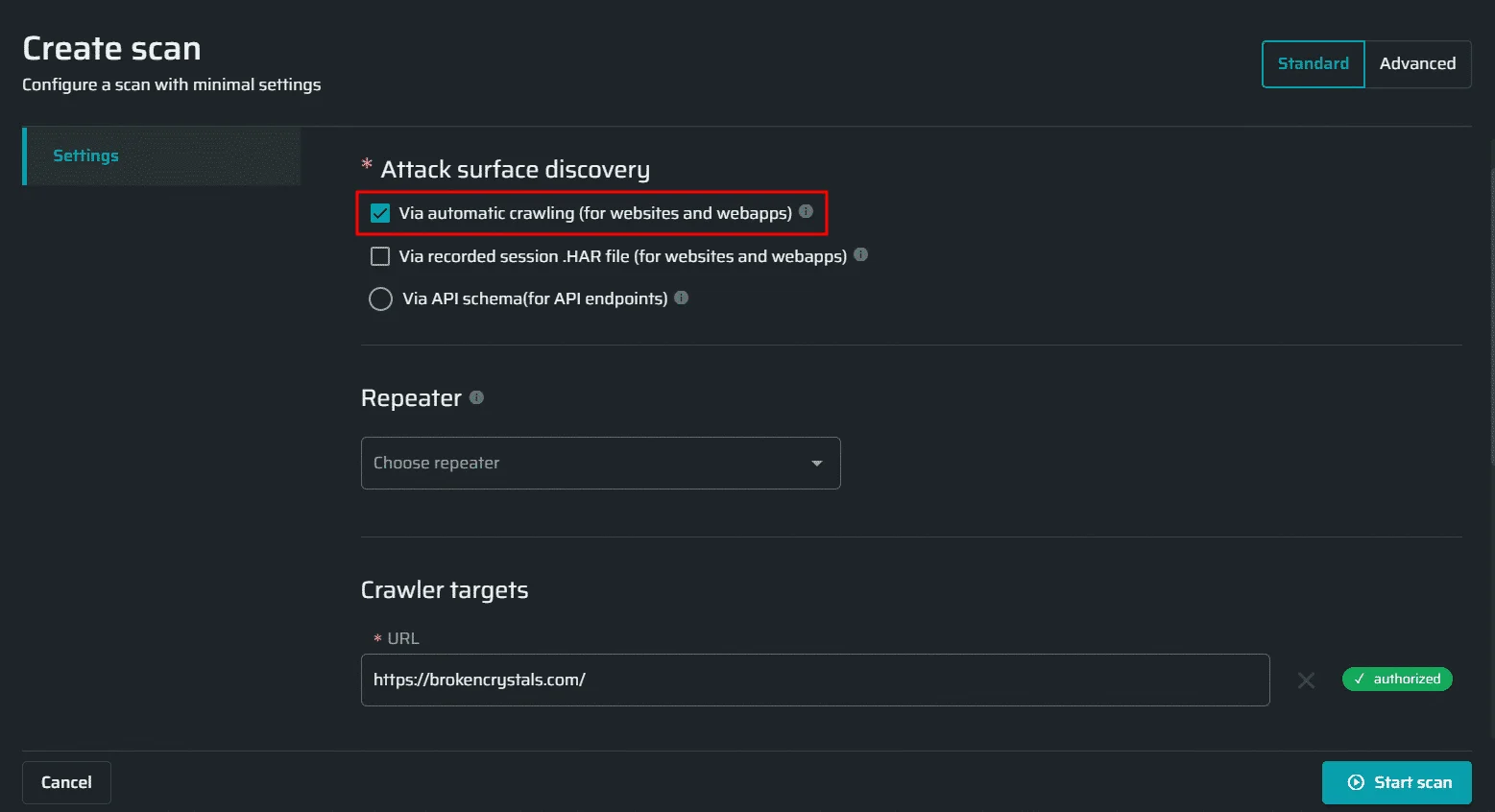
Docker and CLI Scanner
Run scans locally or in CI/CD without depending on the SaaS platform:
# Docker scan
docker run --rm brightsec/cli:latest scan:run \
  --token $BRIGHT_API_TOKEN \
  --name "My App Scan" \
  --crawler https://example.com

# CLI scan with uploaded archive (HAR or API spec)
# First upload your HAR file or OpenAPI spec:
# bright-cli archive:upload --token $BRIGHT_API_TOKEN --archive ./traffic.har
# Then run the scan using the returned archive ID:
bright-cli scan:run \
  --token $BRIGHT_API_TOKEN \
  --name "Archive Scan" \
  --archive ARCHIVE_ID
What does Bright Security integrate with?
 GitHub Actions
 GitLab CI
 Jenkins
 Azure DevOps
 VS Code
 IntelliJ
 Jira
Jira Slack
SlackFor broader context, see the DAST tools landscape and the CI/CD-native peer StackHawk .
How do I get started with Bright Security?
- Install the CLI —
npm install -g @brightsec/clior pull the Docker imagebrightsec/cli:latest. - Authenticate — Pass your API token via the
--tokenflag on each command. - Define your target — Choose a scan method: crawler URL or upload a HAR file / OpenAPI spec via
bright-cli archive:upload. - Run and wait — Launch the scan. Use
bright-cli scan:pollingto wait for completion and fail on severity thresholds. - Review in dashboard or IDE — Findings appear in the web dashboard, VS Code, or IntelliJ with remediation guidance and code-level context.
How to use Bright Security
After install, my typical workflow is: pick a scan method (crawler, HAR replay, OpenAPI spec, or GraphQL introspection), upload the artifact via bright-cli archive:upload, then launch the scan with bright-cli scan:run. Auth tokens pass via --token on every command.
I trigger scans from the CLI for ad-hoc work and from the GitHub Actions / GitLab CI / Jenkins integrations for pipelines. A typical pipeline call uses bright-cli scan:polling to wait for completion and fail the build on a severity threshold (e.g., --break critical,high).
Triage happens in the dashboard, VS Code, or IntelliJ. Each finding ships with code-level remediation guidance, and the AI validation loop is the differentiator — Bright reports under 3% false-positive noise, so confirmed exploits land in front of developers instead of triage queues.
Performance Claims
Bright publishes several customer metrics from production deployments:
- 98% improvement in vulnerability remediation rates
- 10x more vulnerabilities fixed within the development process
- 50% reduction in remediation time through the AI validation loop
- 70% reduction in preliminary scan man-hours (ProCircular case study)
The <3% false positive rate is the key driver of the remediation improvement: developers act on findings they trust.
Development teams practicing DevSecOps who want DAST results in their pull requests, not a quarterly security report. The less-than-3% false positive rate means developers trust the findings enough to act on them.
The Docker and CLI scanners work well in air-gapped or on-premises environments.
What are Bright Security’s limitations?
Unlike Burp Suite , Bright does not include an intercepting proxy or manual request manipulation. Burp Suite is the better choice for hands-on security research and pen testing; Bright is optimized for automated CI/CD scanning.
Unlike Invicti or Acunetix , Bright’s reporting is developer-oriented rather than compliance-oriented. For audit-ready enterprise reports, Invicti or Acunetix are stronger options.
The scanner does not cover infrastructure or network-level vulnerabilities. Pair it with SAST for code-level analysis.
For more on how DAST and SAST complement each other, see the SAST vs DAST vs IAST comparison . You can also explore free DAST tools if budget is a constraint.
What are alternatives to Bright Security?
If Bright Security does not fit, four alternatives cover most exit paths.
StackHawk is the closest peer — CI/CD-native ZAP wrapper with YAML configuration. Pick it when you want a mature pipeline-first DAST built on the open-source ZAP engine.
Burp Suite Professional is the manual-testing toolkit. Pick it when a hands-on pentester drives the work and BApp Store extensibility matters more than CI/CD automation. PortSwigger publishes Burp Suite Pro at $475 per user as of 2026.
Invicti is the enterprise pick — proof-based scanning, multi-team RBAC, and ASPM via the Kondukto acquisition. Pick it when you need centralized portfolio management and compliance-grade reports.
ZAP is the most capable free DAST. Pick it when budget is the constraint and your team has the security expertise to tune the configuration.