


Aikido Security is an ASPM platform used by over 50,000 organizations and 100,000+ teams.
The Belgian company bundles SAST, DAST, SCA, container scanning, secrets detection, CSPM, IaC scanning, and runtime protection into one platform. AutoTriage cuts alert noise by 95%.
Founded in 2022 in Ghent, Belgium, with a San Francisco office, Aikido is SOC 2 Type II and ISO 27001:2022 certified. Public customers — visible on the Aikido customers page — include Revolut, Niantic, Premier League, SoundCloud, Visma, Pendo, and n8n.
What is Aikido Security?
The platform splits into four areas, each covering a different part of the security problem:
| Capability | Details |
|---|---|
| Code Security | SAST, SCA, secrets detection, IaC scanning, container image analysis, malware detection, and license compliance. Supports JavaScript, TypeScript, Python, Go, Ruby, PHP, and Java with framework-specific rules. |
| Cloud Security | Cloud Security Posture Management for AWS, Azure, and GCP. VM scanning, Kubernetes runtime scanning, and cloud asset discovery. |
| Attack Surface | AI-powered pentesting, DAST, and API scanning with fuzzing. Finds vulnerabilities that static analysis misses by testing running applications. |
| Runtime Protection | Zen in-app firewall blocks attacks in production. Bot protection, AI monitoring for LLM usage tracking, and real-time threat blocking without code changes. |
Aikido uses read-only repository access and runs analysis in temporary Docker containers that get deleted after each scan. Setup takes minutes — connect your repositories and scanning starts with sensible defaults.
What are Aikido Security’s key features?
Noise reduction
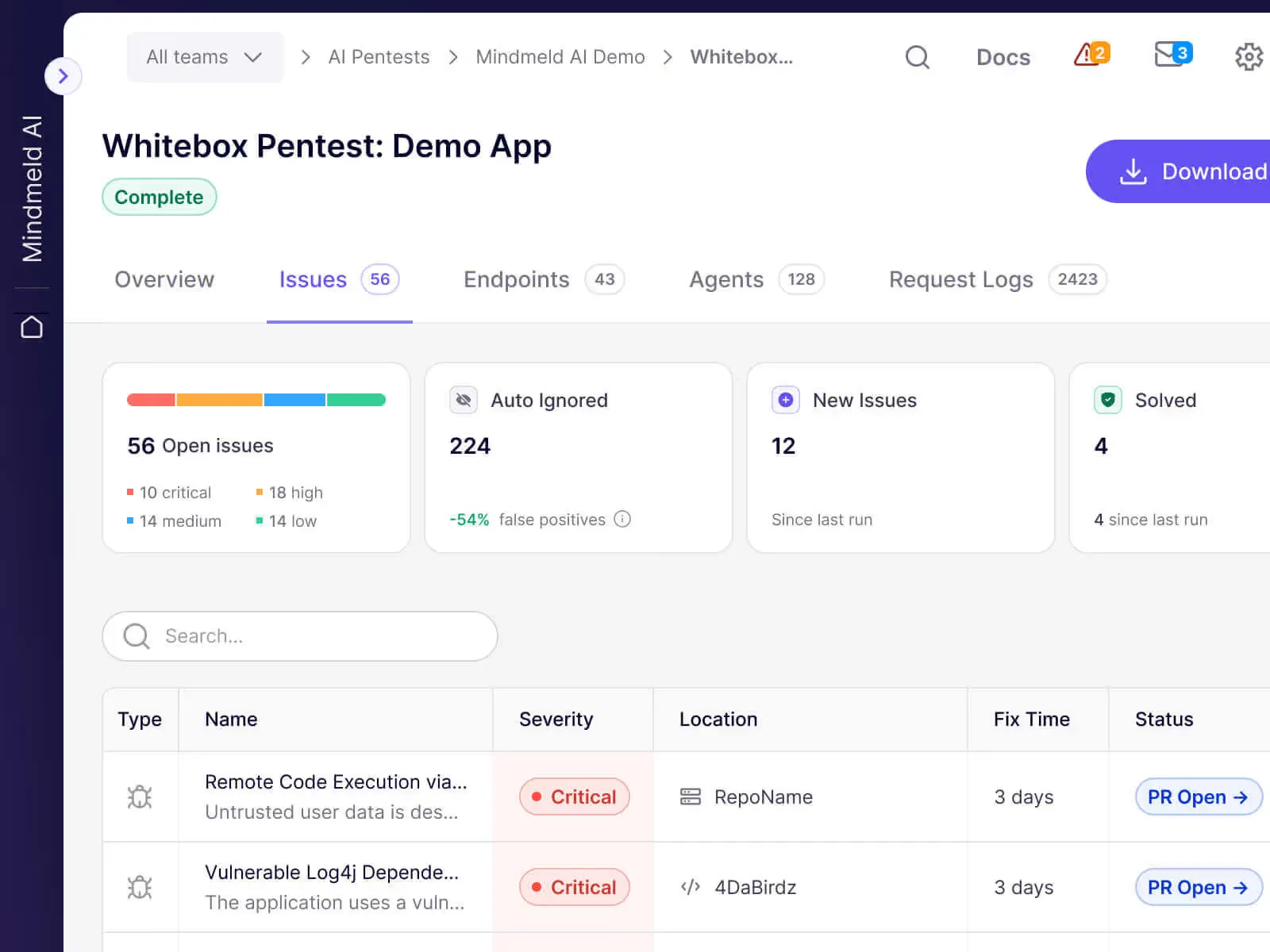
The noise reduction works through several layers. Deduplication catches the same vulnerability found by multiple scanners and reports it once.
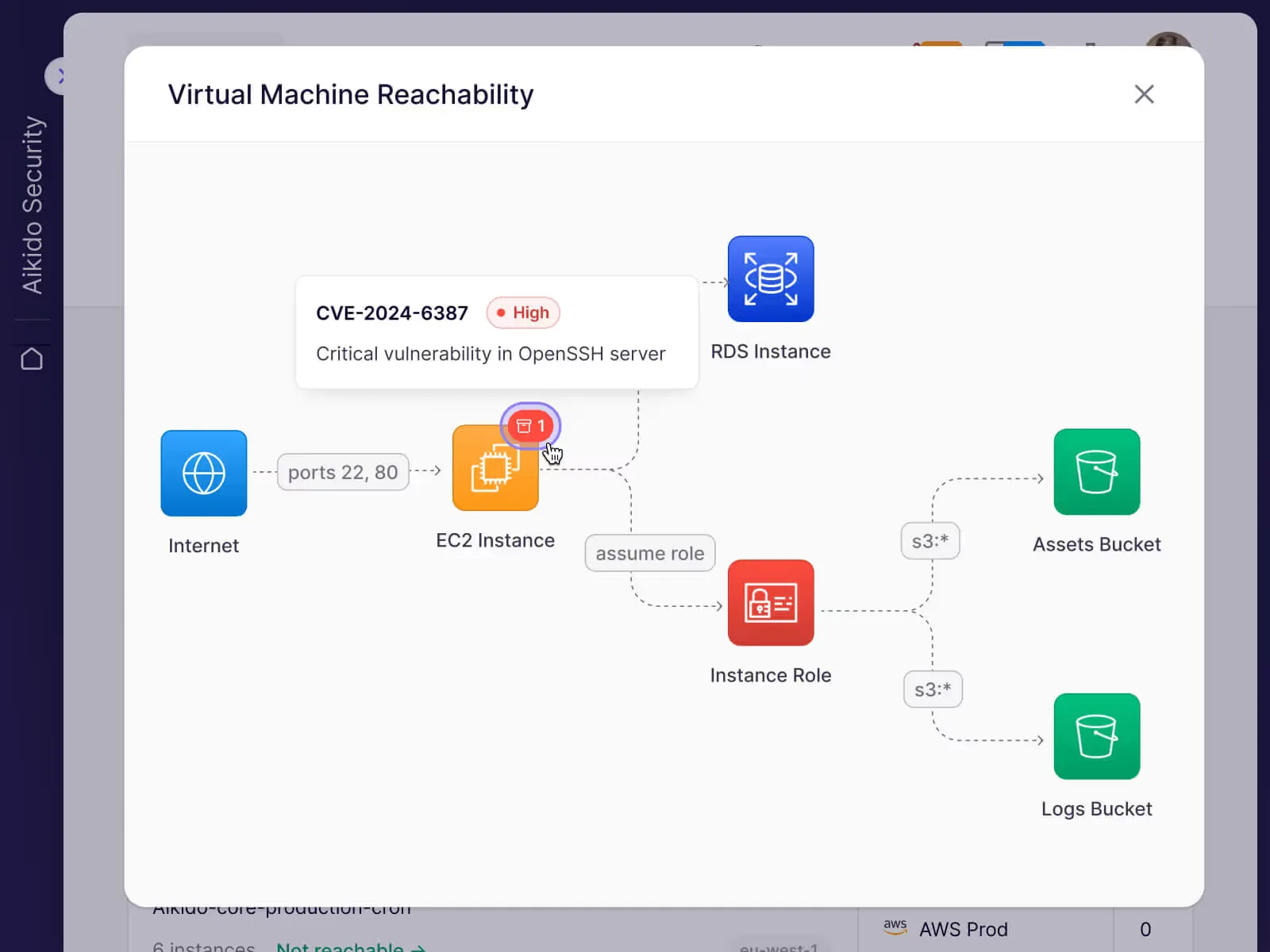
Reachability analysis filters SCA vulnerabilities by actual code usage. Context correlation groups related findings into single actionable issues.
Aikido reports 95% fewer alerts compared to running equivalent standalone scanners.
Malicious package detection
Beyond known CVEs, Aikido catches packages with malicious behavior:
| Threat type | What Aikido detects |
|---|---|
| Typosquatting | Packages mimicking popular library names |
| Dependency confusion | Private package name collisions with public registries |
| Supply chain compromise | Legitimate packages with injected malicious code |
| Suspicious scripts | Installation scripts with unexpected network calls or file access |
AutoFix remediation
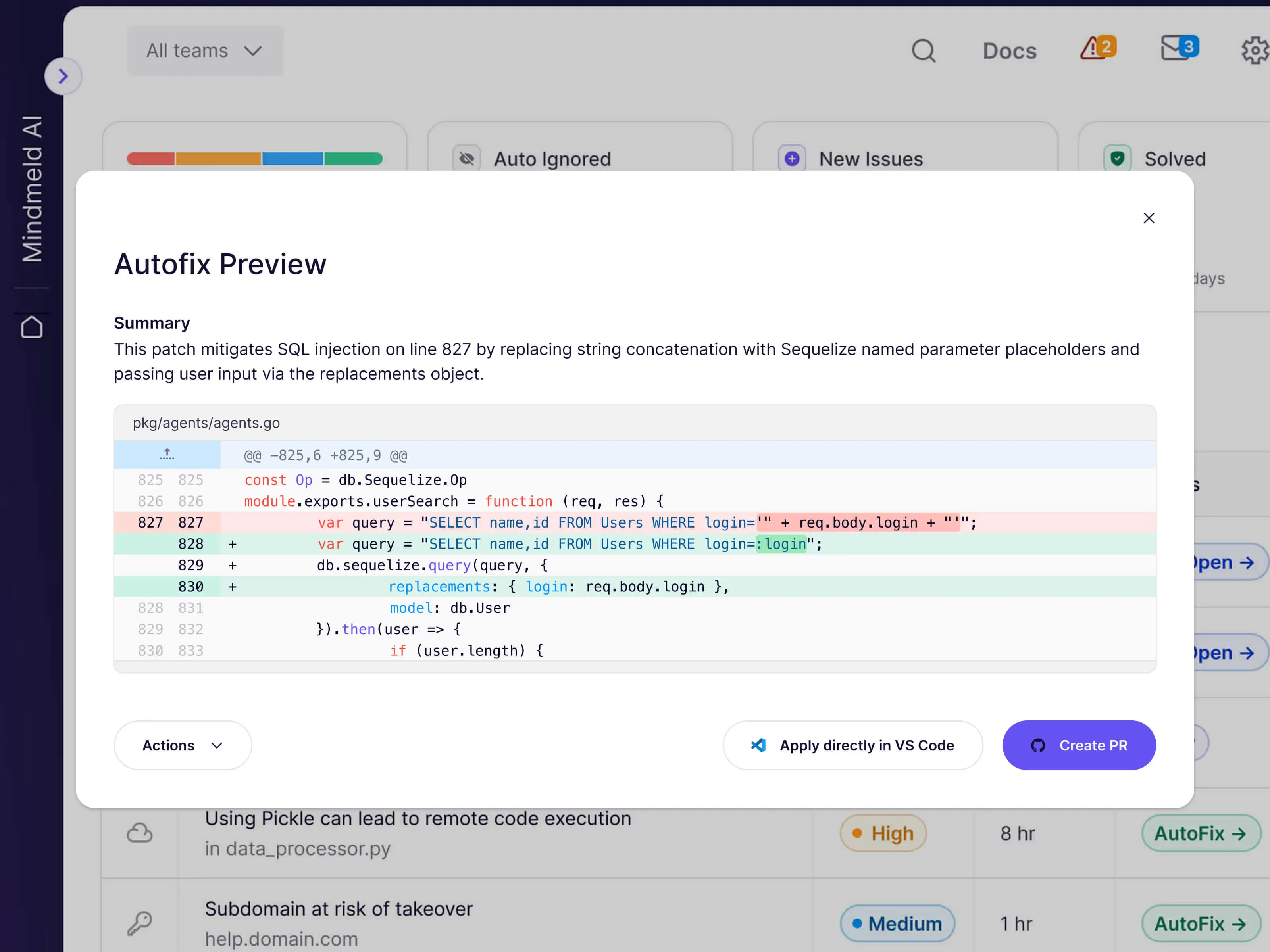
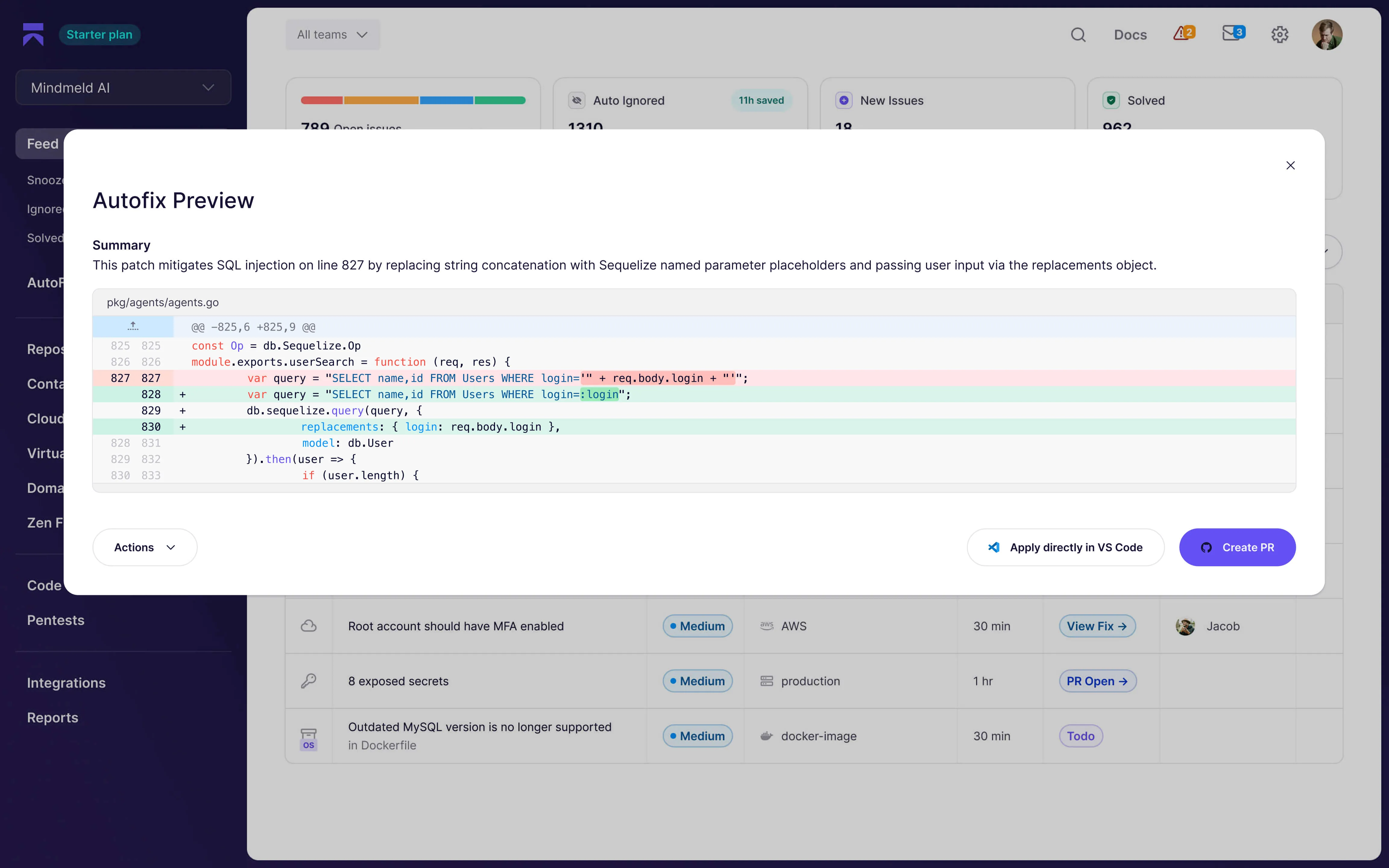
AutoFix generates pull requests with remediation code. It handles SAST findings, dependency upgrades, IaC misconfigurations, and secrets rotation — all without leaving the Aikido dashboard.
Runtime protection with Zen
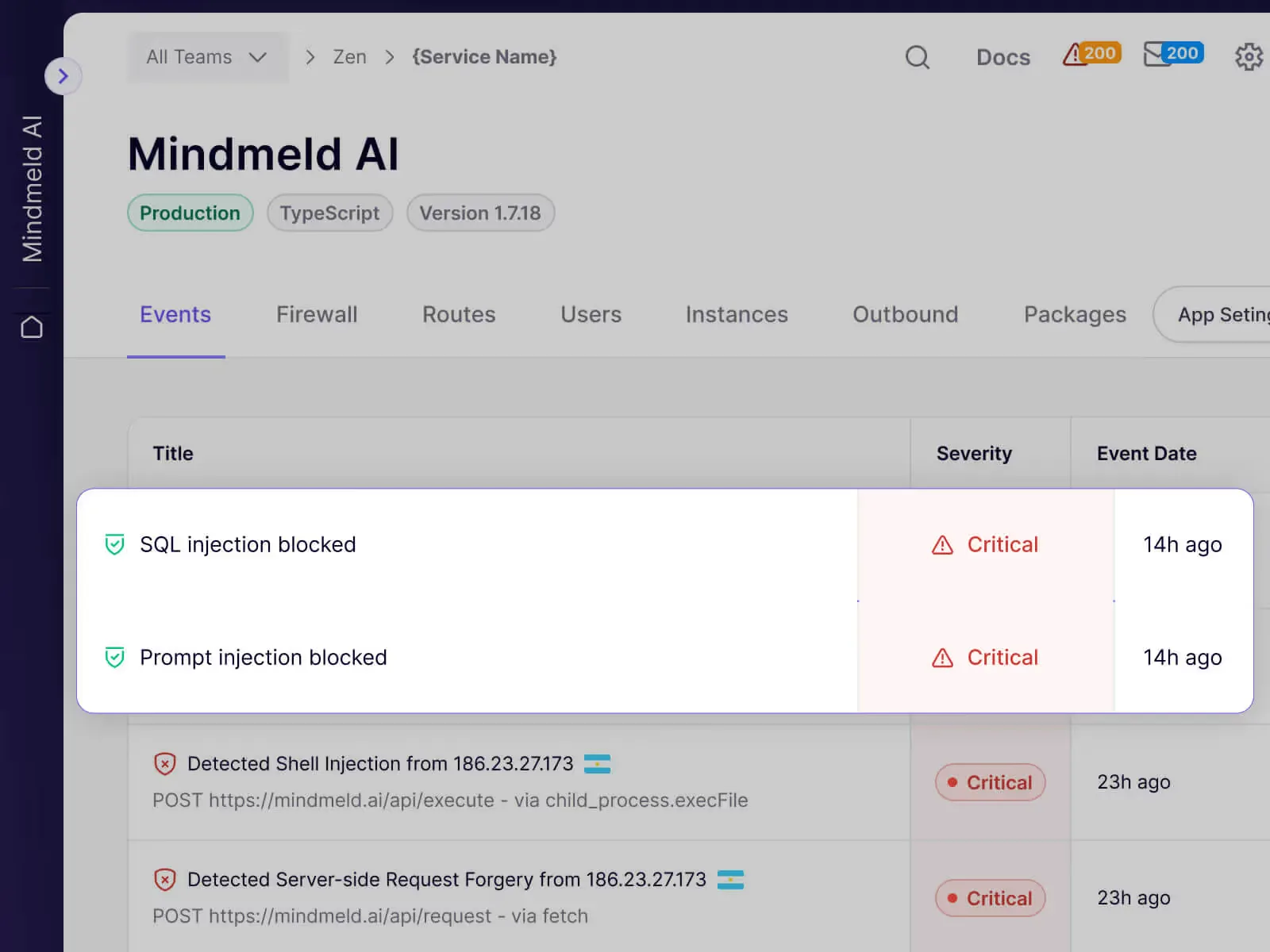
Zen, Aikido’s in-app firewall, adds runtime defense in production. It blocks attacks, detects bots, monitors LLM usage, and works without code changes.
ASPM correlation and prioritization
The deduplication, reachability, and AutoTriage features above are how Aikido implements the ASPM core pattern of vulnerability correlation across scanners. A single finding surfaces once, no matter how many scanners flagged it.
Aikido pairs that correlation with risk-based prioritization. AutoTriage weighs reachability, exploitability, and business criticality before raising an alert, so the queue reflects what is actually exploitable in your stack.
The result is application context enrichment — every issue arrives tagged with the repository, service, runtime exposure, and owner. SAST, SCA, container, IaC, secrets, and CSPM findings all land in one unified dashboard across security tools rather than four separate consoles.
What does Aikido Security integrate with?
 GitHub
 GitLab
 Bitbucket
 Azure DevOps
GitHub Actions
GitLab CI
Azure Pipelines
Azure DevOps
GitHub Actions
GitLab CI
Azure Pipelines Jira
Jira Monday
 ClickUp
 Asana
Asana Vanta
Vanta Drata
Drata Slack
Slack Microsoft Teams
How much does Aikido Security cost?
Aikido publishes its tier shape on aikido.dev/pricing . Four plans cover the range from solo developer to multi-business-unit enterprise.
| Plan | Who it fits |
|---|---|
| Developer | Free tier with no credit card. Single workspace, core scanners, community support. |
| Basic | Small teams that need shared visibility, SSO, and standard integrations. |
| Pro | Growing teams that want compliance reports, advanced policies, and richer integrations. |
| Scale | Larger or multi-unit organizations that need custom contracts, audit support, and enterprise SLAs. |
Two pricing details on the page are worth noting. Paid plans are flat-rate with unlimited users, so cost does not scale with team size — every developer can log in without per-seat budgeting. Scale tier pricing is published as “custom” only, so I cannot quote a number; teams that fit Pro or below can self-serve from the public pricing page without a sales call.
I do not publish dollar amounts here because they shift over time and Aikido already keeps a public tiers page. Always check aikido.dev/pricing before budgeting.
What are alternatives to Aikido Security?
Aikido is a strong fit for developer-led teams that want one platform from code to runtime. Other shapes of organization may prefer a different vendor, and four come up often in the same shortlist.
- Snyk — Better fit when SCA and container scanning are the centre of the program and you already use Snyk’s IDE plugins. Snyk has deeper SCA reachability and a larger language matrix; Aikido has broader category coverage in a single subscription.
- Apiiro — Better fit when you need an ASPM platform that combines its own Deep Code Analysis engine (call-graph + data-flow inspection) with a Risk Graph that maps every finding to ownership, reachability, and business context. Apiiro plugs into the SAST/SCA scanners you already run rather than replacing them — pair it with Aikido when you want a deeper risk model on top of Aikido’s scanner output.
- Cycode — Better fit for security teams that want a strong CI/CD pipeline and SCM posture story alongside code scanning. Cycode leans toward security ownership; Aikido leans toward developer ownership.
- ArmorCode — Better fit when you already own SAST, DAST, and SCA tools and want an ASPM aggregator on top rather than replacing the scanners. ArmorCode does not scan; Aikido does both scanning and aggregation.
If you are still mapping the wider category, the ASPM tools hub lists every vendor I track with side-by-side feature data.
How do I get started with Aikido Security?
- Sign up — Create an account at aikido.dev. Free tier available, no credit card required.
- Connect repositories — Link your GitHub, GitLab, or Bitbucket account. Aikido uses read-only access.
- Scanning starts automatically — Aikido begins scanning with sensible defaults. Results appear within 30 seconds.
- Review and fix — AutoTriage filters noise, AutoFix generates PRs. Connect Jira or Slack for ticket routing and alerts.
CI/CD integration
GitHub Actions:
name: Aikido Security Scan
on: [push, pull_request]

jobs:
  aikido:
    runs-on: ubuntu-latest
    steps:
      - uses: actions/checkout@v4

      - name: Run Aikido Scan
        uses: AikidoSec/github-actions-workflow@v1.0.13
        with:
          secret-key: ${{ secrets.AIKIDO_SECRET_KEY }}
          minimum-severity: critical
Local scanning
# Pull the local scanner Docker image
docker pull aikidosecurity/local-scanner:latest

# Run a local code scan
docker run --rm -v $(pwd):/code aikidosecurity/local-scanner:latest \
  aikido-local-scanner scan /code
When to use Aikido Security
Aikido works best for teams that want broad security coverage without enterprise overhead.
Startups and mid-market companies building security programs from scratch get the most out of it, especially developer-led teams that want scanning running in minutes.
The free tier covers smaller teams; flat-rate enterprise pricing with unlimited users handles growth.
Teams with large existing tool investments or those that need the deepest possible analysis in a single category may prefer dedicated vendors. Apiiro or ArmorCode are better fits for enterprises that want to aggregate findings from existing scanners rather than replace them.